Line Scan vs Area Scan Camera

Image the whole web or the whole part. Roboflow runs on both.

Area scan cameras capture a full 2D frame at once, which fits most parts and stations. Line scan cameras capture one row of pixels at a time and build the image as material moves past, which fits webs, rolls, and very large or fast parts. Train a vision model in Roboflow and run it on images from either. Over 2 million developers build with Roboflow.
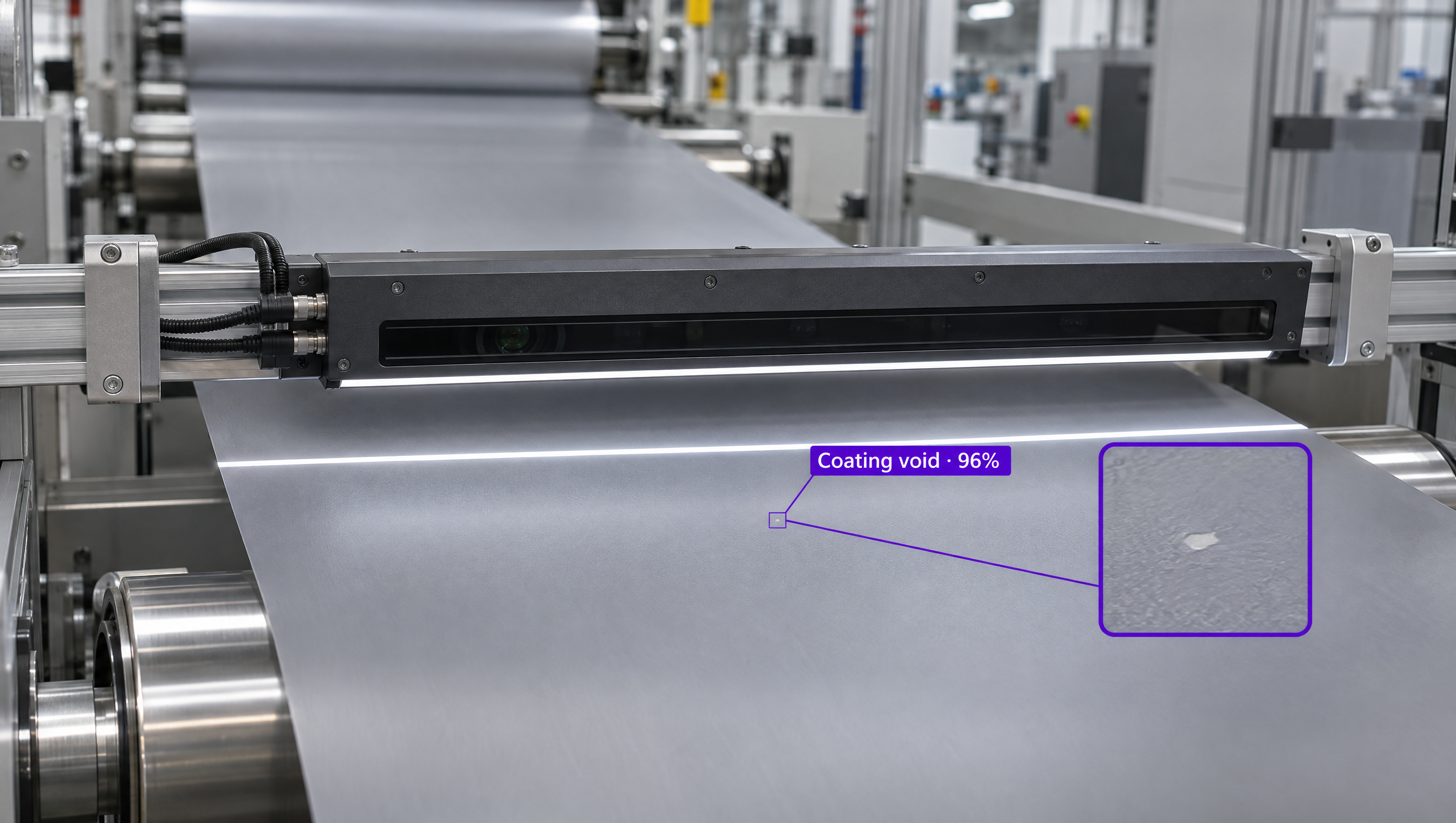
A line scan camera inspecting a moving web of material for defects with vision AI.

Why are companies choosing Roboflow?

Roboflow is enterprise vision AI infrastructure, used by more than half of the Fortune 100, with SOC 2 Type II, HIPAA, and air-gapped deployment. Create datasets, train models, and deploy to production.

  • One Model Workflow, Any Camera

    Label, train, and deploy the same way whether your images come from a line scan or an area scan camera.

  • Line Scan Support Built In

    Roboflow devices add Basler and LUCID line scan cameras as streams over GigE or USB.

  • Runs Next to the Line

    Process images on an edge device or industrial PC at the machine, with TensorRT acceleration on NVIDIA hardware.

Which camera fits your inspection?

Roboflow runs on images from both, so you can choose by what you're inspecting and how it moves.

  • Area Scan: Discrete Parts

    Captures a full frame in one shot. Best for parts that fit in the field of view, including moving parts with strobe lighting or a fast shutter.

  • Line Scan: Continuous Material

    Builds the image line by line as material passes. Best for webs, rolls, and parts too large or fast for one frame.

  • Line Scan Needs Sync and Light

    An encoder ties each line to conveyor or web speed, and high-intensity line lights make up for very short exposures.

OK I’m ready, how do I use Roboflow?

Roboflow makes it easy to build, train, and deploy custom computer vision models, even if you’re not a machine learning expert.

Talk to a Vision AI engineer about your camera setup

Not sure whether your inspection needs line scan or area scan? Bring Roboflow your cameras and use case and we'll show you a model running on your images on the first call.

Ask us about:

  • A plan for the line scan or area scan cameras on your line
  • A live demo of a model trained on your own images
  • Roboflow hardware that runs models next to your line
  • Your trained model served over MCP, so frontier models can call it

Over 80,000 organizations build with Roboflow.

  • Rivian
  • Pella
  • Chobani
  • USG Corporation
  • BNSF Railway
  • American Woodmark
Start where you are

Compare Line Scan and Area Scan Cameras

Line scan and area scan cameras both feed machine vision systems, but they build images in different ways, and that decides which inspections each one suits.

An area scan camera captures the whole object in a single 2D frame. It's the default for most machine vision tasks where parts are small and similar in size in both directions, and even moving parts can be frozen with strobe lighting or a fast shutter.

A line scan camera uses a single row, or a few rows, of pixels and builds a continuous image line by line as the object moves past, much like a fax machine. Because the image isn't limited in length, line scan reaches very high resolution on webs of paper, film, foil, or textiles, and on large PCBs, panels, and wafers. It needs an encoder to sync each line to the conveyor or web speed, and high-intensity line lights because each exposure is so short.

Whichever camera you choose, Roboflow handles the vision model. Label images with Auto Label, train a model such as RF-DETR (opens in a new tab), Roboflow's open-source detection, segmentation, and keypoints model, and deploy it with Roboflow's open-source Inference server (opens in a new tab). On Roboflow devices, you can add Basler and LUCID line scan cameras (opens in a new tab) over GigE or USB as streams, alongside Basler, LUCID, USB, and RTSP area scan cameras.

Teams can also use Roboflow Workflows to build applications that combine computer vision models with business logic, then run them on Basler and LUCID camera setups, an industrial PC, or NVIDIA Jetson next to your line.

For organizations building production computer vision applications in manufacturing, printing and packaging, electronics, or food processing, Roboflow offers a complete training-to-deployment solution for the cameras you already run.

Line Scan vs Area Scan: Feature by Feature

FeatureLine Scan CameraArea Scan Camera
How it capturesOne or a few rows of pixels, stitched line by line as the object movesA full 2D frame in one exposure
ResolutionContinuous image not limited in length; resolution along the motion depends on line rate and speedFixed by the sensor's rows and columns
MotionNeeds the object or camera to move past the lineWorks on still parts, and on moving parts with strobe lighting or a fast shutter
SynchronizationAn encoder on the conveyor or web triggers each lineA trigger per part, or free-running
LightingHigh-intensity line lights for very short exposuresStandard area lighting or strobes
Best forWeb inspection (paper, film, foil, textiles), large PCBs, panels, wafers, and food on conveyorsDiscrete parts, assembly checks, labels, and barcodes
Works with RoboflowYes, Basler and LUCID line scan streams on Roboflow devicesYes, Basler, LUCID, USB, and RTSP cameras on Roboflow devices

Which One Should You Choose?

  • Choose an area scan camera for discrete parts that fit in the field of view, whether they're still or moving.
  • Choose a line scan camera for continuous material on a web or roll, or for parts too large or fast to capture in one frame.
  • Plan for an encoder and line lighting whenever you choose line scan.
  • Whichever you pick, train the defect model on images from that camera with Roboflow and deploy it next to the line.

More on Machine Vision Cameras and Roboflow