What Are World Models in Robotics?
 Mostafa IbrahimPublished Oct 1, 2026
To prepare training data for world models in robotics, preserve complete video sequences with synchronized robot actions, state, and task outcomes so models can learn how interactions unfold. Use Roboflow to label selected frames and train perception models while keeping the original recordings and logs for world-model training.
A robot can locate a cup and still fail to pick it up. Completing the task requires understanding how the cup, gripper, and surrounding objects may move during the attempt. World models in robotics help predict how an environment will change, including what may happen when a robot takes an action.
That capability starts with the training data. Individual labeled images help perception models learn to identify objects. Learning how an interaction unfolds requires sequences that connect camera footage with robot actions, state, and outcomes. What teams preserve during data collection determines which of those capabilities they can build later.
This guide explains what data robotics world models need, how to organize it over time, and where simulation and synthetic data can help. You’ll also learn how to use Roboflow to build perception datasets and models from robot recordings while preserving the complete interactions for world-model training.
What Is a World Model in Robotics?
A world model learns how an environment changes over time and predicts how a robot’s actions may affect what happens next.
World models differ from standard perception models:
- Object detection identifies objects and their locations in a frame.
- Segmentation identifies the pixels that belong to an object or region.
- A world model predicts how the scene may change after an action.
For example, imagine a robot arm picking up a cup. A perception model can detect the cup and the robot gripper in the current camera image. A world model can predict how the scene may change as the gripper approaches the cup and lifts it. This can help a robotics system understand the likely result of an action before it happens.
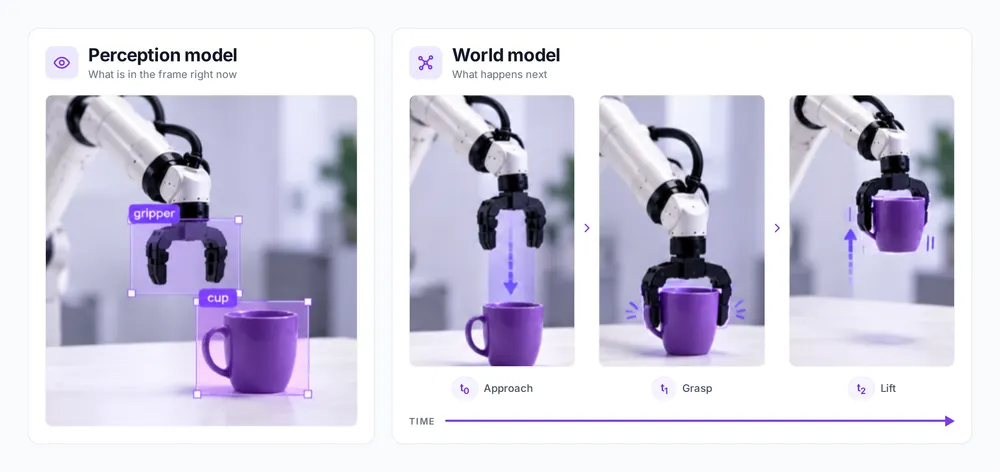
Perception models, world models, and vision-language-action models support different functions within a robotics system:
| Model type | Question it answers | Typical inputs | Typical outputs |
|---|---|---|---|
| Perception model | What is in the scene, and where is it? | Camera images or video frames | Object classes, bounding boxes, segmentation masks, or poses |
| World model | How might the environment change if the robot takes an action? | Current or past observations, candidate actions, and sometimes robot state | Predicted future images, states, or learned representations |
| Vision-language-action model VLA | What should the robot do to follow an instruction? | Visual observations, language instructions, and often robot state | Robot actions or action sequences |
How Are World Models Used in Robotics?
World models in robotics can support planning, training, and evaluation by predicting how an interaction may unfold. Their role depends on the model and the system built around it; a single world model does not necessarily support all three uses.
- Planning: A robot can use predicted outcomes to compare possible actions. For example, before picking up a cup, a planner could use a world model to compare approaching from above versus from the side, then choose the approach predicted to complete the grasp without hitting a nearby object.
- Training: Predicted interactions can help train a robot policy - the model that selects actions. For example, a policy could practice different gripper movements within a learned world model and use the predicted results to improve its grasping strategy.
- Evaluation: Teams can use a world model to explore how a policy might behave under different conditions. For example, they could test predicted outcomes when a cup starts closer to the table edge or another object obstructs the approach.
What Training Data Does a World Model Need?
To train a world model to predict what happens after a robot takes an action, teams need camera footage along with records of the robot’s actions and movements.
A training example can include:
- Camera footage: Shows what happens in the scene during an interaction.
- Robot actions: Records what the robot does, such as moving its arm.
- Robot state: Provides measurements such as joint positions and whether the gripper is open or closed.
- Task and result: Records what the robot was trying to do and whether the attempt succeeded.
Some interactions may require footage from another camera when important parts of the scene are hidden from the main view. Teams should also collect recordings with different starting positions and object arrangements, so the model can learn from a wider range of situations.
How Should Robotics Data Be Structured Over Time?
A robot interaction can be recorded as a sequence of events, as shown below:
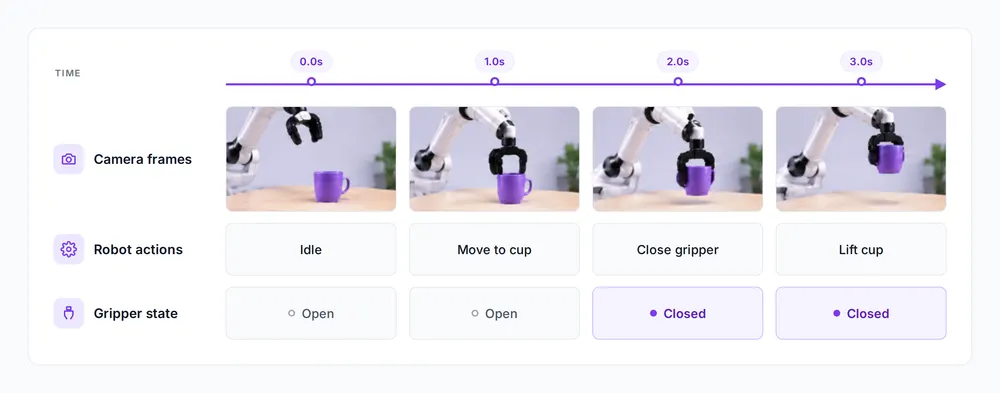
Keep the camera frames in their original order and match timestamps for the video and robot action records. For example, if the robot closes its gripper, the timestamps help identify the frames showing that action and what happens afterward.
When teams extract images from a long video at fixed intervals, they can miss important moments between frames. For example, if a robot drops an object between two selected frames, the images might show the object before and after the drop without capturing the fall itself. Missing those frames makes it harder for a world model to learn how the grasp failed and the object fell.
Keep each attempt as a separate sequence, with a clear start and end. If a robot tries to pick up an object several times, mixing frames from different attempts could make a failed grasp appear successful, giving the world model an incorrect example to learn from.
Where Do Detection and Segmentation Datasets Still Fit?
World models still depend on perception for many basic robotics tasks. Before picking up an object, a robot needs to locate it and check for nearby obstacles. It may also need to separate the object from the background.
Perception datasets and world-model datasets support different parts of that system:
| Single framesPerception dataset | SequencesWorld-model dataset | |
|---|---|---|
| Data | Individual images or selected video frames | Video or frames kept in order |
| Additional information | Bounding boxes, segmentation masks, keypoints | Timestamps, robot actions, state, and task outcomes |
| What it captures | What objects are present and where they are | How a scene changes over time and in response to actions |
The same robot recording can support both datasets. For example, selected frames showing a robot grasping a cup can train an object detector, while the full video and corresponding action logs can support world-model training.
Where Do Synthetic Data and Simulation Help?
Collecting real robot interactions takes time, especially when teams need examples of rare situations. With simulation, teams recreate the robot and its workspace in software. They can change object positions or camera angles to generate training images without repeating each setup with a physical robot. Generative world models such as NVIDIA Cosmos work differently; they create new visual scenarios from prompts or existing recordings.
Synthetic data can help fill gaps in real recordings. For example, if a perception model struggles to detect objects in poor lighting, teams can retrain it with synthetic images generated through Roboflow's synthetic data pipeline showing similar lighting conditions and test whether detection improves on real images.
Real-world testing matters because generated images may look different from what the robot's camera actually captures. Objects may also behave differently in simulation. For example, a robot might successfully grasp a cup in simulation but struggle to pick it up in the real world.
Roboflow has demonstrated this approach with NVIDIA in a manufacturing defect-detection project. In a benchmark with Corning, a detector trained on eight real defect images alongside synthetic examples generated using NVIDIA Cosmos reached 0.95 mAP and perfect recall on the hardest defect class, outperforming a model trained on real data alone.
Where Does Roboflow Fit in a World-Model Robotics Workflow?
Roboflow helps teams build the perception component of a robotics system: detecting objects, labeling visual data, and deploying models that interpret camera images. Teams can use selected frames from robot recordings to develop those capabilities while preserving complete videos and synchronized robot logs separately for world-model training.
The following demonstration shows how to build a cup-and-gripper detector and monitor the cup’s position with Roboflow. It demonstrates perception and rule-based monitoring.
We uploaded a synthetic 10-second video showing a robot arm picking up a purple cup, viewed from a fixed external camera. We used Roboflow to extract frames from the uploaded video at a selected sampling rate, then used Gemini (Boxes) Auto Label to generate initial annotations for two classes: cup and gripper.
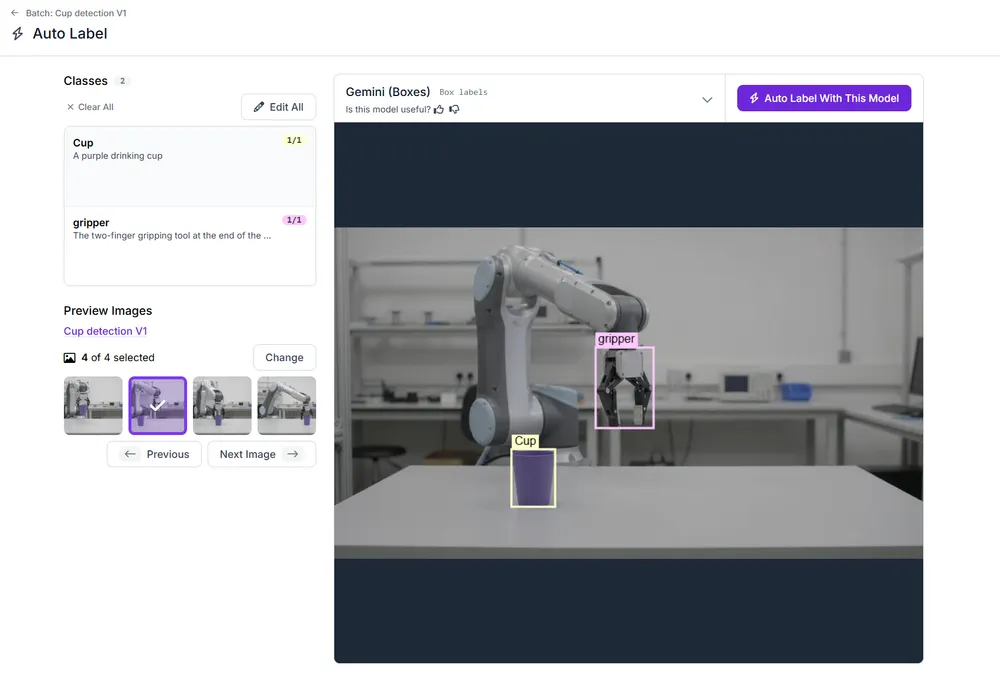
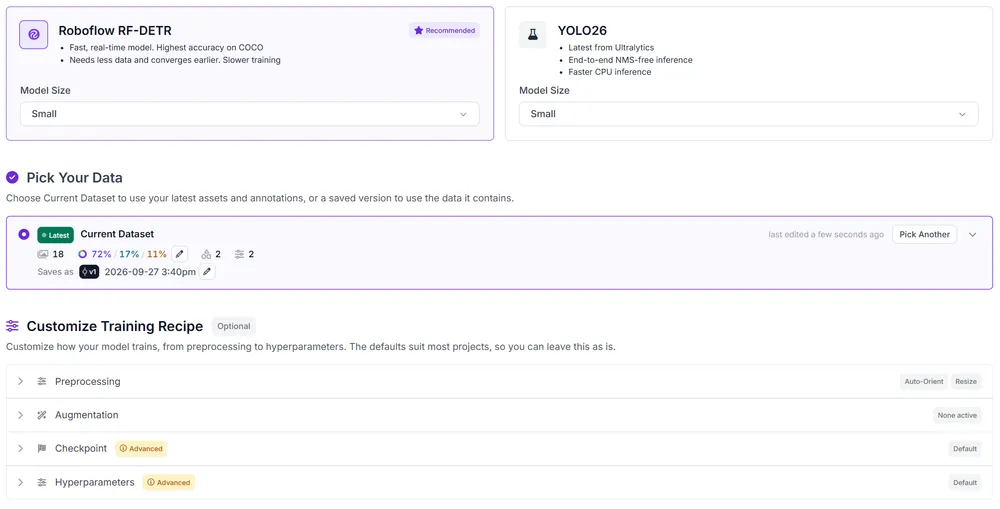
After reviewing the annotations, we created a dataset version (opens in a new tab) and trained an RF-DETR (opens in a new tab) object detection model.
Next, we connected our trained RF-DETR model to Roboflow Workflows and built a cup-monitoring workflow, shown below.
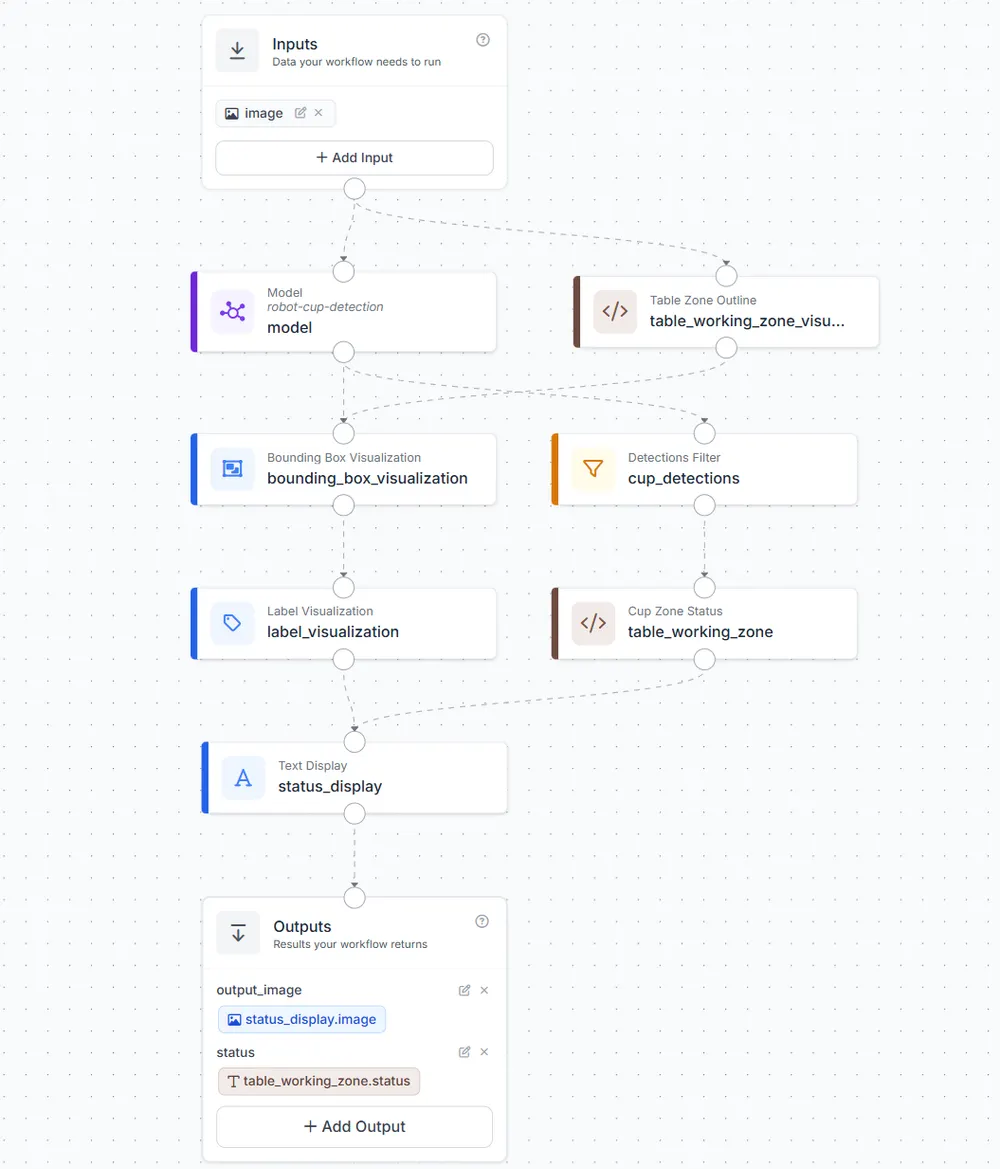
The Model block detects the cup and gripper, while the Bounding Box Visualization (opens in a new tab) and Label Visualization (opens in a new tab) blocks display their locations and confidence scores.
We used the Table Zone Outline block to mark a working area in the camera image, covering the tabletop and the area above it. A Detections Filter (opens in a new tab) selects only cup predictions and passes them to our Cup Zone Status block, which checks whether the detected cup is inside that area.
The Text Display (opens in a new tab) block adds a message to the image, such as "Cup inside working zone" or "ALERT: Cup outside working zone." The Outputs block returns the annotated image and the cup's zone status.
During deployment, the model might struggle to detect the cup when it is partially hidden by the gripper. Teams can use Roboflow Active Learning (opens in a new tab) to collect images processed by a deployed model and review difficult cases. They can correct the annotations and add these examples to the next dataset version before retraining the model.
What Should You Preserve Now, and What Can You Create Later?
Before turning robot recordings into smaller datasets, decide what needs to be saved. You can extract and label frames later, but once footage or robot logs are deleted, the missing information cannot be recovered.
- Save during collection: Keep the full, original videos and any robot action and state logs. Keep timestamps for both so you can match each action to the right moment in the video. Mark where each attempt starts and ends, and record whether the robot completed the task.
- Create later: Use the saved videos to extract and label frames for object detection or segmentation. You can also make smaller datasets for specific tasks.
- Keep when relevant: Record which camera captured each video. If you're using multiple cameras, keep the calibration details needed to compare their views. Save task instructions and notes about the workspace so teams know what the robot was asked to do and where it worked.
When extracting frames, keep a reference to the original video and its timestamp. This lets you return to the full recording if you need to check an annotation or understand why a model made an incorrect prediction.
Robotics World Models Conclusion
Before your next robotics data collection session, check that the full videos and robot logs are being saved. Then upload a recording to Roboflow and extract selected frames. Use Auto Label (opens in a new tab) for initial annotations, then review them before creating a dataset version. Synthetic examples can help when real images are limited, and you can validate improvements against real footage.
Further Reading: