Physical AI Training Data
 Mostafa IbrahimPublished Nov 10, 2026

Physical AI training data pairs what a robot senses with what it does next. Collect it through teleoperation, human demonstrations, automated runs, or simulation, and log session IDs, synced timestamps, task results, and camera calibration for every episode. Before you train a perception model, audit the dataset in Roboflow for missing boxes, duplicates across splits, and gaps in distance, lighting, and occlusion, then version it and train an RF-DETR baseline.
A warehouse robot needs to recognize a pallet from its own camera while moving through an aisle, under changing lighting, and with other equipment blocking part of the view. A model trained on clear, unobstructed images may struggle in those conditions. Useful physical AI training data needs to represent the situations the system will encounter when deployed.
What you collect depends on what the model needs to learn. A perception model can learn to locate people and equipment from annotated images, while a robot policy needs observations paired with actions and a world model learns from sequences showing how an environment changes. Each requires different training examples, but all benefit from data that covers the intended tasks and operating conditions.
In this guide, we’ll explain the types of physical AI training data, how teams collect it, and what to record. Then, we’ll use a warehouse dataset from Roboflow Universe (opens in a new tab) to audit visual coverage, correct annotations, identify missing conditions, and create a versioned dataset for training a perception model.
What Is Physical AI Training Data?
Physical AI training data is the images, video, sensor measurements, and interaction records used to train AI systems that perceive and act in the physical world.
Depending on the task, it can include annotated camera images, depth measurements, robot joint positions, task instructions, and sequences showing actions and their outcomes.
Timing matters when learning from interactions. Camera footage, robot state, and action records need to be synchronized so the model can connect what the robot sensed with what it did next.
Training Data for Different Physical AI Models
Perception models, robot policies, and world models learn different things from training data. Here’s how their requirements compare:
| Model type | Training data | What the model predicts |
|---|---|---|
| Perception models | Images or video with task-specific labels, such as bounding boxes, segmentation masks, or keypoints; some tasks also use depth data | Object classes, locations, boundaries, poses, or other properties of the scene |
| Robot policies, including vision-language-action (VLA) models | For learning from demonstrations, sequences pairing sensor observations and robot state with actions; VLAs also use language instructions describing the task | Robot actions or sequences of actions |
| World models | Sequences showing how observations or environment states change over time, often paired with actions | Future observations or states, including the possible effects of an action |
For example, when a worker steps into an aisle, a perception model detects the worker, a robot policy decides whether the robot should stop or reroute, and a world model predicts how the scene will change as the robot moves.
In this tutorial, we focus on preparing visual perception data: annotated warehouse images for detecting people, forklifts, and pallets.
Preparing Video Training Data for Action Recognition
Some physical AI tasks require understanding what happens over time. A single image might show a worker holding a box. A video provides the sequence needed to distinguish picking it up, opening it, and placing it on a pallet. Training data for these tasks needs labels that identify when each action begins and ends.
In Roboflow, you can create an Action Recognition project, upload videos, and annotate actions as segments on a timeline. Each segment connects an action class to a specific time range. Use consistent boundaries across recordings: for example, starting an “opening box” segment when the lid begins moving and ending it when the box is open.
You can then fine-tune NVIDIA Cosmos 3 Edge on those labeled videos. The trained model returns a timeline of recognized actions in new clips, which an application can compare against an expected process to identify missing or out-of-order steps. Collect footage from the intended deployment camera so the training examples reflect its viewpoint and lighting.
Action recognition teaches a model to identify activities in video. Training a robot policy to perform those activities from demonstrations requires additional data connecting observations to robot control commands.
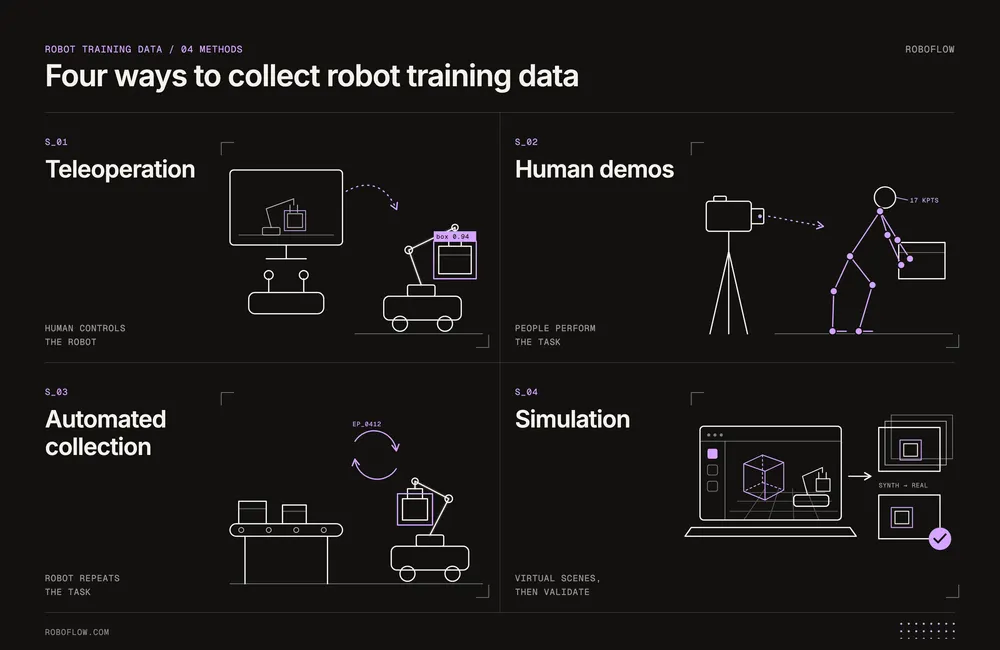
How Is Physical AI Training Data Collected?
For models learning robot movements, the collection method determines whether training data includes actual robot commands or only recordings of how a task was performed.
Robot Teleoperation
In robot teleoperation, a person uses a controller to operate a real robot. The system records what the robot sees and the commands the person sends. Collecting many of these examples for training can take time.
Human Demonstrations
A person performs a task while cameras or motion-tracking devices record their movements. These recordings show how the person handles objects, but a robot may need to move differently to perform the same task.
Automated Robot Collection
A robot performs the same task many times without a person controlling every movement. The system records the robot's actions and the result of each attempt. For example, if a robot drops a box while trying to pick it up, recording that failure helps identify situations that need more training examples. If a person steps in to correct the robot, recording the correction can provide a useful example of how to handle the task next time.
Simulation and Synthetic Data
Simulation allows teams to create training data in a virtual warehouse on a computer, without running experiments on real equipment. The simulator can record what the virtual robot sees and how it moves while performing a task.
Synthetic images or videos can also provide visual examples. However, they must be checked against real-world conditions before use, since generated scenes may contain unrealistic details.
Where to Find Physical AI Training Data
Public datasets can help you prototype a physical AI application and understand what your own data collection should capture. Start by matching the dataset to the task: annotated images can support object detection, while learning robot behaviors from demonstrations requires observations paired with actions.
The following sources provide examples of both:
| Dataset source | What it contains | When to use it |
|---|---|---|
| Roboflow Universe: Warehouse Dataset (opens in a new tab) | 8,301 annotated images across seven classes, including people, forklifts, and pallets | Building an initial warehouse object detector and practicing perception dataset auditing |
| DROID (opens in a new tab) | Robot manipulation demonstrations with camera observations, robot actions, and language instructions, collected across varied environments | Exploring manipulation policy training and how demonstrations connect observations with actions |
| Open X-Embodiment (opens in a new tab) | A collection of robot datasets organized into episodes using the Robotics Learning Datasets (RLDS) format | Exploring training data from different robots, tasks, and environments |
What Should a Physical AI Dataset Record?
When reviewing a failed robot task or checking a possible labeling error, teams may need to examine the original recording to understand what happened. To make that possible, link each training example to its source recording. A useful dataset should include:
- Session and episode IDs: Give each recording session an ID and divide it into episodes, with each episode covering one attempt to complete a task. This keeps the records from different attempts organized.
- Camera footage and robot movements: Save both with matching timestamps. If they are out of sync, a model may learn to associate an action with the wrong moment.
- Task instructions and results: Record what the robot was asked to do and whether it completed the task successfully.
- Camera calibration: Store the camera's calibration settings and mounting position. With depth data, these help locate objects relative to the robot.
When uploading camera images to Roboflow, include session and episode IDs in the filenames so each image can be traced back to its original recording.
Audit a Physical AI Perception Dataset in Roboflow
Before using a public dataset for warehouse object detection, we need to check whether its images match the task we want to train a model for.
Open the Warehouse Computer Vision Dataset by Addverb Technologies on Roboflow Universe. The original project contains 8,301 images across seven object classes.

We forked the dataset. In our Roboflow project, we kept three classes: forklift, person, and pallet. A warehouse robot needs to detect these objects while moving through aisles. Open the Classes & Tags tab to review the classes and check how many annotations each contains.

Take a quick look at the images. Many are taken from a low perspective, similar to what a camera on a warehouse robot might capture. Open a few annotated images to check that the bounding boxes fit the objects and that no visible forklifts, people, or pallets were missed.

Also, look for duplicate or very similar images across the training and test sets. If the same warehouse scenes appear in both, the evaluation results may give a misleading impression of how well the model performs on new images.
Plan Data Collection Around Missing Conditions
During our dataset review, we found images that already had annotations but were missing bounding boxes for some objects. This differs from reviewed images with no target objects, which can be marked with a null annotation. We also noticed a few possible duplicates.
We can correct the missing boxes and remove the duplicates in Roboflow Annotate. For each condition below, check whether the dataset covers it, and plan where to add images if it doesn’t:
| Condition | What to check | Possible next step |
|---|---|---|
| Object distance | Whether forklifts and people appear at different distances | Collect more images at distances that are missing or rarely seen in the dataset. |
| Lighting | Whether brighter and darker warehouse areas are covered | Test whether brightness augmentation could help, using realistic settings |
| Occlusion | Whether partly hidden objects are represented | If detection accuracy is low for partly hidden objects, add more training examples |
| Camera movement | Whether footage from a moving camera is available | Test the model on images captured while the robot is moving, including blurry images, to check for missed detections. |
With these checks, we can decide which situations need new footage and where Roboflow augmentation, such as adjusting brightness, could add useful variation to existing images. Augmentation only varies the images you already have, so situations that were never recorded, such as a forklift seen from a moving robot, still need new footage.
Prepare and Version Physical AI Perception Data in Roboflow
We can now prepare a dataset version for training a model to recognize objects in warehouse environments.
Open the Dataset tab in our Roboflow project. In the search bar above the images, enter this query: class:person AND class:forklift
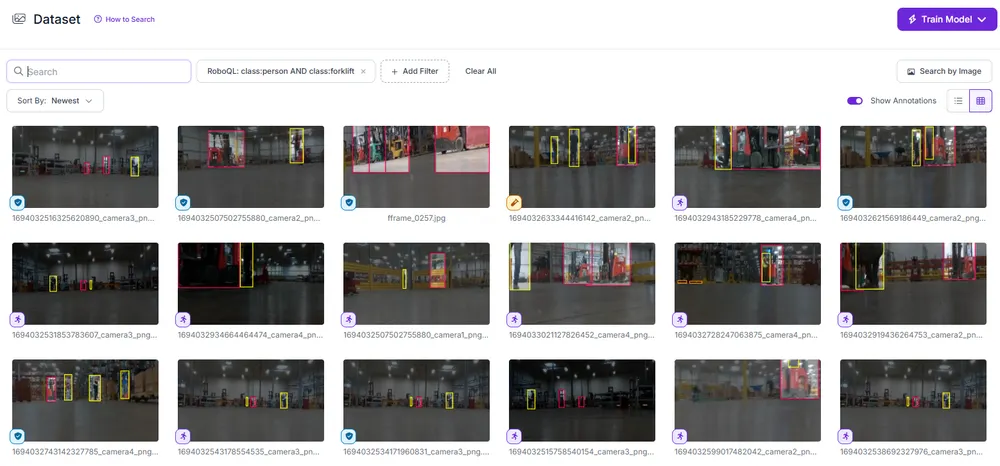
Look for images where a forklift partly blocks a worker from view. Add the occluded_person tag to these images in Roboflow so you can filter by this tag to check whether a trained model can still detect partly hidden people.

From the search results, open an image that needs correction in Annotate. Select the appropriate class, draw a bounding box around the missed object, and save the annotation. If an existing box has the wrong label or inaccurate boundaries, correct it before continuing.

Next, open the Dataset tab and check the training, validation, and test splits. Review how the classes are distributed across them. For example, if the test set contains no forklifts, we cannot use it to evaluate how well the model detects forklifts.

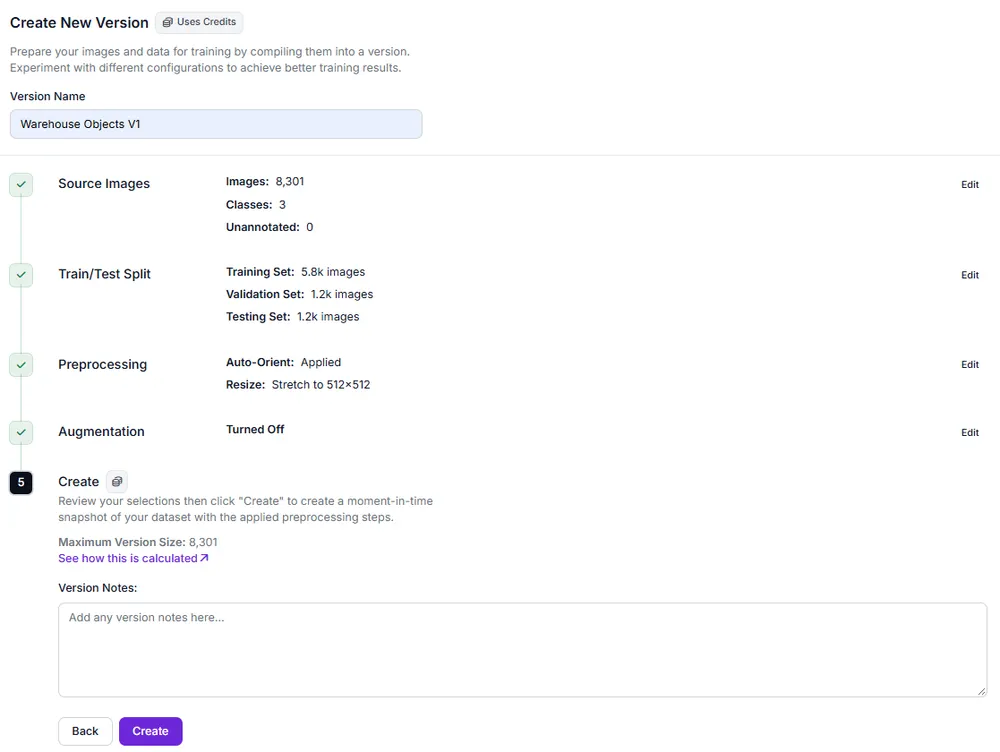
To create a dataset version, open the Versions tab and select Create New Version. Confirm the dataset split, then move to the preprocessing settings. Under Preprocessing, keep the default Auto-Orient and Resize steps. In the Augmentation step, leave augmentation disabled for this initial version, then click Create to generate the dataset version.
Get Started with Physical AI Training Data
Put your first dataset version to work by training a baseline RF-DETR model in Roboflow. Evaluate its predictions on separate warehouse recordings, then use the missed objects and incorrect detections to decide what to collect next.
To get started, fork the warehouse dataset (opens in a new tab) or upload your own images to Roboflow. Choose one perception task, train your first model, and use its results to guide your next dataset version.
Further Reading: