Model Weight Security: Protect Vision AI Models with Roboflow
 Mostafa IbrahimPublished Aug 5, 2026
To secure vision model weights, run Roboflow Inference self-hosted (free on every plan) so weights and images stay on your own hardware, then encrypt the disk, and use scoped API keys, RBAC, and audit logs to control who can access or export them. For networks that can’t allow outbound connections, use Offline Mode on Roboflow Enterprise to run inference fully air-gapped with a planned 30-day lease renewal, and prove it to your security team with the network-isolation test in this guide.
Deploying a computer vision model (opens in a new tab) on your own hardware gives you control over where inference runs. It also puts a valuable asset on that hardware: the trained model weights. Vision model weight security means controlling who can access, copy, or modify those files, how they are protected at rest, and where they move during deployment.
For teams running vision AI on factory servers or edge devices, keeping camera images inside the network addresses only part of the security review. Teams also need to understand how weights are downloaded and cached, which connections the runtime requires, and how to protect a device that someone could physically access.
Roboflow makes it easier to build and deploy vision AI within your security requirements. The free tier includes private projects and models, supported model weight downloads, and 10 monthly credits for credit-billed services. Running models and Workflows locally with Roboflow Inference does not consume credits, so increasing local inference volume does not increase your metered Roboflow inference charges. For environments that require air-gapped operation, Roboflow Enterprise offers Offline Mode for supported models, with a planned cache lease renewal process.
This guide explains how to secure vision model weights in a Roboflow deployment, from local caching and weight exports to access controls and offline inference. You’ll also walk through a network-isolated deployment test and learn where Roboflow’s managed-platform protections end and your device-level controls begin.
Where Your Images and Model Weights Go
Where the model runs decides what leaves your network, and Roboflow gives you the full range of options to place that line exactly where your security requirements need it. From fully managed cloud to a completely air-gapped container, the choices fall along one axis: how much stays inside your walls.
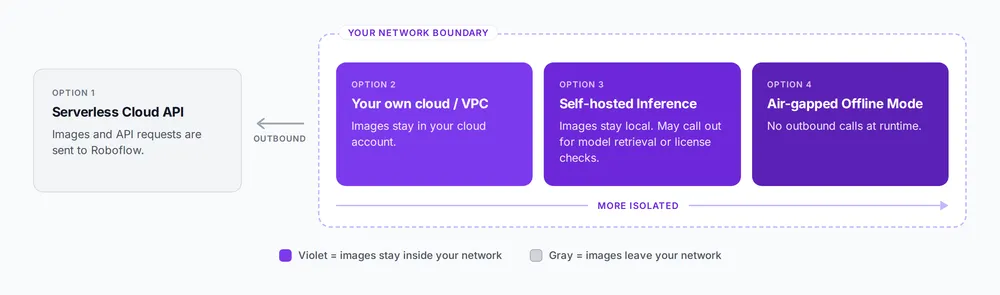
- Serverless Cloud API (opens in a new tab): Images are sent to Roboflow's infrastructure for inference, and predictions are returned through the API. It's the quickest way to get started, but both images and API requests leave your network, which may not meet the requirements for sensitive workloads.
- Your own cloud or VPC (opens in a new tab): Inference runs inside your own cloud account, so your images stay within your infrastructure while you keep the convenience of cloud deployment.
- Self-hosted Inference (opens in a new tab): Models run on your own servers or edge devices. Weights are cached locally on the first request, so later predictions use the local copy. Depending on the model and licensing configuration, connected deployments may make outbound calls for model retrieval, metadata, or license validation.
- Air-gapped Offline Mode (Roboflow Enterprise) (opens in a new tab): Self-hosted Inference configured so the runtime makes no outbound calls during inference. Models are transferred through approved channels such as GitOps or physical media, keeping the pipeline, from camera to inference to PLC, inside the protected network. Cached weights carry a lease of up to 30 days, so plan a renewal path through a Secure Gateway or a scheduled cache refresh.
The four options above represent the security-relevant choices; Roboflow offers finer-grained variants within each, such as Dedicated Deployments (opens in a new tab) and the Deployment Manager (opens in a new tab) for managed edge fleets, for teams that need them.
| Deployment option | Where images are processed | Outbound connectivity | Who manages the inference host |
|---|---|---|---|
| Serverless Cloud API | Roboflow infrastructure | Required for API requests | Roboflow |
| Your cloud or VPC | Your cloud infrastructure | Depends on configuration | Your team |
| Self-hosted Inference | Your servers or edge devices | May be needed for model retrieval or other services | Your team |
| Air-gapped mode | Your isolated infrastructure | None during inference; lease renewal at least every 30 days | Your team |
Get Production Deployment Support from Roboflow
Roboflow’s forward-deployed engineers can help you turn a working vision model into a production system. That support can include deployment planning, hardware selection, on-premises implementation, and integration with your existing cameras and operational systems.
For teams evaluating model weight security, this means working through deployment requirements together: where weights will reside, how inference fits within your network, and how model updates and offline lease renewals will be managed. Your organization retains control of its infrastructure and security policies, with Roboflow helping plan and implement the vision AI deployment.
Talk to Roboflow about your hardware, connectivity constraints, and security requirements to define a path from initial validation to production.
Model Weight Security at Rest and on the Edge
With self-hosted inference, a local copy of the model artifacts resides on hardware you control. The first time Roboflow Inference runs a model, it downloads the weights and stores them in a local Docker volume. Every subsequent prediction uses that copy, so images stay on your hardware during inference.
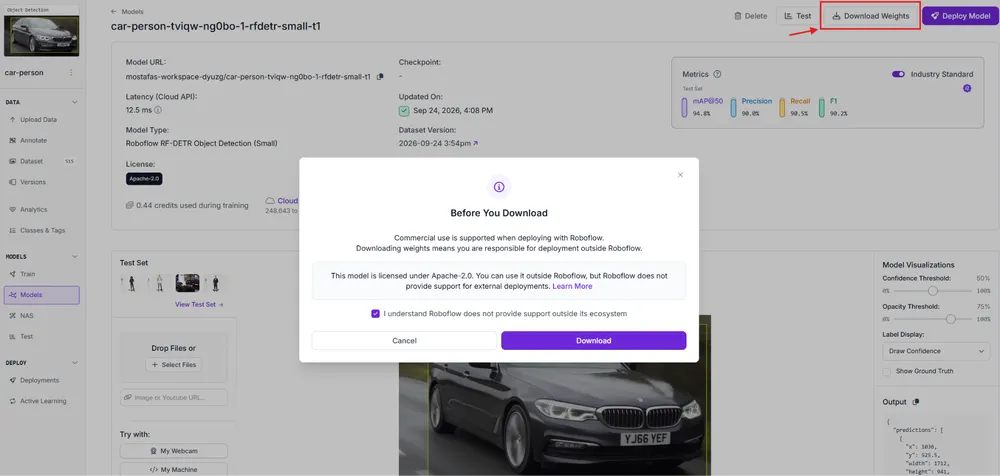
You can also download the weights directly. Open a trained model, select Download Weights (opens in a new tab), and save the model file locally. The screenshot below shows this process with an RF-DETR model, including confirmation that the weights can run outside Roboflow. ONNX (opens in a new tab) is the recommended export format, with support for TensorRT, OpenVINO, or CoreML depending on your hardware. Since export support varies by architecture, check the supported models table (opens in a new tab) before choosing a model. The license determines how you can use the weights. Core RF-DETR (opens in a new tab) models, for example, use Apache-2.0, allowing you to run those weights outside Roboflow. (Some Plus variants use a different license.)
One important consideration is that the model weights in the local volume are not encrypted at the file level. Anyone with access to the underlying disk may therefore be able to read the weights. For edge devices with physical access, full-disk encryption helps protect the model files if the device or its storage is removed.
Run Cached Model Weights Offline and Prove the Container Can't Phone Home
Here's how Roboflow Inference (opens in a new tab) runs without network access.
Roboflow Enterprise’s Offline Mode caches model weights in a Docker volume while the server is connected, then serves them with no outbound connections. Cached weights are valid for up to 30 days. When fewer than seven days remain, the server tries to renew the lease once an hour through the Roboflow API or a Secure Gateway, and a successful renewal resets it to 30 days.
That makes Offline Mode a fit for both intermittently connected sites and fully air-gapped ones, but an air-gapped site needs a planned renewal process. That might mean a scheduled connection through a Secure Gateway, or periodically refreshing the cache on a connected machine and transferring it in through your approved channel. The following demonstration warms the cache while connected, then proves the server runs with no network access.
Setup
You need Docker installed (opens in a new tab) a trained model in your Roboflow workspace, and a Roboflow Enterprise plan, which is required for Offline Mode.
Pull the CPU inference image while online, then create a named Docker volume for the cache. The volume persists across container restarts, so the warmed cache remains available for offline inference.
docker pull roboflow/roboflow-inference-server-cpu
docker volume create roboflow
Keep your Roboflow private API key out of your commands by putting it in a .env file, then place a test image in the same folder.
ROBOFLOW_API_KEY=your_private_keyPhase 1: warm the cache while connected
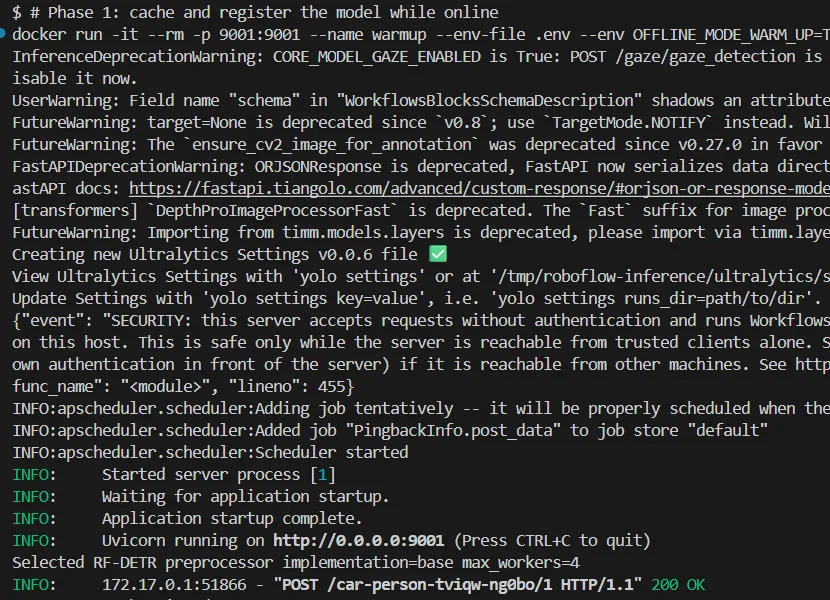
Start the server with the warm-up flag, which registers each model as it loads so it can be served later with no network:
docker run -it --rm -p 9001:9001 \
  --env-file .env \
  --env OFFLINE_MODE_WARM_UP=True \
  --mount source=roboflow,target=/tmp/cache \
  roboflow/roboflow-inference-server-cpu
In a second terminal, send one request so the model downloads and registers. Passing the key as a bearer header rather than a URL parameter keeps it out of the URL and access logs:
source .env
base64 -w0 test.png | curl -s \
  -H "Authorization: Bearer $ROBOFLOW_API_KEY" \
  -d @- "http://localhost:9001/your-model/1"
The server returns a prediction, and the model is now in the offline registry. Stop the warm-up server with Ctrl+C.
Phase 2: seal it off and prove it
Restart the same container with no network and no key. The OFFLINE_MODE flag loads from the registry, and --network none leaves only the container's loopback interface, with no external network connectivity:
docker run -it --rm -p 9001:9001 \
  --network none \
  --env OFFLINE_MODE=True \
  --mount source=roboflow,target=/tmp/cache \
  --name offline-demo \
  roboflow/roboflow-inference-server-cpu
Before running inference, confirm the container has no way out by trying to reach Roboflow from inside it:
docker exec -it offline-demo curl -m 5 https://roboflow.com
The container cannot resolve the address because it has no outbound network path. Copy the image in and run inference against the sealed server:
docker cp test.png offline-demo:/tmp/test.png
docker exec -it offline-demo bash
Run inference against the local server from the isolated environment. No API key or network connection is required; the model responds directly from its cache:
# inside the container:
base64 -w0 /tmp/test.png | curl -d @- "http://localhost:9001/your-model/1"
The prediction completes entirely offline.

What this means for your security posture
Running in this mode disables credential checks against the Roboflow API, making local security controls essential. The self-hosted server security guide (opens in a new tab) recommends treating the server as a controlled internal service, not exposing it without protection. Four areas require consideration:
- Network access: Keep the server on a private network behind a firewall. Use authentication or a proxy if other machines need access.
- Device security: Encrypt the disk and mount the model cache as read-only to protect the weights from unauthorized access or modification.
- Physical access: Secure the enclosure, particularly in factory environments where physical access can bypass software controls.
- Lease renewal: Decide how the cache will be renewed before the 30-day lease runs out, whether through a Secure Gateway in your DMZ or a scheduled cache refresh moved in through approved media. Treat it like any other planned maintenance window for the protected zone.
These measures follow established security practices for air-gapped OT environments. The model server should meet the same requirements as other devices operating within the protected network.
Compliance Posture: Platform Controls vs. Local Weights
Deployment modes determine where data resides and travels. Certifications address a separate question: whether Roboflow's managed infrastructure has been independently assessed against recognized standards. These are published across Roboflow's Trust Center (opens in a new tab) and Enterprise documentation (opens in a new tab):
- SOC 2 Type II (opens in a new tab): An independent examination of security controls over a defined period. It covers Roboflow’s managed platform, not your self-hosted infrastructure.
- HIPAA with BAAs (opens in a new tab): Roboflow offers HIPAA-aligned infrastructure and can execute a Business Associate Agreement governing the handling of protected health information.
- PCI compliance (SAQ A) (opens in a new tab): Validated under Self-Assessment Questionnaire A, meaning card payments are handled by an outsourced, PCI-compliant processor rather than on Roboflow's own systems.
- Encryption (opens in a new tab): AES-256 at rest and TLS in transit, with the TLS configuration rated A+ by Qualys.
Managed-platform encryption does not extend to the local model cache on your self-hosted devices. As discussed earlier, cached model weights are not encrypted at the file level. Your team controls disk encryption, file permissions, and physical access to that storage.
These assurances also do not determine where inference images travel. The cloud API sends images to Roboflow for processing, while self-hosted inference processes them within your infrastructure. A security review should assess both the platform’s controls and the deployment’s actual data flows.
Roboflow’s forward-deployed engineers can help with deployment planning and implementation.
Where Roboflow Fits IEC 62443
Manufacturing, energy, and defense teams often follow IEC 62443 (opens in a new tab), which secures industrial control systems through protected zones and controlled communication paths, limiting the spread of breaches.
IEC 62443 applies to development processes, hardware components, and integrated systems, while system-level conformity is distributed across asset owners, integrators, service providers, and product suppliers, depending on how the overall architecture is designed and operated. Roboflow serves as a software component within that controlled architecture.
In an air-gapped deployment, Roboflow Inference runs inside the protected OT zone. Cameras send images for local inference, and Workflows enterprise blocks (opens in a new tab) such as the PLC ModbusTCP block and the OPC UA Writer Sink send the result to a PLC to trigger actions such as rejecting defective parts. These blocks ship in enterprise builds of the Inference server. The entire process stays within the zone, while the engineering team retains control of PLC logic and network segmentation.
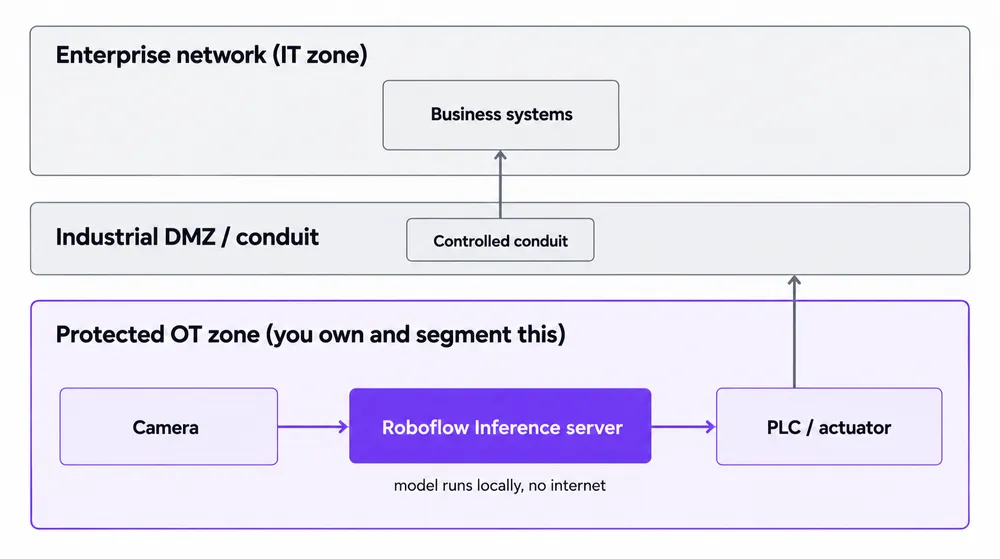
IEC 62443 compliance depends on your architecture, not one vendor. Roboflow runs inside your protected zone without opening external connections, keeping certification and network controls in your hands.
For a closer look at how Roboflow fits into segmented industrial networks, read our guide to deploying vision AI on-premises within IT/OT environments, covering Purdue Model levels, air-gapped inference, and controlled connectivity through a DMZ gateway.
Who Can Access and Export Model Weights
Access control is especially important in industrial environments, where edge devices may be physically accessible. The focus is on defining what each credential can access and maintaining visibility into its use. Roboflow Enterprise provides four relevant controls:
- SSO (opens in a new tab): Integrates authentication with your identity provider, allowing access to be managed centrally.
- RBAC and custom roles (opens in a new tab): Apply permissions based on job responsibilities, limiting access to functions such as deployment management and data export.
- Scoped API keys (opens in a new tab): Restrict device credentials to the specific resources and actions they require.
- Audit logs (opens in a new tab): Record activity involving users, roles, devices, API keys, and exports, with events available through OpenTelemetry for SIEM integration.
Together, these controls support least-privilege access and traceability by limiting permissions and maintaining an auditable record of activity.
Strengthen Model Weight Security with Roboflow
Model weight security starts with controlling where your trained models live, who can access them, and how they move into production. Roboflow gives you the flexibility to run vision AI within your infrastructure, keep inference images inside your network, and protect model weights using your organization’s storage, access, and network controls.
Self-hosted inference is free on every Roboflow plan. For environments that require air-gapped operation, Roboflow Enterprise adds Offline Mode for supported models, alongside identity, permissions, and audit controls that support secure deployment. Local disk encryption, file permissions, physical protection, and a planned offline lease renewal process complete the deployment’s security posture. Roboflow’s forward-deployed engineers can help you plan and implement that architecture.
Start by validating a model on your own hardware and documenting its storage, access permissions, and network behavior. Then work with Roboflow to bring that deployment into production, with model weight security built into how you operate vision AI.
Further reading