How Roboflow Agent Keeps Your Data Inside the Lines
 Contributing WriterPublished Nov 5, 2026
Before you approve an AI agent, you need to know exactly where your images, prompts, and results end up. This post maps every path for Roboflow Agent.
Challenges of AI Agents in the Enterprise
Someone on your team has probably already asked to use an AI agent to build their next inspection workflow. If you run IT or security, that request lands on your desk with a list of questions attached, and "trust us" isn't an answer you can take to your CISO. These are the questions we hear most from enterprise IT teams before they sign off:
- Data loss prevention (DLP). Where does an image, prompt, or result go once the agent sends it to a model provider? Could proprietary designs, processes, or other intellectual property end up somewhere they shouldn't?
- Model training on customer data. Will a third-party model learn from what we send it?
- Data retention. Who keeps a copy of the data, and for how long?
- Access. Can the agent see or change more than the person using it?
- Cost. Can an agent run incur spend nobody planned for, and can we see what it's using?
- Personally identifiable information (PII). Vision data often captures people. How do we keep faces and other PII from spreading?
Here's how Roboflow Agent handles each one today, and what's still on the roadmap.
At a glance
- No training on your data
- Zero data retention with model providers
- Your permissions, nothing more
- Spend tracking
- Documented data paths
Where Your Data Goes with Roboflow Agent
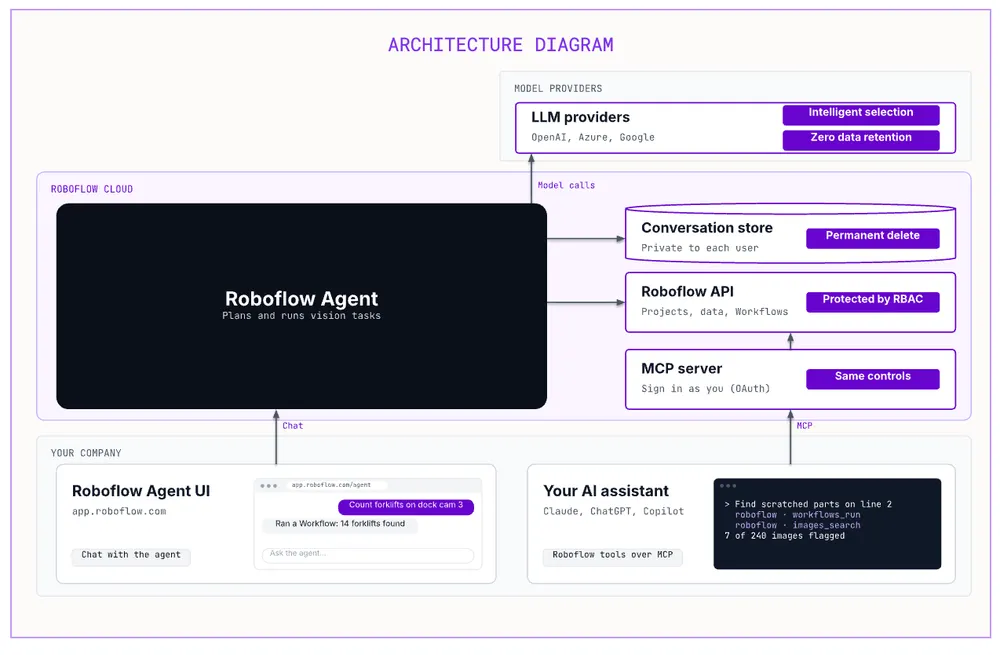
Roboflow Agent runs on Roboflow's platform and works with the data already in your workspace, under the same security controls as the rest of your projects. To plan and carry out a task, Agent calls large language models from OpenAI, Microsoft Azure OpenAI, and Google. EU workspaces use EU-hosted model endpoints. Agent data leaves Roboflow in three places: those model calls, the service we use to monitor Agent's quality, and our documentation search. You can find our full list of subprocessors in the Roboflow Trust Center (opens in a new tab).
No Training on Your Data
We've signed agreements with the model providers Agent uses that prohibit them from training their models on the customer data we send them. Your images, prompts, and results are used to complete your request, and nothing else.
Zero Data Retention (ZDR)
Roboflow requires and enforces zero data retention on every call Agent makes to a model provider, backed by enterprise ZDR agreements with each of those providers. Once a provider returns a response, it doesn't keep the data we sent.
ZDR applies to model providers. Inside Roboflow, your conversations with Agent, including its replies and any plans it writes, are saved in your workspace so you can pick up where you left off. Only you can see them unless you share them, and you can permanently delete them at any time.
The Agent Only Sees What You Can See
Roboflow Agent acts on behalf of the signed-in user and inherits that user's permissions. If you can't open a project, Workflow, or dataset, Agent can't either. Workspace roles apply exactly as they do everywhere else in Roboflow. For example, if a contractor only has access to one project, Agent can't see or change anything outside that project when the contractor uses it.
Intelligent Model Selection
Different vision tasks call for different models. Agent uses a Mixture of Experts approach to route each step of a task to the model best suited for it, whether that's planning a Workflow, analyzing an image, or writing code for a custom block. You get strong results without having to pick models yourself.
Bring Your Own Key
If your policies require model usage to run through your own provider accounts, Agent supports your own OpenAI or Microsoft Azure OpenAI API keys. Once your keys are turned on for your workspace, every Agent call uses them, and nothing falls back to Roboflow's keys. Model usage is billed to your provider account, Roboflow adds no model charge, and those conversations aren't traced for quality monitoring. The same keys also power the Agent API and the OpenAI blocks in Roboflow Workflows, and Workflows include Gemini blocks that accept your own key, too.
Keys are added under Third Party Keys in workspace settings. Only people with permission to edit third-party keys can add or change them, and no one, including Roboflow staff, can read a key back through the product.
A note on model selection. Your own keys can only reach the models your provider account has access to, which can limit Agent's ability to pick the best model for each task. We recommend bringing your own key only when your policies require it. If you do, our support team will turn it on for your workspace and help make sure your keys can reach the right models, so Agent keeps performing well.
Spend and Usage Insights
Agent usage draws on your Roboflow credits. Workspace admins can see it on the workspace Usage page as its own Roboflow Agent line. With your own keys, Roboflow records no model cost, and spend stays inside the limits you set with your provider.
Using Roboflow from Your Company’s AI Assistant
Your company may already have an approved AI assistant, like ChatGPT, Claude, or Microsoft Copilot. Roboflow's MCP server lets it work with Roboflow directly. When your assistant hands a task to Agent, the request runs through the same Agent, with the same model providers, retention settings, and controls described above. Connect by signing in with your Roboflow account, so the server acts as you, with your permissions. Learn more about MCP here.
Personal Information in Images
Vision data often includes faces or other identifiable characteristics, which may not be authorized for collection in some scenarios. We're adding automatic blurring of faces and other PII at upload, plus a way to mark projects that contain PII so they're easy to audit. If your team needs this, talk to our enterprise team about becoming a design partner on this capability.
Our architecture, data handling summary, subprocessor list, and contract terms are available for your security team. Visit the Roboflow Trust Center (opens in a new tab) for our security documentation and subprocessor list, or talk to sales to request the full security review packet.