Introducing Roboflow Organizations for Enterprise
 Leo UenoPublished Nov 18, 2026
Roboflow Organizations for Enterprise lets you roll vision AI out across departments and business units, while each team keeps its own Workspace, members, data and spending controls. Leaders get one dashboard for adoption and deployment volume, plus SSO, custom roles, export-control restrictions and credit reallocation across Workspaces.
Over 80,000 organizations build with Roboflow, including teams at over half of the Fortune 100. Enterprises like Rivian, BNSF Railway, and USG use Roboflow to make visual intelligence part of their operations.
Roboflow customers often begin with a small, nimble team deploying successful vision solutions using Roboflow, and want to quickly expand their solutions and Roboflow tooling across the rest of the enterprise without worrying about complex data and billing concerns. The most successful enterprises scale AI impact by ensuring that problems aren’t solved in silos, while retaining control, visibility, and delineation across teams.
One visual intelligence platform
Today, we’re introducing Organizations. An Organization brings multiple Workspaces together under one umbrella Organization. Organizations let large enterprises scale vision AI capabilities across departments, units, and projects. Each Workspace keeps its own members, projects, data, internal spending controls, and access controls.
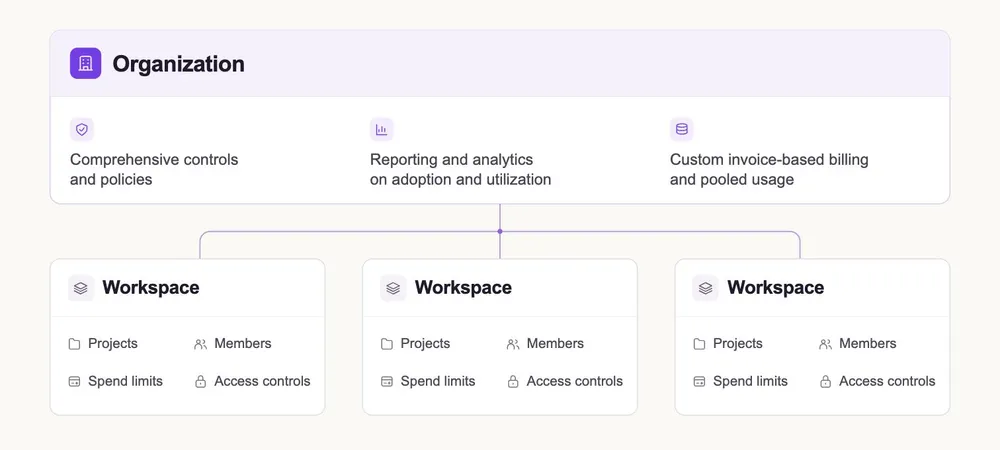
Organizations are equipped with:
- Reporting and analytics on adoption and utilization across their organization
- Support for custom billing agreements
- Credit reallocation and Workspace spending limits
Keeping those workspaces separate ensures teams within the organization can move quickly and adopt new capabilities without sacrificing organizational control and visibility.
See visual AI adoption and deployment
Most of the enterprises we work with ask:
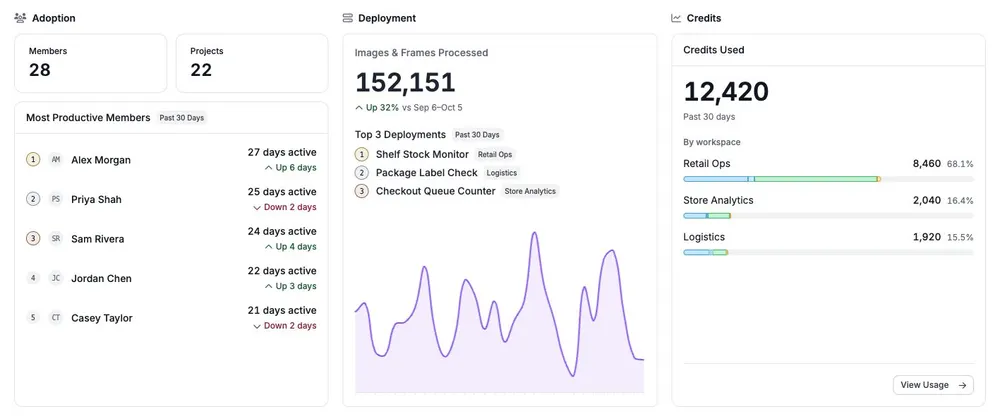
- Which teams are putting vision AI into use?
- Where are vision use cases actually getting into deployment?
- Who can help the next team get started, and which teams may need support?
The Organization Dashboard answers those questions with a view of member activity, projects, deployment volume, and adoption trends across Workspaces.
Advanced access control and compliance
Often, enterprises have business units or teams subject to compliance or standards, whether from customers, internal policy, or because they operate in a regulated industry.
Roboflow’s Enterprise controls include single sign-on, custom roles, folder permissions, and restrictions on access to export-controlled data. This means that a business unit handling regulated or commercially sensitive data can operate in a dedicated Workspace, with limited and controlled access, while not placing undue restrictions on other business units without such regulatory requirements.
Granular credit visibility and control
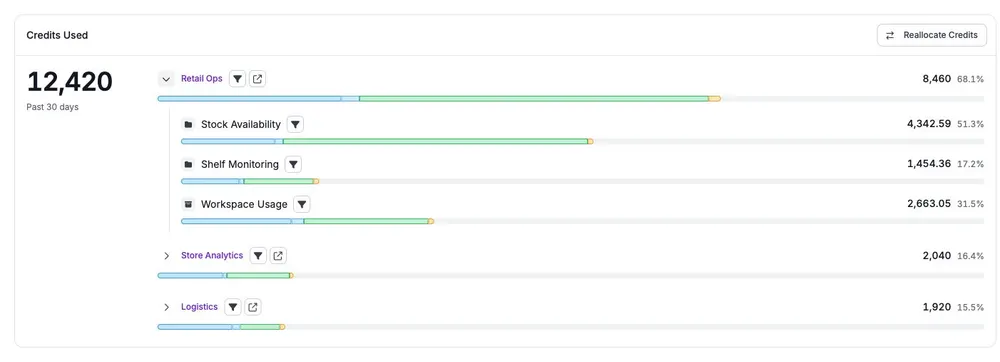
Leaders also need to understand credit usage and control spending. A dedicated page within the Organization Dashboard allows insight into where credits go across different departments, teams or units (organized by Workspace) and even more granularly into individual project folders.
It supplies business leaders with the context necessary to allocate costs to sites and projects, plan next year’s use cases, and reallocate unused credits across Workspaces as team needs change.
What’s next?
As enterprises expand their use of Roboflow, we’re making it easier to bring new teams onto the platform and manage access and usage across Workspaces.
We will also be expanding Roboflow Organizations to support vendors that offer Roboflow-powered products to their own customers.
Many enterprises already use Roboflow to build their company-wide vision program with Roboflow. Organization dashboards are available today on select enterprise workspaces. Please reach out to our team to get started rolling out vision AI to your organization.


