The Best Data Labeling Tools
 Timothy MPublished Sep 1, 2026
To choose a data labeling tool, pick one that handles your data type and annotation formats, speeds up work with AI-assisted labeling, includes review workflows for quality control, and exports cleanly into your training pipeline. For computer vision projects, Roboflow covers the whole workflow in one place, from labeling with tools like Label Assist and Auto Label through training and deployment, and you can start free today.
When you train a computer vision model to detect damaged products, count inventory, or identify missing parts, your annotations define what it should learn. Missing objects, inconsistent labels, and poorly drawn boxes can make it harder for the model to recognize what matters in your application.
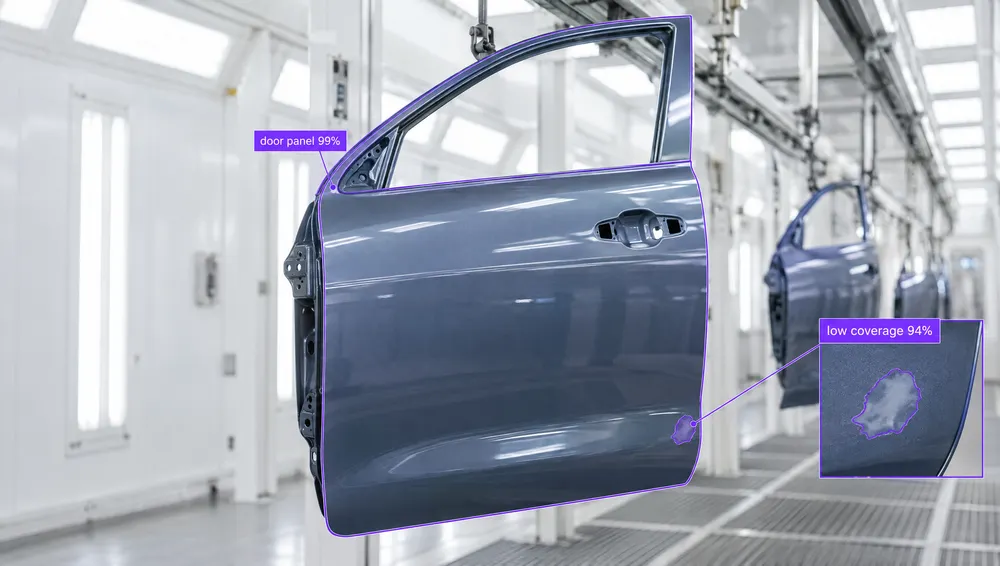
Data labeling, also called data annotation, is the process of adding structure to raw data for machine learning. In computer vision, that might mean drawing bounding boxes around products, outlining defects with segmentation masks, or assigning a category to an image.
The right data labeling tool helps you turn raw images into a dataset you can trust. Beyond annotation, look for ways to automate repetitive work, review labels with your team, and move your data into training. Which features matter most depends on what you’re building, how much data you have, and where your models will run.
In this guide, we’ll cover what to look for in a data labeling tool and compare five options: Roboflow, Amazon SageMaker Ground Truth, Vertex AI, CVAT, and Labelbox.
The Best Data Labeling Tools: Key Features
When comparing options, consider these features.
- Annotation Capabilities: A strong data labeling solution should adapt to any task, from drawing bounding boxes and outlining polygons to marking segmentation masks, tagging keypoints, or labeling multimodal datasets.
- Automation: For large projects when you want to label thousands of images, automation is critical. Therefore, ideally your solution would also support AI-assisted labeling or model-generated suggestions to automatically draw boxes or segment objects, although human supervision is must.
- Collaboration: Machine learning projects often have a large team with several annotators. Therefore, empowering task assignment, multi-user editing, and version control is important, so that every team member can work together efficiently and track progress.
- Quality Control: Accurate models start with accurate labels. To build reliable machine learning systems, your data needs consistent, high-quality annotations. The best labeling platforms make this easy with built-in review workflows, consensus scoring, and validation tools that catch issues early.
- Integrations: Your data comes from everywhere: cloud storage, sensors, internal tools. The right data labeling solution should connect seamlessly with your existing ML stack through SDKs, APIs, or cloud integrations.
- Scalability and Pricing: Finally, choose a data labeling solution that scales with you. Some platforms offer free tiers to get started, while others provide enterprise-grade plans with advanced automation, team collaboration, and dedicated support as your projects grow.
Explore the Best Data Labeling Tools
Let's take a deep dive into some of the best data labeling solutions.
1. Roboflow
Roboflow connects data labeling, dataset management, model training, and deployment in one platform. Its browser-based annotation tools support bounding boxes, polygons, segmentation masks, keypoints, and image classification, along with video segments for action recognition and image-and-text annotations for multimodal projects.
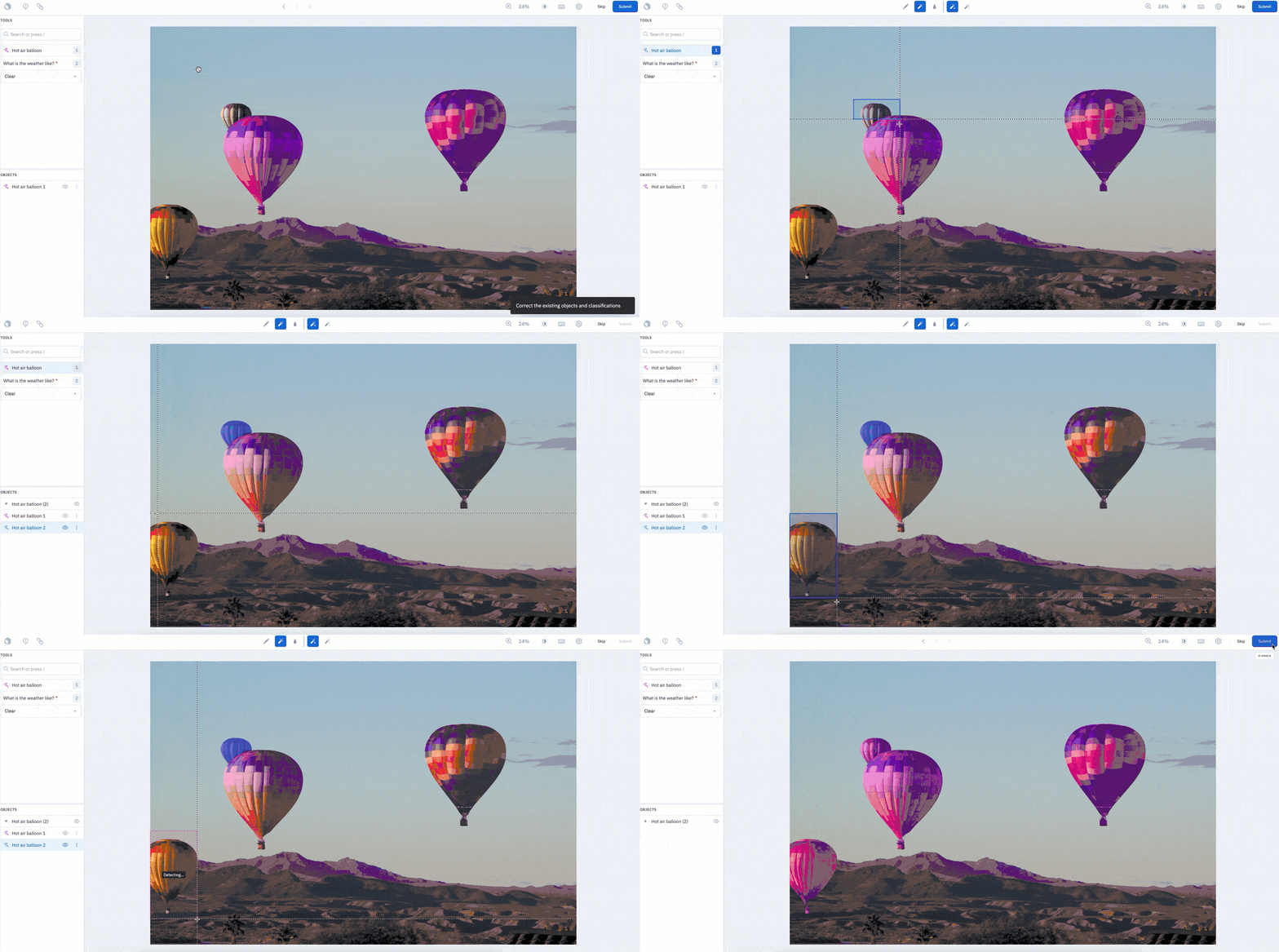
A major strength is the range of ways to automate labeling. Auto Label (opens in a new tab) can generate annotations using foundation models such as SAM 3, Gemini 4 Argon, and GPT-6.1 Terra, models trained in Roboflow, or a saved Roboflow Workflow. You can describe the objects you want to find, preview results on sample images, and review the annotations before training. Workflows also let you combine multiple models and filtering rules into a custom labeling pipeline. Available models and annotation formats depend on your project type.
For interactive annotation, Smart Select uses Segment Anything to generate and refine object outlines with clicks. Label Assist uses foundation models, your trained models, or public models from Roboflow Universe to suggest annotations as you open each image. These tools help you spend more time checking labels and less time drawing them.
For a guided way to prepare your dataset, use Roboflow MCP (opens in a new tab) to connect your AI assistant to Roboflow. With the Roboflow ChatGPT plugin (opens in a new tab), you can describe what you want to label, create a project, upload images, preview an auto-labeling model, and start a labeling job through conversation. Your selected vision model generates the annotations, which you can review and correct in Roboflow before training. MCP also connects these capabilities to coding agents such as Claude Code, Cursor, and Codex.
If you prefer to work directly in your workspace, Roboflow Agent helps you organize labeling work, send batches for review, start model training, and build and test Workflows. Describe your application and use Agent to connect dataset preparation to a working computer vision system.
Teams can assign labeling jobs, share instructions, and leave comments on images. Dataset versioning, preprocessing, and augmentation connect the labeled data to training. You can train and deploy through Roboflow or export your dataset in formats such as COCO, YOLO, and Pascal VOC for use in your own pipeline.
Roboflow is a strong fit for developers and enterprises that want labeling connected to the rest of their computer vision workflow. The free tier includes private projects and models, plus 10 credits per month to get started.
Challenges
- AI labeling consumes credits, and some foundation models add token charges.
- Review Mode, labeling analytics, annotation history, and role-based access controls are listed as Enterprise features on the current pricing page.
- Roboflow’s focus is visual data. For projects centered on audio transcription, evaluate a platform designed around those formats.
AI-assisted labeling in Roboflow
2. Amazon SageMaker Ground Truth
Amazon SageMaker Ground Truth is a data labeling service within Amazon SageMaker AI. It supports image classification, bounding boxes, semantic segmentation, text annotation, video object tracking, and 3D point cloud labeling. Existing customers can assign work to internal teams or vendors through AWS Marketplace, with data and labeling results stored in Amazon S3.
Ground Truth is now closed to new customers. AWS continues to support existing customers with security and availability improvements but does not plan to introduce new features. This makes it relevant for teams maintaining existing Ground Truth pipelines, while teams choosing their first labeling platform will need another option.
For existing users, Ground Truth combines human annotation with active learning on supported tasks. It trains a model on an initial set of human-labeled examples, automatically labels predictions that meet its quality threshold, and sends lower-confidence examples to workers. This can reduce manual work on large datasets, although it adds training and inference costs.
Challenges
- Setup requires configuring S3 storage, IAM permissions, labeling jobs, and a workforce, which adds work for teams unfamiliar with AWS.
- Automated labeling requires at least 1,250 data objects; AWS recommends at least 5,000, making it less suitable for small initial datasets.
- The Mechanical Turk workforce option is no longer available following its closure on September 30, 2026. Existing users must use another workforce option.
For teams moving an object detection dataset, Roboflow can import Ground Truth output manifests alongside the source images, preserving bounding boxes and class names. See our Amazon SageMaker Ground Truth comparison for more on migration options.

3. Vertex AI
Vertex AI, now incorporated into Google Cloud’s Gemini Enterprise Agent Platform, provides tools for preparing datasets, training models, and deploying predictions. For image labeling, you can import existing annotations or use the Google Cloud console to assign classification labels and draw bounding boxes. It is a practical option for teams already building and managing their machine learning infrastructure on Google Cloud.
Google retired its managed data labeling service in 2024. The remaining console-based workflow supports manual image annotation, while teams that need outsourced labeling can use third-party providers. AutoML image training remains available for classification and object detection once the dataset is labeled.
The distinction for teams evaluating labeling tools is how automation connects to the dataset. Google’s Cloud Storage Auto Annotate generates metadata using pretrained models. Gemini can also return bounding boxes from custom prompts, but developers need to connect those predictions to dataset preparation and review. Roboflow brings prompt-based Auto Label and annotation review into the same dataset workflow.
Challenges
- Dataset preparation involves Google Cloud projects, storage buckets, permissions, and import formats, adding setup for teams unfamiliar with the platform.
- The documented image-labeling interface requires users to assign labels and draw boxes themselves, or import annotations generated elsewhere.
- Building a Gemini-based labeling pipeline requires handling predictions, reviewing results, and converting approved annotations into the dataset’s expected format.
Teams looking for integrated AI labeling can bring images from Google Cloud Storage into Roboflow, generate annotations, and review them before training. See our Vertex AI and Roboflow comparison for more details.

4. CVAT (Computer Vision Annotation Tool)
CVAT is an annotation platform for teams that need detailed control over their datasets. You can run the free, open-source Community edition on your own infrastructure, use the hosted CVAT Online service, or choose CVAT Enterprise. Its tools support bounding boxes, polygons, segmentation masks, keypoint skeletons, classification tags, and 3D cuboids.
Video annotation is a particular strength. Annotators can track objects across frames and use keyframe interpolation to fill in positions between manually labeled frames. CVAT also now supports audio annotation, including timestamped transcription, speaker labeling, and sound events.
CVAT offers automatic annotation and interactive AI assistance through built-in models, integrations with Hugging Face and Roboflow, and models running on your own hardware. Available options depend on the edition and plan. Quality-control tools include manual review, comparisons against ground-truth annotations, and consensus workflows that combine annotations from multiple labelers.
CVAT is a strong fit for technical teams that want control over their annotation environment, particularly for video and 3D projects. Teams should also plan how labeled data will move into their model training and deployment pipeline.
Challenges
- The Community edition puts installation, upgrades, backups, and infrastructure management on your team. CVAT Online provides a hosted alternative.
- Connecting your own models can require deploying inference functions or running an AI agent on your hardware.
- CVAT Online’s free tier limits storage, tasks, and AI usage. Check the plan’s automation and collaboration features against your requirements.
For teams that want labeling connected directly to training and deployment, Roboflow can import supported COCO, YOLO, or CVAT XML exports. See our CVAT and Roboflow comparison for more on the differences.

5. Labelbox
Labelbox combines data annotation, dataset management, and expert labeling services. It supports images, video, text, documents, audio, and geospatial data, with annotation tools for tasks such as object detection, segmentation, and classification. Teams can use their own annotators, work with an existing vendor, or access Labelbox’s expert workforce through Alignerr.
Its AI-assisted labeling features help reduce manual work. Teams can import predictions from their own models or use Foundry to generate labels with foundation models. Catalog provides tools for searching and curating datasets, while configurable review and rework workflows help teams check annotations before using them for training.
Labelbox’s offering now extends beyond traditional annotation to generative AI development, including supervised fine-tuning data, preference ranking, and model evaluation. This makes it relevant for organizations managing multiple data types and projects that require specialized human expertise.
Challenges
- Usage is measured across data management, annotation, and model-related activities. Foundry inference and optional services can introduce additional charges, so costs depend on the full workflow.
- Teams need to define label schemas, configure automation, and establish review workflows to get the most from the platform.
For computer vision teams that want annotation connected directly to model training and cloud or edge deployment, Roboflow brings those steps into one platform. Explore the Labelbox and Roboflow comparison for more detail.
Get Started with Data Labeling
The right data labeling tool should help you create consistent annotations, review mistakes, and move your dataset into training. Before committing to a platform, test it with a small batch of your own data. Measure how much work it takes to produce accurate labels, including the time spent reviewing and correcting automated annotations.
To get started with Roboflow, upload 20-50 images that represent your application, including different lighting conditions, camera angles, and difficult examples. Define the objects you want to identify, then try Auto Label to generate annotations. Review the results for missed objects, incorrect classes, and inconsistent boundaries before labeling the rest of your dataset. This first batch helps you refine your labeling instructions early.
For help choosing an approach, open Roboflow Agent and describe what your application needs to see and do. You can also use Roboflow MCP, including the ChatGPT plugin, to manage datasets, run auto-labeling, and train models through conversation. Start with a specific request: “I want to detect pallets in warehouse images. Help me define my classes and test automated labeling on a small batch.”