Computer vision answers · Energy
How do I detect utility poles and their components with computer vision?
Without a crew climbing, or driving past, every pole to look.
Short answer
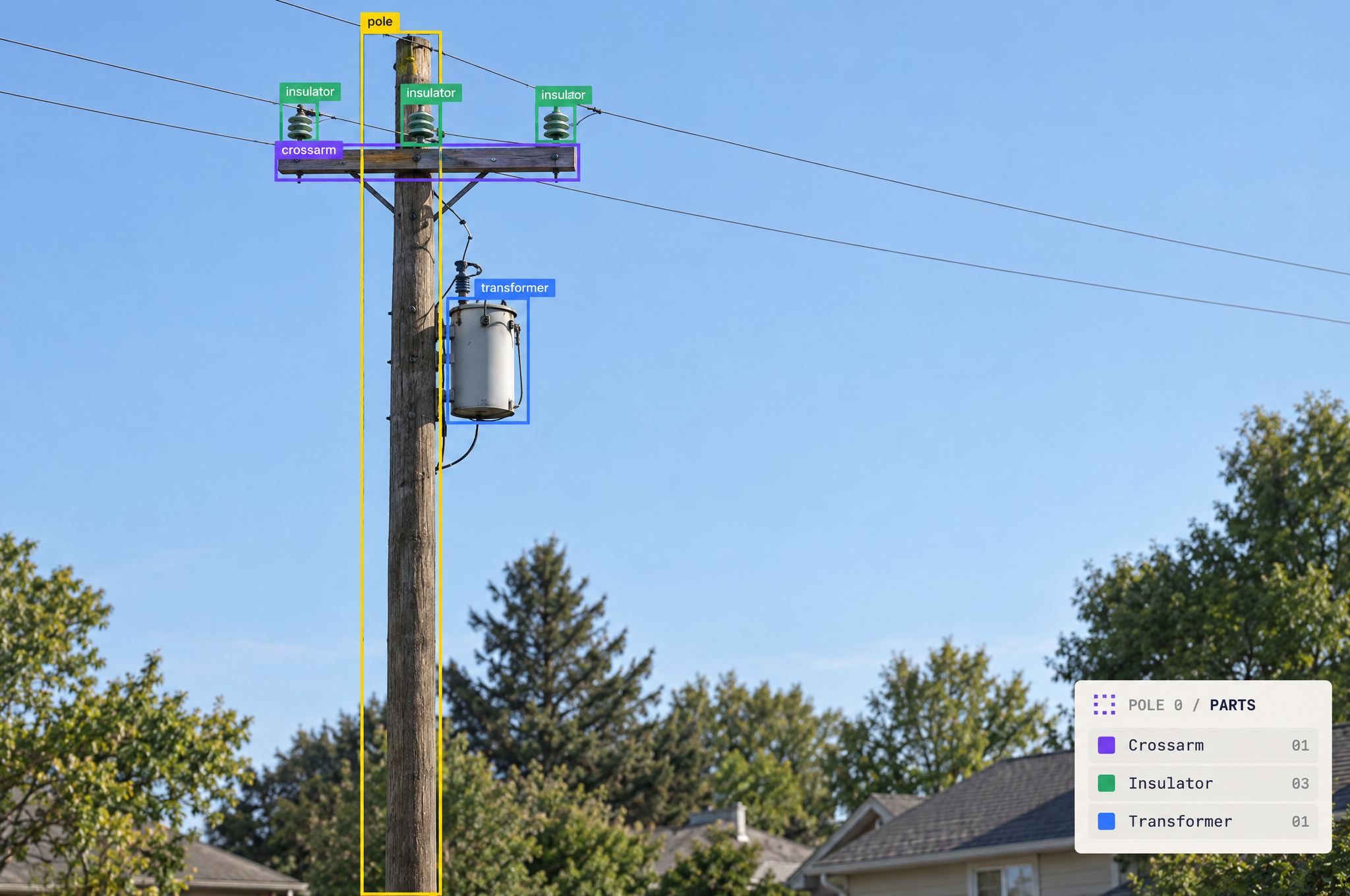
Train an object detection model to find each utility pole and its components, such as crossarms, insulators and transformers, with Roboflow for free. Then assign each component to the pole it sits on, so every pole in your footage comes with its own list of parts. Label the whole pole as its own class as well as each component, so components from a pole in the background never get counted on the pole in front.
Skip the setup. Describe your images.
Describe your images and what you need to find. The agent sets up labeling, training and deployment with you.
Key facts
- What you need
- Pole photos or video and a model trained on your components
- What you get
- Every pole found, with a list of the components on it
- Image sources
- Drone, vehicle-mounted and handheld cameras
- Runs on
- Cloud API, or an edge device or server running Docker
How to build utility pole detection, step by step
Six steps from drone or vehicle footage to every pole with its components listed.
Connect Roboflow to your coding agent, ChatGPT or Codex
Collect footage the way you inspect
Label each pole and each component as its own class
Train a detection model
List the components on each pole
Pythonimport supervision as sv from inference import get_model model = get_model("your-project/1") result = model.infer("route_12_frame.jpg", confidence=0.4)[0] detections = sv.Detections.from_inference(result) poles = detections[detections.data["class_name"] == "pole"] parts = detections[detections.data["class_name"] != "pole"] centers = parts.get_anchors_coordinates(sv.Position.CENTER) for i, (x1, y1, x2, y2) in enumerate(poles.xyxy): inside = (centers[:, 0] >= x1) & (centers[:, 0] <= x2) & (centers[:, 1] >= y1) & (centers[:, 1] <= y2) print(f"pole {i}:", parts.data["class_name"][inside].tolist()) # pole 0: ['crossarm', 'insulator', 'insulator', 'insulator', 'transformer']Rather not write code? Ask the Roboflow agent to set this up for you
Run every inspection and send findings to work orders
Why 2 million engineers build on Roboflow
Label faster
Auto-label with SAM 3 or your own model, then fix the misses instead of drawing every box.
RF-DETR
Roboflow’s open-source real-time detection model, built for accuracy (opens in a new tab) on small objects.
Logic built in
Counting, zones, tracking and alerts are ready-made Workflow blocks, so there is less code to write.
Your model, your weights
Use your trained weights on every plan, including free, through the open-source Inference package.
Run it anywhere
Self-host on a workstation, Docker, an on-prem GPU or an edge device, or call the cloud API.