Use Gemini 4 Argon to Build Computer Vision Applications
 Patrick DescherePublished Oct 13, 2026
Today we added Gemini 4 Argon, Google’s newest multimodal model, to Roboflow. As of this writing, it ranks first on Roboflow Playground (opens in a new tab), where we compare vision models on real-world tasks, for object detection, counting, and text extraction.
Roboflow is a platform for building computer vision applications, from labeling images and training models to deploying them in the cloud or on your hardware. With Gemini 4 Argon in Roboflow, you can label hundreds of images automatically to train a model that’s fast enough for live video, or use Argon as one step in an application that combines several models.
What is Gemini 4 Argon?
Gemini 4 Argon is the newest multimodal model from Google. You give it an image and instructions in plain language, and it returns text, structured data, or bounding boxes around the objects you ask for. In our evaluations, it’s especially good at three tasks that come up often in vision applications: finding objects, counting them, and reading text in real-world images from manufacturing, logistics, and aerial imagery.
Build vision applications that advance with the frontier
Every advance in frontier models expands what’s possible with computer vision. Gemini 4 Argon is another step toward applications that understand more of the world, solve more ambitious problems, and improve as the underlying models improve.
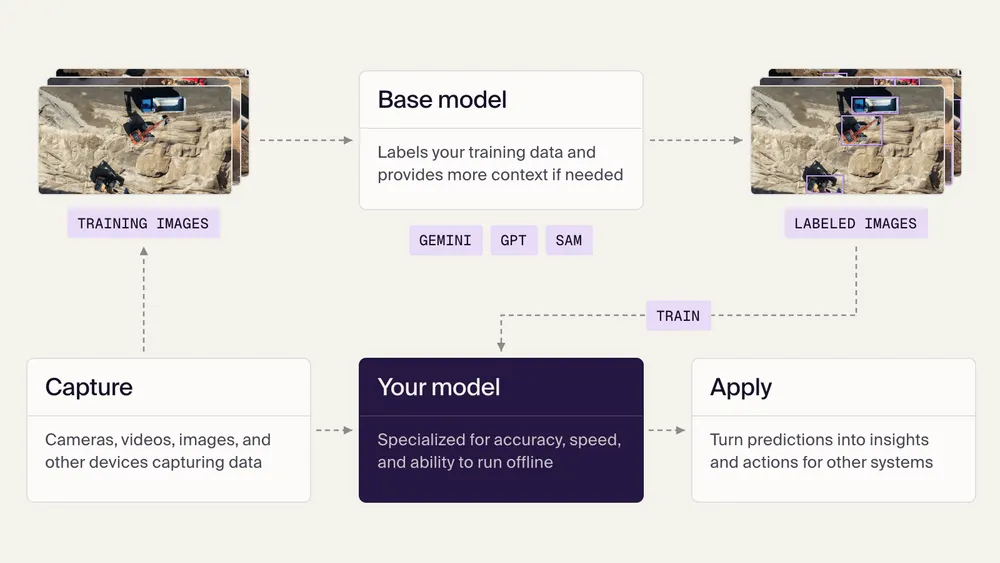
Our vision for Roboflow is to be the vision harness that turns those advances into better applications: a foundation for evaluating new capabilities, combining frontier and specialized models, and routing each task to the right model. The goal is to keep customers at the frontier of what’s possible across accuracy, speed, and cost, with the freedom to adopt better models from any provider, without vendor lock-in.
Auto Label and Workflows are two starting points, which you can use to build vision systems that keep getting better: stronger evaluations, more capable reasoning, and better ways to put each new breakthrough to work.
Auto label data with Gemini 4 Argon
Auto Label (opens in a new tab) draws labels on a whole batch of images for you. You list the objects you want labeled, with a short description of each, and Gemini 4 Argon finds every match and draws a bounding box around it. That way, you can label hundreds of images without drawing each box by hand and spend your time reviewing the results instead.
Those labels become training data for a specialized model. Gemini 4 Argon can find objects from a written description, but a model of its size is too slow and costly to run on every frame of a live video. A model like RF-DETR (opens in a new tab), trained on your images, runs in real time on edge devices like NVIDIA Jetson. With Auto Label, Argon labels the training data, and RF-DETR runs on your cameras in production.
For example, let’s say you operate a quarry and want to know how your equipment is used across a shift, like how many loads each wheel loader moves and how long dump trucks wait to be filled. You pull a few hundred frames from drone footage of the site, list classes like haul truck, dump truck, wheel loader, excavator, and screening plant, and run Auto Label with Gemini 4 Argon. After you review the labels, you train an RF-DETR model that tracks every vehicle on the site, frame by frame.
Gemini 4 Argon is available in Auto Label on object detection projects, in Label Assist (opens in a new tab) in the annotation editor, and through Roboflow Agent (opens in a new tab). You can also start Auto Label jobs with it from the Roboflow API, the Roboflow MCP server (opens in a new tab), and the Python SDK by setting the model type to gemini-4-argon-boxes. On paid plans, it’s now the default model for object detection labeling, so Auto Label selects it for you.
Use Gemini 4 Argon in your Workflows
Workflows (opens in a new tab) are how you build vision applications in Roboflow. You connect models and logic as steps, then run the result in the cloud or on your hardware. Some use cases might need more than a detector can provide, like reading a serial number or answering a question about what’s happening in a scene. Gemini 4 Argon is now a model option in the Google Gemini block (opens in a new tab), so you can add those steps to your Workflows.
For some vision tasks, you get more consistent and accurate results by breaking the job into smaller steps instead of showing one model the full image and asking for everything at once. A Workflow can find the parts you care about, crop each one, ask Argon about each crop, and check the answers against what you expect.
A Workflow finds capacitors on a motherboard, crops them along with their board labels, and asks Gemini 4 Argon for structured information about each one.
For example, let’s say you inspect motherboards and need to confirm that every capacitor matches the bill of materials (BOM). The example Workflow in the video above does it in six steps:
- Find the capacitors. A Google Gemini block with the Object Detection task finds each capacitor on the board.
- Include the board label. A Detection Offset block adds 80 pixels on each side of every box, so each crop also includes the reference designator printed next to the capacitor, like EC56.
- Crop each capacitor. A Dynamic Crop block cuts each padded box out of the image.
- Ask Argon about each crop. A second Google Gemini block uses the Structured Output Generation task to return the reference designator, capacitance, rated voltage, whether the rating is legible, and a short reason when a technician should take a look.
- Parse the answer. A JSON Parser block turns Argon’s response into fields the next step can use.
- Check against the BOM. An Expression block compares each capacitance and voltage rating with the expected values.
A large multimodal model takes longer and costs more per image than a specialized detector, so it pays to use it selectively. For a high volume of images or live video, a common strategy is to run an efficient detector like RF-DETR to find the areas of interest, then send Argon only the frames where a product is in position under the camera, or crops of the specific components you need to verify. That way, the detector covers frames at full speed, and Argon reads and reasons only where your application needs it.
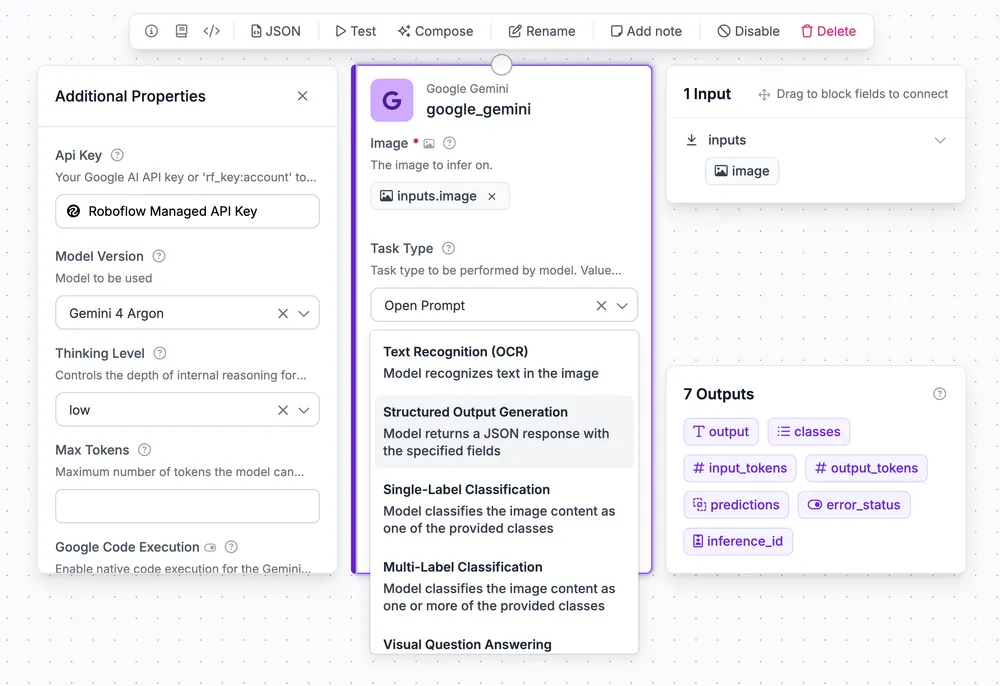
The Google Gemini block supports these task types with Gemini 4 Argon:
- Object Detection: Argon returns bounding boxes for the classes you list.
- Text Recognition (OCR): Argon reads the text in an image.
- Structured Output Generation: Argon returns JSON with the fields you define, like a capacitance value and a voltage rating.
- Single-Label and Multi-Label Classification: Argon assigns an image one or more of the classes you provide.
- Visual Question Answering: Argon answers a question you ask about the image.
- Captioning: Argon writes a short or detailed description of the image.
- Open Prompt: Argon follows the prompt you write and returns its response as text.
Detection and classification results use the same format as other Roboflow models, so they connect directly to blocks like visualizations, counting, and filters. You can also set a thinking level for each step, using a low level for quick answers and a high level when a task needs more reasoning.
Workflows with Gemini 4 Argon run in the Roboflow cloud starting today, through the Serverless API (opens in a new tab). Support for self-hosted inference servers will follow in an upcoming release of Roboflow Inference. By default, the block uses Roboflow’s managed key and bills Gemini token use to your Roboflow credits. You can also provide a Google AI API key and pay Google directly.
Get started with Gemini 4 Argon
Gemini 4 Argon lets you describe what you need in plain language and get back boxes, counts, and text. In Roboflow, you can put that to work in two ways: labeling the training data for a fast, specialized model, or handling the steps in a Workflow that need to read and reason about what your cameras capture. Whether you’re tracking equipment across a quarry or verifying components on a production line, you can now bring the right models for the job to each step.
Log in to Roboflow to try Gemini 4 Argon in Auto Label, or add the Google Gemini block to a Workflow. To see how Argon compares with other models, read Piotr’s post and explore the results on Roboflow Playground (opens in a new tab).