Train, Evaluate, and Deploy Anomaly Detection Models with Roboflow
 Erik KokaljPublished Oct 28, 2026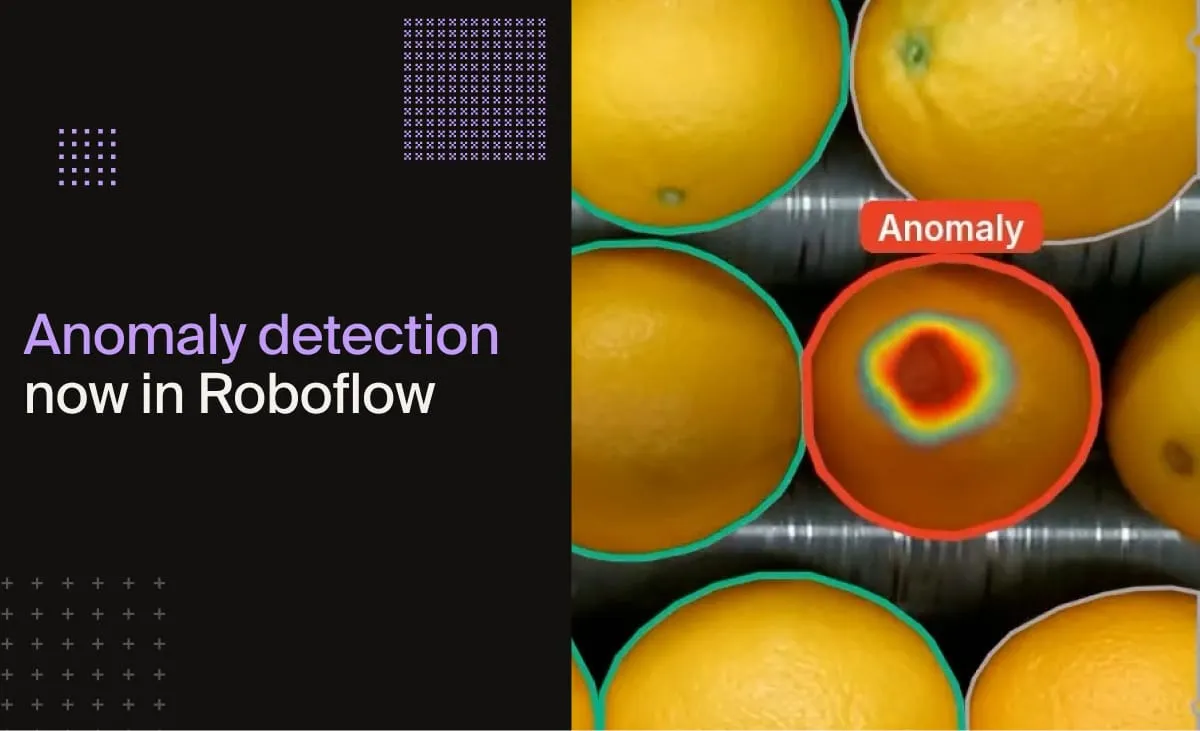
Today we’re announcing full support for anomaly detection models (opens in a new tab) in Roboflow, allowing you to deploy them in the cloud or on your hardware. Anomaly detection allows you to find things that look different from normal, like a damaged component or a stray bolt on a conveyor belt, without needing images of those issues to train on. That way, you can build vision systems that catch rare, unpredictable problems, even without examples of them in your training data.
An anomaly detection model is trained on images that show what "good" looks like. Then, when you run new images through the model, it tells you whether each one is normal or anomalous, returns an anomaly score, and can produce a heatmap of the areas that differ the most.
Anomaly detection in an oranges sorting line. We trained PatchCore on only 237 crops of good oranges, and it flags rot and blemishes it never saw during training.
Anomalies are, by definition, hard to find. On a well-run production line, a defect might show up once in thousands of parts, and no two look the same. Collecting enough labeled examples to train an object detection or classification model takes a long time. That makes anomaly detection a great fit for quality assurance and quality control (QA/QC), like sorting food, inspecting parts and packaging, and catching defects you couldn’t list in advance.
The model can return the anomaly "severity" in the form of a heatmap. In the above video of an anomaly detection model running on this egg line, the model flags stains, chips, and marks on the shell. Yellow indicates the anomaly is slightly above the threshold, while red indicates an anomaly far above it.
Here is another example where we trained FoundAD on frames of rocks, and it flags a stray bolt and a piece of debris it didn't see during training. In this case, we're using SAHI (Slicing Aided Hyper Inference), then feeding each slice separately to the anomaly detection model.
When to use anomaly detection models
Object detection needs labeled examples of every defect you want to find. On a production line that's the hard part: defects are rare, and every one looks different. A scratch, a dent, a missing screw and a stain have little in common, except that none of them look like a good part.
Anomaly detection flips that. Good parts are easy to collect, so the model learns from those and flags the rest. It works well for:
- Food and agriculture: dirty or cracked eggs, bruised fruit, foreign material on a belt
- Manufacturing: scratches, dents and contamination on metal, plastic or glass surfaces
- Electronics: missing or misplaced components, solder defects
- Packaging and labels: torn packaging, misprinted or missing labels
- Textiles: weaving faults, holes and stains
It's also a good first model when you have no defect data yet. Run it on the line, review what it flags, and you have the start of a labeled defect dataset for an object detection model later.
How it works
Both architectures start from an image model pre-trained on millions of images, and use it to describe every small patch of your image.
- PatchCore runs each training image through a WideResNet-50 and stores the patch features in a memory bank. At inference, every patch is compared to its nearest normal patch. Patches far from anything seen in training are anomalous. There's no gradient training, so it trains fast.
- FoundAD uses a frozen DINOv3 encoder and trains a small projector that learns the shape of the normal feature space. Patches that don't fit it get high scores.
Either way you get an anomaly score for the image and an (optional) heatmap of where it came from.
PatchCore vs. FoundAD: accuracy and speed
We trained both on four categories of the VisA dataset (opens in a new tab), once with 4 normal images and once with all of them.
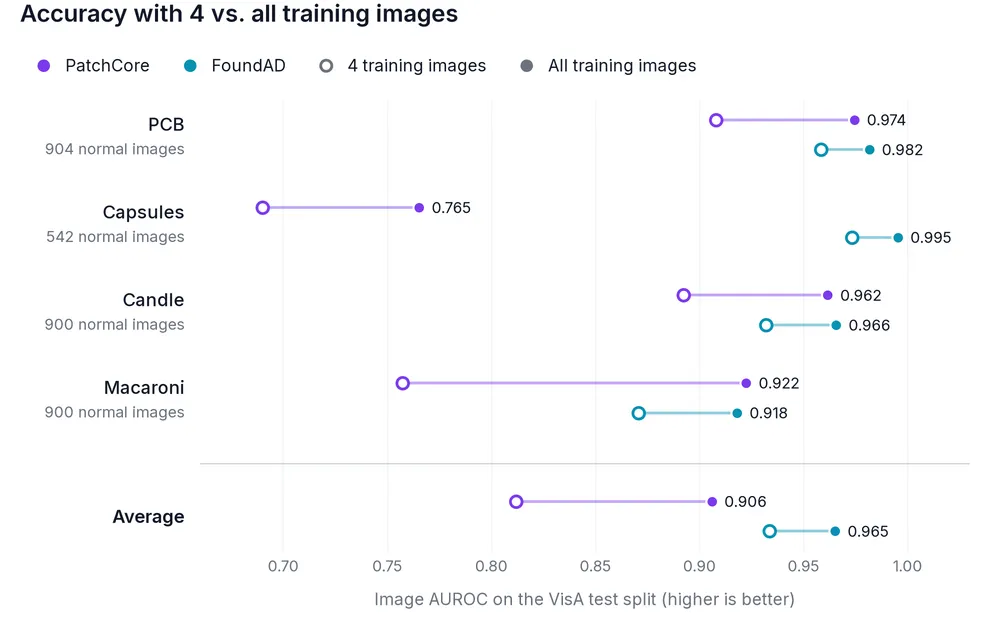
FoundAD is the better pick when you only have a few good images, in line with the FoundAD paper (opens in a new tab). More data helps both, PatchCore the most.
Inference speed
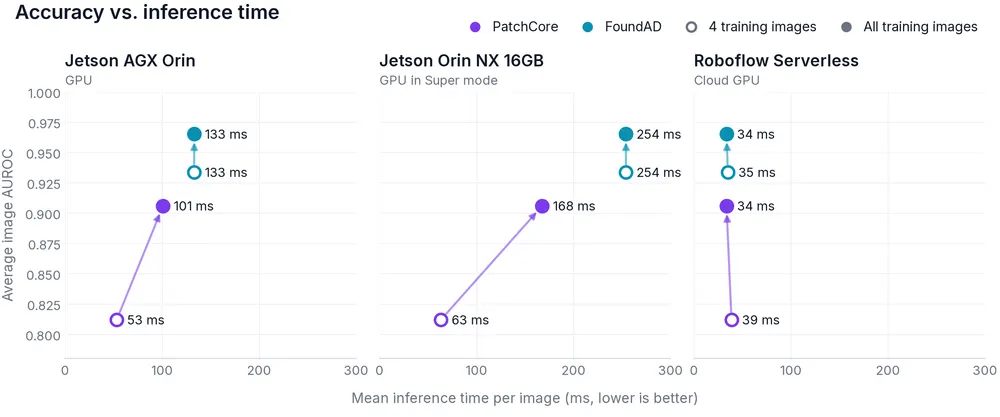
inference benchmark api-speed on Roboflow Inference 1.8. PatchCore at 224×224, FoundAD at 512×512.FoundAD’s speed doesn’t depend on how many images you train on. PatchCore searches a memory bank that grows with the training set, so it slows down as you add data. Which of the two is faster depends on the hardware.
Resolution matters even more, since both the patches per image and the memory bank grow with it:
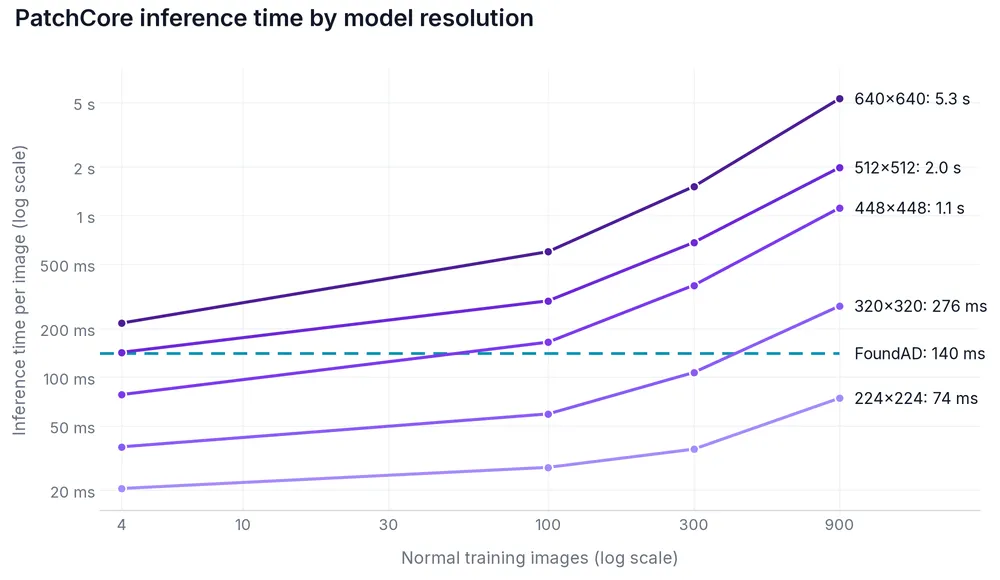
So for higher-resolution inputs, FoundAD is usually more applicable. PatchCore trains in minutes, while FoundAD takes longer (hours on large datasets).
How we measured
Each model ran at its default image size (224×224 for PatchCore, 512×512 for FoundAD) on Roboflow Inference 1.8, using the public Jetson image on the Jetsons. We measured it using inference-cli (opens in a new tab) (inference benchmark api-speed): 10 warm-up requests, then 100 timed ones per model, sent one at a time.
These results come from one benchmark, so treat them as an example, not as what to expect. Accuracy and speed on your data depend on your images, defects, image size, and hardware, so try both models on your own data.
Step 1: Create an Anomaly Detection project
In app.roboflow.com, click "New Project" and pick "Anomaly Detection" as the project type.
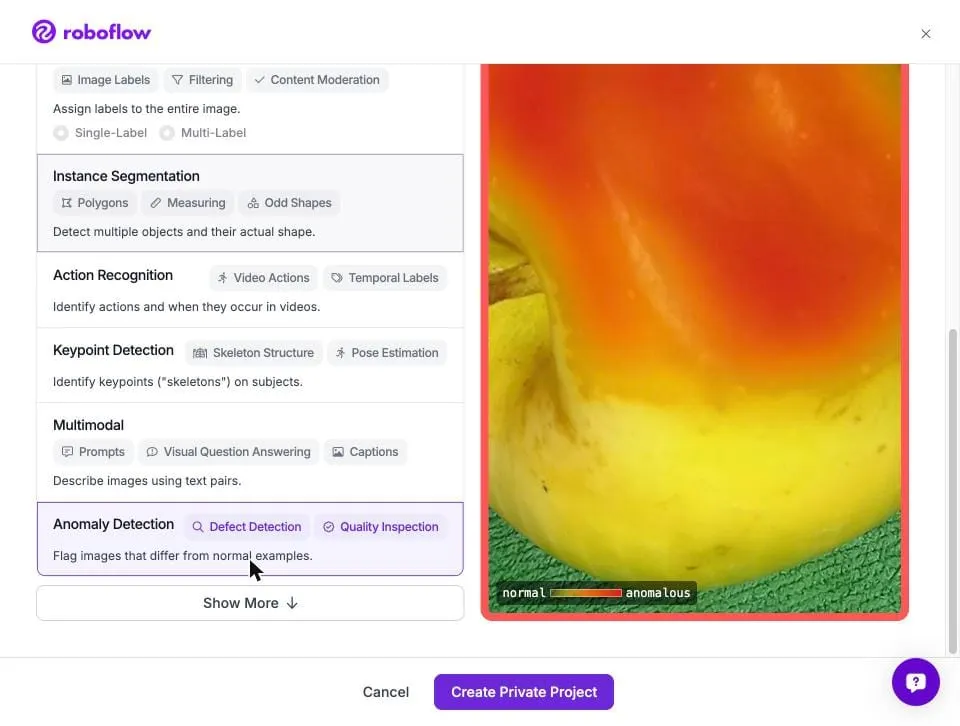
Step 2: Upload and label images
Upload images of good products and label them "normal". The model trains on these only, so normal images are all you need to get started.
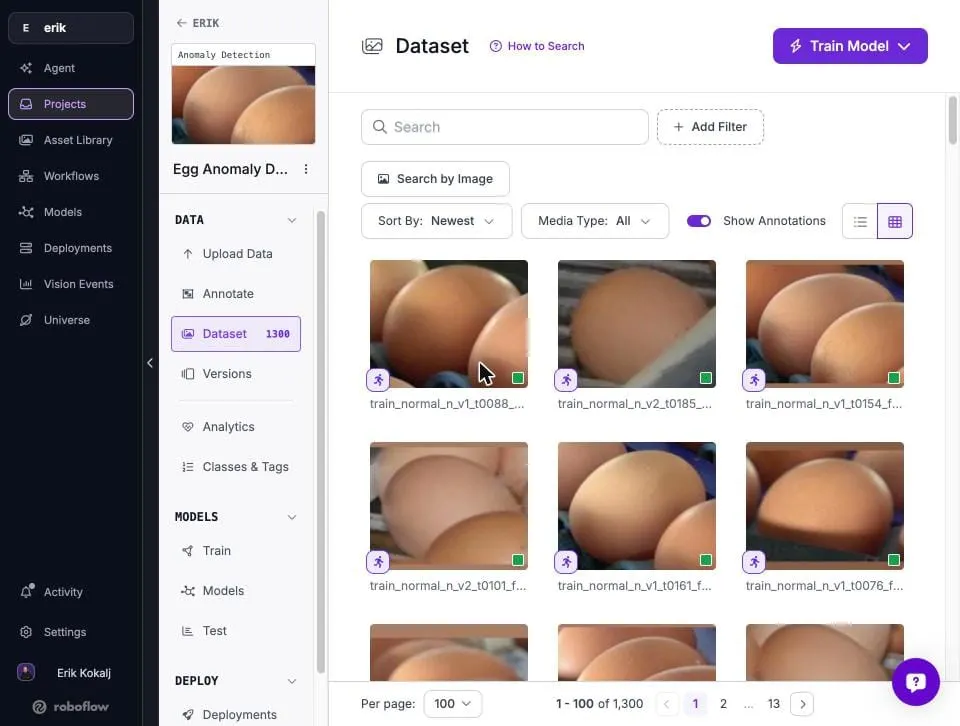
Two things matter most:
- One object per image. Anomalies are often small, so crop to the object. We used an instance segmentation model (SAM3 or object detection would work as well) to find each egg in the video frames and cropped a padded square around it. In a full conveyor frame with 60 eggs, one dirty egg barely moves the score.
- Only truly normal images in "normal". If a dirty or cracked egg (an anomaly!) sneaks into the training set as normal, the model learns that dirt/crack is normal.
If you have some anomalous images, you can label them "anomalous" and they won't be used to train the model (both architectures learn from normal images only, and anomalous images in the training split are skipped). They will be used to pick the threshold that best separates normal from anomalous, and to report precision and recall. Without them, it sets the threshold from the normal validation images, so roughly 1% of them would be flagged.
Labels are per image: open an image from "Annotate" and pick "normal" or "anomalous", like a classification model. If there's an anomalous object, you don't mark where the defect is; the model works that out on its own and returns it as a heatmap (see Step 4). Most of your images will be normal, so you can label a whole upload batch at once with "Mark All Normal".
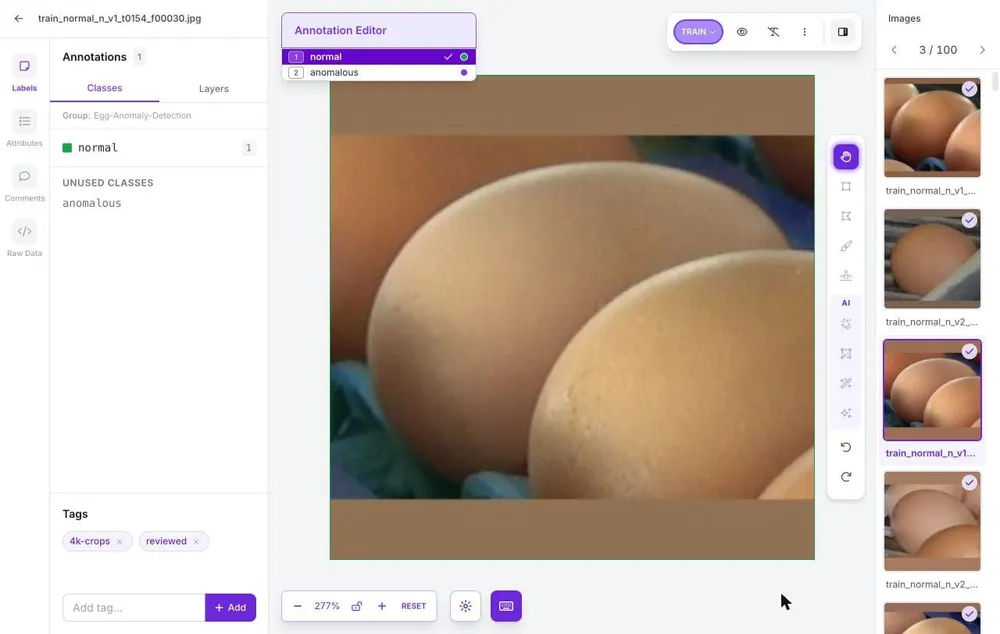
Our final dataset had 962 normal crops for training, plus 208 validation images (12 anomalous) and 130 test images (11 anomalous) to set the threshold and check accuracy.
Step 3: Train PatchCore or FoundAD
Click "Train Model", pick an architecture, and choose the dataset version to train on.
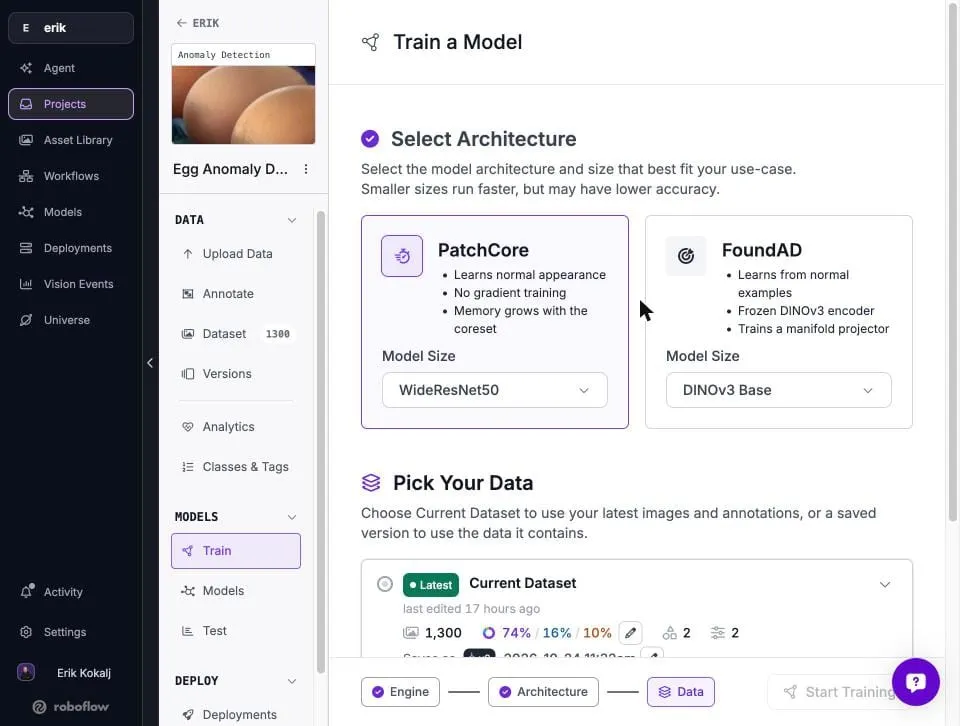
We trained both on the same version. On our test set PatchCore came out ahead: it caught 14 of 15 real defects at 2 false alarms, while FoundAD caught 10. PatchCore trains in minutes and FoundAD takes longer (see the benchmark above), so try both on your data.
Step 4: Run your model
When training finishes, the model shows up under "Models". Send it an image through the Serverless API, and add include_anomaly_map to get the heatmap back:
import base64, os
import numpy as np
import requests

with open("egg.jpg", "rb") as f:
    image = base64.b64encode(f.read())

result = requests.post(
    "https://serverless.roboflow.com/your-workspace/your-model-id",
    params={"api_key": os.environ["ROBOFLOW_API_KEY"], "include_anomaly_map": "true"},
    data=image,
    headers={"Content-Type": "application/x-www-form-urlencoded"},
).json()

print(result["anomaly_score"], result["anomaly_threshold"], result["is_anomalous"])

# heatmap as float32, shape [height, width]
m = result["anomaly_map"]
heatmap = np.frombuffer(base64.b64decode(m["data"]), "<f4").reshape(m["shape"])
The response has anomaly_score, anomaly_threshold and is_anomalous, plus the heatmap at the model's input resolution.

Tips for production
- Score inside the object. The heatmap also reacts to the background and neighboring objects. We took the top 1% of heatmap values inside the egg instead of the whole crop, which raised AUROC on our test set from 0.97 to 0.999.
- Set the threshold from your own clean images. We used the 99.5th percentile of scores on clean validation crops. Different cameras may need different thresholds.
- Vote over frames on video. Flag an object only when it's anomalous in most of its recent frames, so one blurry frame doesn't reject a good egg.
- Skip bad crops. Blurry, dark or partly hidden crops look unusual too. Filter them before scoring.
Get started
Create an Anomaly Detection project, upload images of good parts, and train your first model today. Sign up for Roboflow to get started, or talk to sales about running it across your lines.