PatchCore Anomaly Detection: Tutorial and FoundAD Comparison
 Mostafa IbrahimPublished Oct 26, 2026
PatchCore anomaly detection learns from images of good products only. It stores features from small patches of those images and flags any region of a new image that doesn’t match, so you can catch rare defects without labeling each one. In Roboflow, mark your images as Normal or Anomalous and train PatchCore (fewer false alarms) or FoundAD (catches more defects). Use its anomaly heatmaps to see where defects are, then deploy it in a Workflow that flags parts for review.
PatchCore anomaly detection helps you inspect products when examples of defects are scarce. You train it using images of acceptable products, giving the model a reference for identifying unusual patterns in new images. This approach is useful when you have plenty of normal inspection images but few examples of scratches, missing components, or damaged circuit traces.
PatchCore extracts visual features from normal images and stores representative examples in a memory bank. During inspection, it compares features from a new image against that reference, producing an anomaly score and a heatmap showing regions that look unusual. With Roboflow, you can train the model, examine these outputs, and evaluate its predictions on images it has not seen.
In this tutorial, we’ll train PatchCore on 40 normal printed circuit board images, then compare it with FoundAD using the same dataset splits. You’ll learn how to prepare the data, interpret anomaly heatmaps, evaluate missed defects and false alarms, and connect a trained model to an inspection pipeline in Roboflow Workflows.
What Is PatchCore Anomaly Detection?
PatchCore is a visual anomaly detection method that detects and localizes unusual patterns in images by comparing them with examples of normal appearance. It uses a pretrained neural network to extract features from small image regions, called patches, and stores representative features from normal training images in a memory bank.
During inspection, PatchCore compares each patch in a new image with its closest match in that memory bank. Larger differences produce higher anomaly scores. An image-level threshold determines whether the image is classified as normal or anomalous, while a heatmap highlights the regions that differ from the normal examples.
This makes PatchCore useful in electronics manufacturing, where acceptable printed circuit boards may be easy to collect but examples of individual defects are scarce. You can build the reference using normal PCB images, then test whether the model flags issues such as scratched traces or missing components.
PatchCore identifies deviations rather than assigning a specific defect category. Changes in lighting, positioning, or acceptable product appearance can also produce high scores, so validation should include both normal variations and defective boards.
Prepare a Dataset for PatchCore Anomaly Detection
For this tutorial, we'll use a local dataset of 80 PCB images: 60 normal and 20 containing visible defects. Before uploading them to Roboflow, we'll review the images and organize them into separate training, validation, and test folders.
- Check the smaller defects. Inspect the PCB images at full resolution, paying particular attention to small solder bridges and missing components. If an image in the defective group shows no visible defect, set it aside for review before including it in the dataset.
- Choose the training images. Set aside 40 normal images, including examples with different lighting and exposure. These variations help the models learn what an acceptable PCB can look like under different conditions.
- Reserve images for validation and testing. Use 10 normal and 10 defective images for validation, then set aside another 10 normal and 10 defective images for testing.
- Organize the images into folders. Create five folders: train_normal, valid_normal, valid_anomalous, test_normal, and test_anomalous.
Next, we'll upload each folder as a separate batch in Roboflow and assign its corresponding label and dataset split.
Upload and Label Normal and Anomalous Images in Roboflow
Open Roboflow and create a new project. Select Anomaly Detection as the project type.
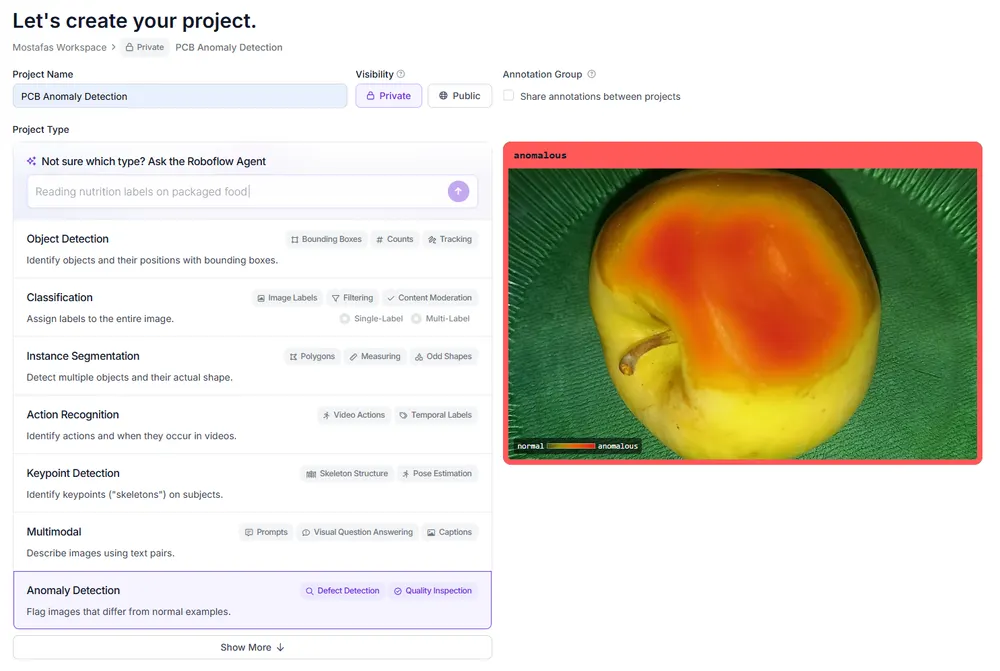
Go to Upload Data (opens in a new tab). Upload each of the five folders as a separate batch (opens in a new tab), keeping the original folder names as batch names to make them easier to identify.
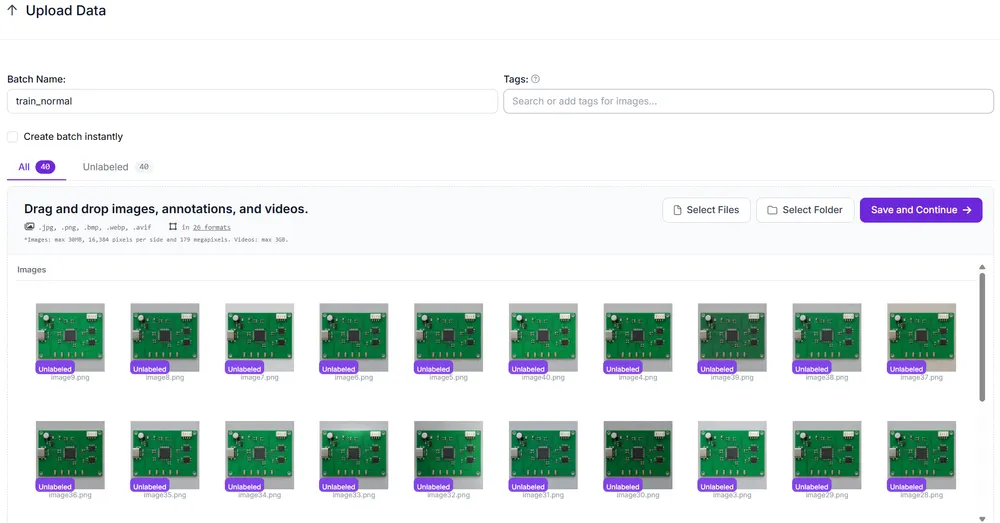
Once the images are uploaded, open Annotate to assign their labels.
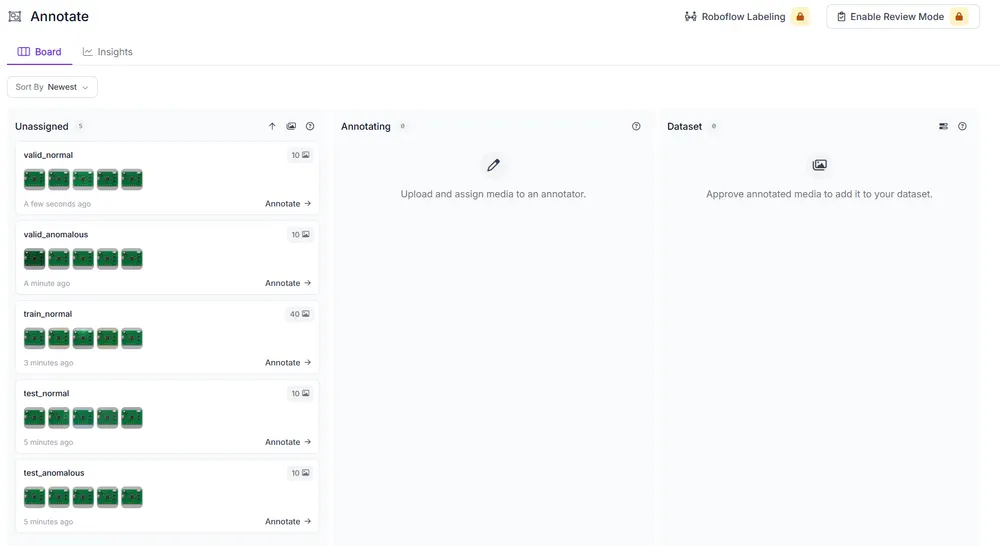
Use Mark All Normal for batches of normal images and Mark All Anomalous for batches containing defects.
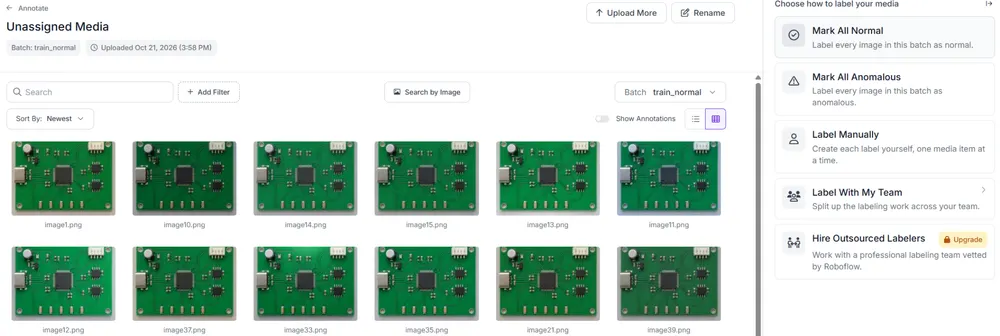
Assign the train_normal batch to Training, valid_normal and valid_anomalous to Validation, and test_normal and test_anomalous to Testing.
Before generating a dataset version, confirm that Roboflow shows 40 training images, 20 validation images, and 20 test images. Under Versions, enable Auto-Orient and leave augmentation disabled. Following Roboflow's recommended image sizes, we created two dataset versions: one resized to 224 × 224 for PatchCore and another to 512 × 512 for FoundAD. Both versions use the same dataset splits.
PatchCore vs. FoundAD: How the Models Differ
PatchCore uses a pretrained network to extract features from small regions of an image, called patches. It stores selected features from normal images in a memory bank. When testing a new PCB image, PatchCore compares each patch's features with the closest match in the memory bank. Larger distances indicate regions that differ from the normal examples.
FoundAD uses a pretrained visual encoder to extract features from images. The encoder stays unchanged while a smaller network, called a projection network, learns from the normal PCB images. When testing a new image, FoundAD compares the original features with those produced by the projection network. Larger differences can indicate regions that contain anomalies.
| Feature | PatchCore | FoundAD |
|---|---|---|
| Main approach | Memory bank | Feature projection |
| What happens during training | Selects and stores normal patch features | Trains a projection network |
| Anomaly scoring | Distance to the closest stored feature | Difference between original and projected features |
| Localization | Patch scores used to generate heatmaps | Patch scores used to generate heatmaps |
We'll compare their predictions on the same PCB test images to see how their approaches perform.
How to Train PatchCore and FoundAD in Roboflow
Open the PCB Anomaly Detection project in Roboflow and go to Versions. We'll start with the first version, which contains the images resized to 224 × 224.
Open the version and select Train on This Model. In the architecture selection screen, choose PatchCore with WideResNet50 as the backbone.
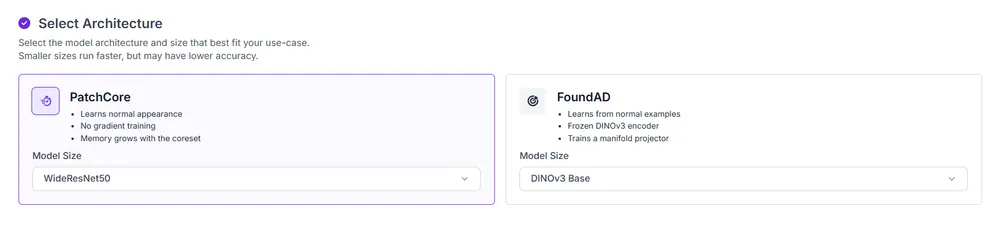
We kept the default training settings and started the training job.
PatchCore uses the 40 normal training images to build its memory bank. The defective images remain in the validation and test sets, so they are not used to build the model's reference of normal PCB features.
Next, open the second version, which contains the same images resized to 512 × 512. Start a new training job and select FoundAD, using DINOv3 Base as the visual encoder. We kept the default settings for this run as well. FoundAD trains its projection network using the normal training images.
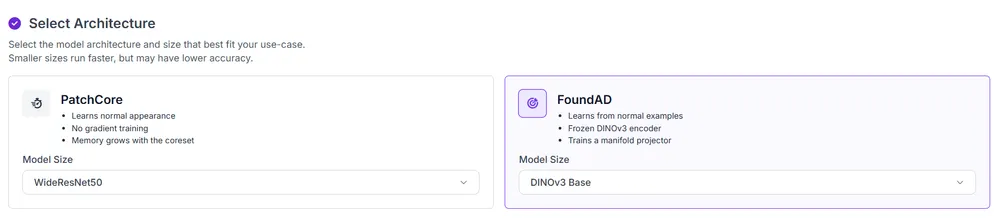
In our experiment, FoundAD took longer to train and consumed more Roboflow credits than PatchCore.
Run Inference and Generate Anomaly Heatmaps
After training, open the PatchCore model in Roboflow and click Test. Select an image from the test set or upload your own to view the model's prediction and anomaly heatmap.
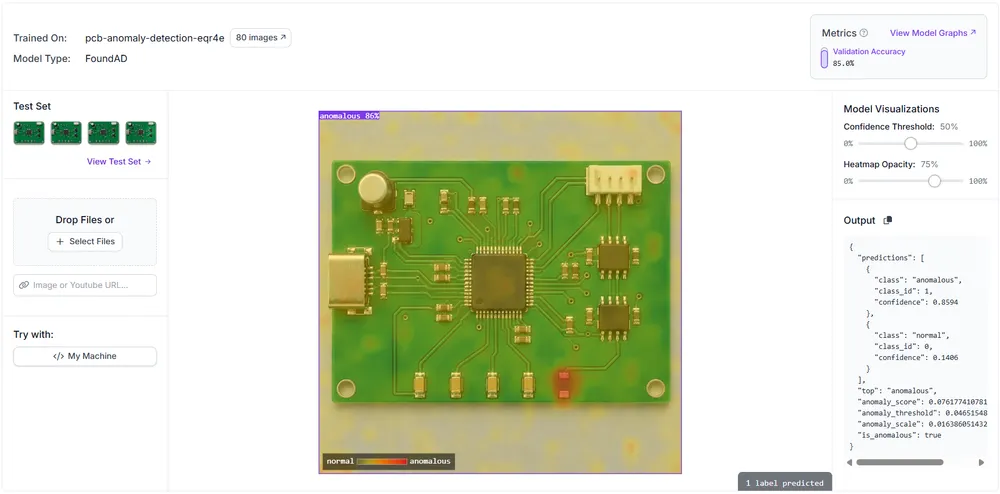
Start with a defective PCB image. In our example, PatchCore predicts Anomalous and highlights an area near the bottom of the board. Test the same image with FoundAD, then compare the predicted labels and heatmaps to see whether both models detect the defect and which regions they highlight.
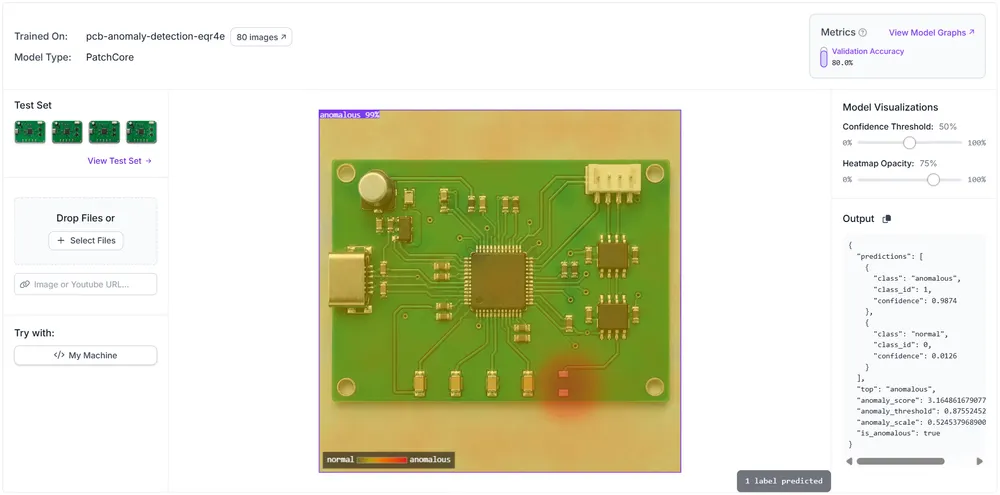
The Output panel shows the model's prediction and the values used to determine whether an image is anomalous:
- top: The predicted class, either normal or anomalous.
- anomaly_score: A score indicating how unusual the image appears to the model.
- anomaly_threshold: The score used to determine if an image should be classified as anomalous.
- is_anomalous: A true or false value indicating whether the image exceeds that threshold.
For example, the FoundAD model returns an anomaly score of approximately 0.076, above its threshold of 0.0465, so is_anomalous is true.
Repeat the process with a normal PCB image. In our tests, both models predicted Normal, even though their heatmaps highlighted some areas of the board.
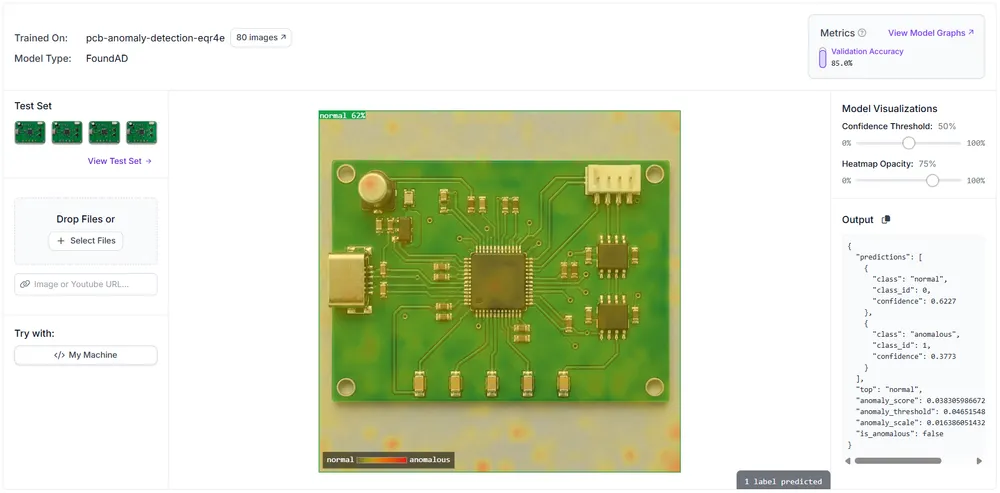
Use the Heatmap Opacity slider to make the overlay more transparent, allowing you to see the PCB components beneath the highlighted regions more clearly.
Evaluate PatchCore and FoundAD on Unseen Defects
In Roboflow, go to Model Evaluation (opens in a new tab) for each model and select Test Set from the upper-right menu. Under Anomaly Detection Metrics, Roboflow shows the results for 20 PCB images: 10 Normal and 10 Anomalous.
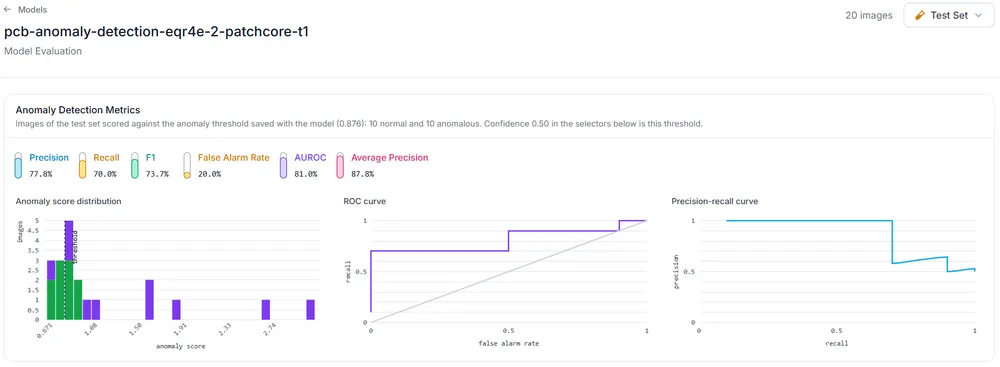
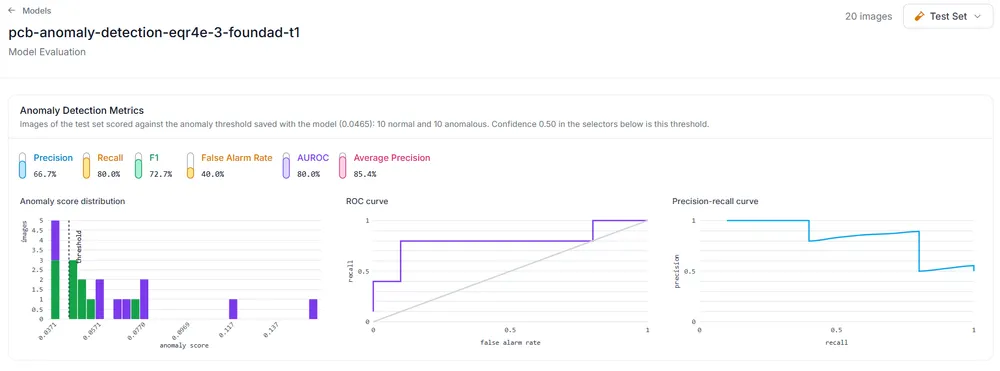
In our experiment, FoundAD achieved higher recall, detecting more defective PCBs. PatchCore had higher precision and fewer false alarms. In PCB inspection, missed defects can allow faulty boards to pass inspection, and false alarms can lead to unnecessary checks of normal boards.
Roboflow also reports F1 score and AUROC. F1 combines precision and recall, and AUROC measures how well a model separates normal and anomalous images across different thresholds. The AUROC results were close: 81% for PatchCore and 80% for FoundAD.
The summary metrics use each model's saved anomaly threshold, while the Performance by Class charts show results at the selected confidence settings.
The Performance by Class charts show results at 51% confidence for PatchCore and 60% for FoundAD. At these settings, PatchCore correctly classified all ten normal PCBs, while FoundAD incorrectly flagged one normal board.
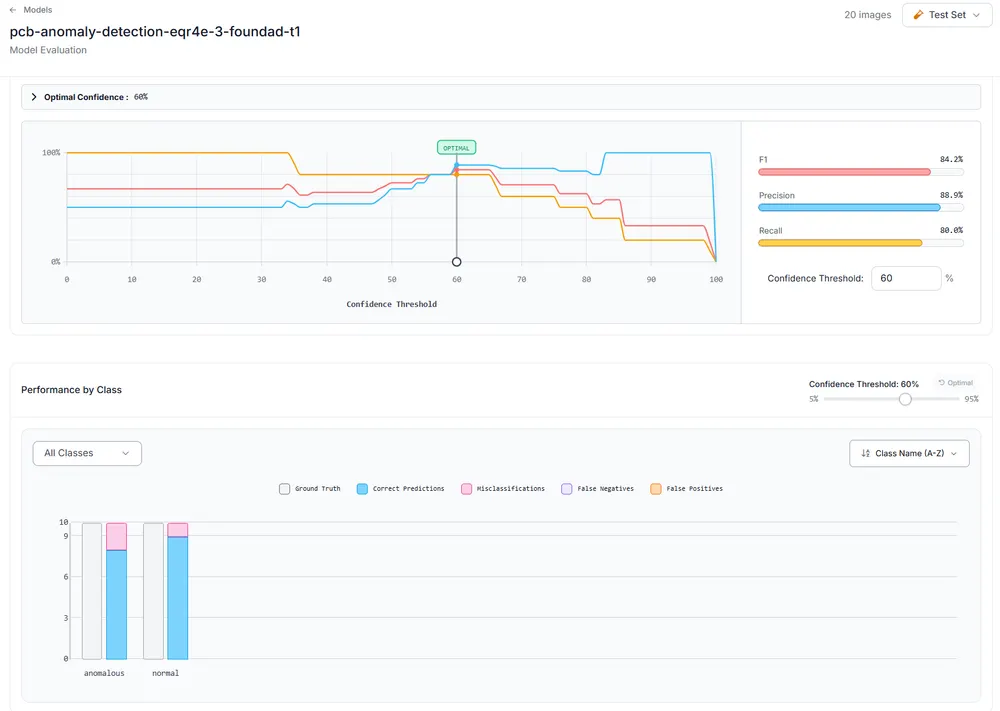
With only 20 test images, these results provide an initial comparison. Testing more PCBs with a wider range of defects and imaging conditions would give a clearer picture of how reliably the models perform in production.
When Should You Choose PatchCore or FoundAD?
Based on our results, PatchCore is a good starting point for further testing if reducing false alarms is the priority. FoundAD is worth considering when detecting more defects matters most.
Deploy Your Anomaly Detection Model with Roboflow Workflows
Roboflow Workflows lets you connect your trained anomaly detection model with other processing steps. You can use PatchCore or FoundAD in a Workflow to automatically flag PCB images with anomalous predictions for review.
For example, add a notification step to send an email when a board is flagged, or use a webhook to pass the result to an inspection system. Once configured, the Workflow can run through Roboflow Inference in the cloud.
Get Started with PatchCore in Roboflow
In this tutorial, we prepared a PCB dataset in Roboflow and trained PatchCore and FoundAD using normal images, then used Model Evaluation to review each model's test-set metrics.
The next step is to test the models with images collected during regular PCB inspections. Have an inspector check the predictions and record any normal boards incorrectly flagged as anomalous, along with defective boards the models missed. Use these examples to improve the dataset and evaluate updated models on a separate test set.
Further Reading: