How to Draw Segmentation Masks with Python
 James GallagherPublished Sep 3, 2024
Image segmentation models like SAM 2 and YOLOv8 Segmentation return masks. These masks can be processed in various ways according to your project: you can filter masks by area, trigger logic based on the presence or absence of predictions, and more.
Before you build applications with vision models, it is helpful to visualize model predictions. This will help you develop a better understanding of how your model is behaving.
Using the Roboflow supervision (opens in a new tab) Python package, you can draw segmentation masks returned by a variety of computer vision models onto images. In this guide, we will show how to draw segmentation masks with supervision.
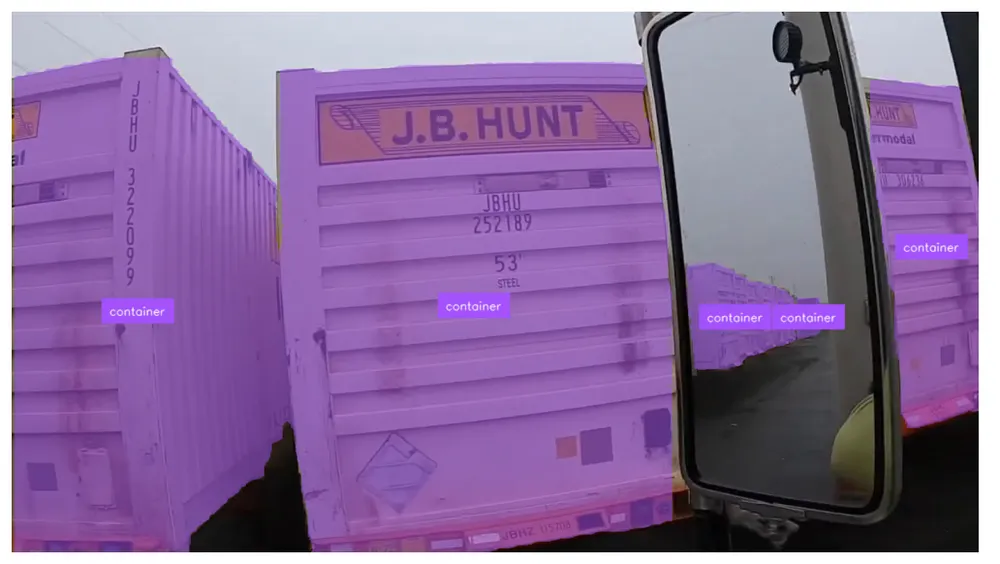
Here is an example of our annotator in use:
Without further ado, let’s get started!
How to Draw Segmentation Masks with Python
To draw segmentation masks, we are going to use the supervision Python package. Supervision comes with a suite of annotators (opens in a new tab) that allow you to plot predictions from various model types, from object detection to segmentation.
To get started, first install supervision (opens in a new tab):
pip install supervisionStep #1: Load Data
To draw segmentation masks, we need to load our data into a supervision (opens in a new tab) Detections object. This object stores computer vision model predictions in a standard format that works with all supervision (opens in a new tab) APIs, including detection visualizations, detection filtering, and metrics.
For this guide, let’s load data from a model trained on Roboflow and deployed with Roboflow Inference (opens in a new tab), an open source inference server.
We can load model predictions using the following code:
import cv2
import supervision as sv
from inference import get_model

model = get_model(model_id="yolov8n-640")
image = cv2.imread(<SOURCE_IMAGE_PATH>)
results = model.infer(image)[0]
detections = sv.Detections.from_inference(results)
There are several data loaders available for popular computer vision Python packages, including:
- from_deepsparse (opens in a new tab) (Deepsparse (opens in a new tab))
- from_detectron2 (opens in a new tab) (Detectron2 (opens in a new tab))
- from_mmdetection (opens in a new tab) (MMDetection (opens in a new tab))
- from_sam (opens in a new tab) (Segment Anything Model (opens in a new tab))
For a complete list of data loaders, see the supervision Detections documentation (opens in a new tab).
Step #2: Choose an Annotator
Now that we have loaded predictions from our model into a supervision (opens in a new tab) object, we can use those detections with the supervision (opens in a new tab) Annotators API to visualize model results.
There are several annotators available with support for segmentation masks. To plot segmentation masks, we can use the MaskAnnotator. If you want to plot all regions outside of a segmentation mask (ideal for removing backgrounds in images), you can use the BackgroundColorAnnotator.
For a full list of supported annotators in supervision for all computer vision model types, see the supervision Annotators documentation (opens in a new tab).
Let’s use the MaskAnnotator.
Step #3: Draw Predictions
We can annotate our detections like so:
mask_annotator = sv.MaskAnnotator()
label_annotator = sv.LabelAnnotator(text_position=sv.Position.CENTER_OF_MASS)

annotated_image = mask_annotator.annotate(
	scene=image, detections=detections)
annotated_image = label_annotator.annotate(
	scene=annotated_image, detections=detections)

sv.plot_image(annotated_image)
When our model is run on an image, here are the results:
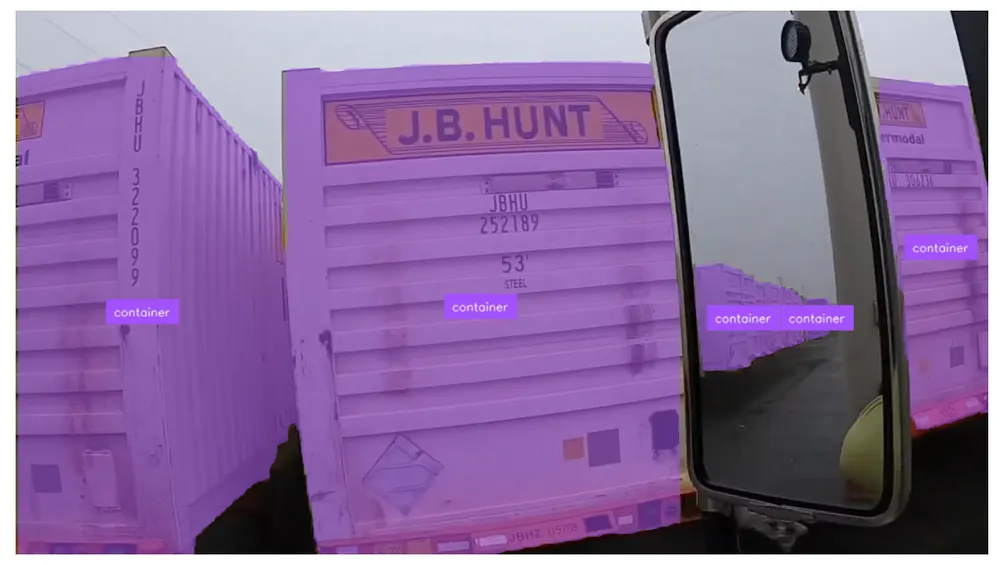
Our system has successfully plotted tight segmentation masks around detections.
Conclusion
Using the supervision Python package, you can draw segmentation masks from a range of popular computer vision models, from Segment Anything to YOLOv7 Segmentation to YOLOv8 (opens in a new tab) Segmentation.
In this guide, we installed supervision, loaded detections from a model hosted on Roboflow and deployed with Roboflow Inference (opens in a new tab), then visualized detections from the model on an image with the MaskAnnotator.
To learn more about the suite of functionalities available in supervision, from annotators to metrics to detections processing and filtering, refer to the supervision documentation (opens in a new tab).
A note on licensing: YOLOv8 is released under AGPL-3.0, which affects commercial use:
- On Roboflow cloud: a commercial license is included for every user, including the free plan.
- Self-hosted: you need an Enterprise license add-on, or you must open-source your application under AGPL-3.0.
- Permissive alternative: RF-DETR (opens in a new tab) is Apache 2.0, free for commercial use anywhere.