Best LLMs for OCR
 Dikshant ShahPublished Oct 1, 2026
LLMs such as Claude Fable 5 and Kimi K3 can go beyond text transcription to understand documents, answer questions, and return structured outputs. With Roboflow Playground, you can compare LLMs on your production images by accuracy, cost, and latency to find the best fit for your OCR use case.
Optical character recognition (OCR) has traditionally relied on specialized computer vision models designed to detect and recognize text in images. Today, general-purpose multimodal large language models (LLMs) can also extract and interpret text from images, screenshots, scanned documents, and PDFs.
Beyond text extraction, these models can interpret document content, preserve aspects of its structure, answer questions, summarize information, and return results in structured formats. This makes them particularly useful for workflows where OCR is just the first step in a larger process.
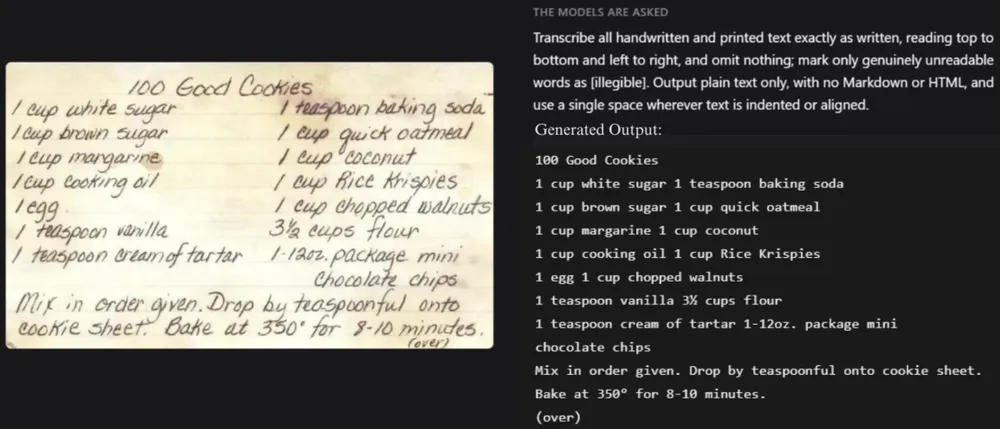
In this guide, we will evaluate leading closed and open-weight LLMs for OCR, comparing their accuracy, cost, and inference speed. We will also show you how to test these models on your own images using Roboflow Playground (opens in a new tab) and integrate LLM-based OCR into computer vision pipelines with Roboflow Workflows and Roboflow Agent.
LLMs vs. Dedicated OCR Models
There are two broad approaches to using AI for OCR: dedicated OCR models and general-purpose LLMs. The right choice depends on your requirements for accuracy, speed, cost, and the level of understanding your application needs.
Dedicated OCR Models
Dedicated OCR models are optimized for text extraction and document processing. Depending on the model, they can handle text detection and recognition, document layout analysis, table extraction, formula recognition, and reading-order detection.
Examples include PaddleOCR, PP-OCR, (opens in a new tab) GLM-OCR, (opens in a new tab) and other specialized models. For a detailed comparison, see our guide to the best dedicated OCR models.
Strengths
- Speed and cost: Many dedicated OCR models are relatively small and can process large volumes of documents efficiently, even on modest hardware or CPUs.
- Structured output: They can return text alongside bounding boxes and, depending on the model, confidence scores, making it easier to validate results and integrate them into downstream pipelines.
- Reliable transcription: They are designed to recognize text rather than generate responses, reducing the risk of introducing information that is not present in the source. Recognition errors can still occur, particularly with low-quality images.
- Local deployment: Many can run on your own infrastructure or edge devices, making them suitable for sensitive documents and offline applications.
- Specialized capabilities: Certain models excel at tasks such as table reconstruction, handwriting recognition, mathematical formula extraction, and multilingual text recognition.
Limitations
- Limited reasoning: Most dedicated OCR models focus on extracting text rather than interpreting its meaning, answering questions, or identifying the most relevant information.
- Multi-stage processing: Complex document workflows may require separate components for text detection, recognition, layout analysis, and post-processing.
- Challenges with complex inputs: Unusual layouts, noisy scans, and documents containing a mix of charts, diagrams, and text may require additional processing, specialized models, or fine-tuning.
When to use a dedicated OCR model
- You need to process large volumes of documents while keeping costs and latency low.
- Accurate, verbatim transcription is a priority, particularly for contracts, financial records, and medical forms.
- You need text coordinates, bounding boxes, or confidence scores for validation and downstream processing.
- Documents must be processed locally to meet privacy, security, or offline deployment requirements.
General-Purpose LLMs
General-purpose LLMs can extract and interpret text from images, screenshots, scanned documents, and PDFs. Unlike dedicated OCR models, they can also use visual context and language reasoning to understand the extracted information, answer questions, summarize documents, and return specific fields in structured formats.
This category includes closed-source models such as OpenAI's GPT models, Anthropic's Claude, and Google's Gemini, as well as open-weight models such as Qwen and Kimi. Their OCR capabilities vary by image source, so performance should be evaluated on your specific images and tasks.
Strengths
- Understanding beyond transcription: They can summarize documents, classify content, answer questions, and extract specific information, such as an invoice's total amount and due date, in a single workflow.
- Flexible output: With appropriate prompting, they can return results as JSON, Markdown, or a custom schema, potentially reducing the need for separate post-processing steps.
- Contextual interpretation: They can interpret charts, diagrams, annotations, and mixed text-and-image content. Context can also help them resolve ambiguous text, although it can sometimes lead to incorrect assumptions.
- Adaptability: A prompt can often replace some of the rules and custom logic required by traditional document-processing pipelines, making it easier to handle different document formats.
Limitations
- Higher cost and latency: Multimodal LLMs can be more expensive and slower per page than dedicated OCR models, particularly when processing large documents or high-resolution images.
- Hallucination risk: They may misread text, correct unusual wording, or generate plausible but incorrect values. This is especially important for numbers, identification codes, and legal documents.
- Less precise localization: Exact text coordinates, character-level confidence scores, and reliable bounding boxes may be unavailable or less precise, depending on the model.
- Output variability: Results can vary across runs, making validation important for applications that require consistent, reproducible output.
- Data privacy: Using a hosted API involves sending document data to a third-party provider, subject to its data-handling policies. Open-weight models can instead be self-hosted, provided the required hardware and infrastructure are available.
When to use a general-purpose LLM
- You need to understand document content rather than simply transcribe it.
- You want to extract specific fields from documents with varying layouts without building a separate template for each format.
- You need to combine text extraction with tasks such as summarization, classification, document comparison, or question answering.
- Your document volume and latency requirements allow for the additional cost of LLM-based processing.
Dedicated OCR vs. General-Purpose LLMs
| Dedicated OCR Models | General-Purpose LLMs | |
|---|---|---|
| Primary strength | Fast, accurate text extraction | Document understanding and reasoning |
| Cost at scale | Lower | Higher |
| Speed | Fast | Generally slower |
| Hallucination risk | Lower | Higher, requiring validation |
| Text localization | Bounding boxes and coordinates typically available | Often limited or unavailable |
| Confidence scores | Commonly available | Often unavailable |
| Output flexibility | Structured, model-specific formats | Flexible, prompt-defined formats such as JSON or Markdown |
| Setup | May require multiple processing stages | Often requires primarily prompt design |
| Complex documents | Strong with supported document structures | Flexible across varied and unstructured documents |
| Best for | High-volume transcription and document processing | Information extraction, Q&A, summarization, and document reasoning |
Best Closed Frontier LLM Models for OCR
Closed frontier models are proprietary, general-purpose multimodal models developed by leading AI companies. They are typically accessed through APIs rather than self-hosted and can perform a wide range of tasks, including image understanding, OCR, reasoning, and document analysis.
The models below were selected based on their performance on Roboflow Playground’s Vision Evals OCR benchmark (opens in a new tab) as of October 2026. We focus on models that combine strong OCR accuracy with practical costs and inference speeds. All of the models below are available as workflow blocks in Roboflow Workflows.
1. Claude Fable 5
Claude Fable 5 is Anthropic's most capable publicly available model and is designed for complex reasoning and multi-step tasks.
Anthropic reports improvements in reading dense charts, financial filings, and tables embedded in PDFs compared with previous models. This makes Fable 5 well suited to document-heavy workflows that require more than simple text recognition.
On Roboflow Vision Evals, OCR is its strongest task. It scores 94% on the OCR benchmark, ranking #1 among 88 models at low reasoning effort.
The main tradeoffs are cost and latency. Fable 5 averages $0.039 per OCR sample, the highest cost among the models compared here at low effort, and takes approximately 10.87 seconds per sample. It is therefore best suited to accuracy-first document workflows where the additional cost and latency are acceptable.
2. Muse Spark 1.2
Muse Spark 1.2 (opens in a new tab) is a reasoning model from Meta Superintelligence Labs and a coding-focused update to Muse Spark 1.1.
On Roboflow Vision Evals, OCR is its strongest task, with a score of 93.6% at low reasoning effort. This places it just 0.4 percentage points behind Claude Fable 5 while offering a substantially lower cost and faster inference.
Muse Spark 1.2 averages approximately $0.0079 per OCR sample and takes about 7.37 seconds per inference. That makes it roughly one-fifth the cost of Fable 5 while remaining within 0.4 percentage points of its OCR accuracy.
Muse Spark 1.3 is newer, but it performs worse on this benchmark. It scores 91.3% on OCR and takes approximately 32.47 seconds per inference, nearly 4.4 times as long as Muse Spark 1.2.
For OCR, Muse Spark 1.2 offers one of the strongest combinations of accuracy and cost. It is particularly well suited to high-volume OCR and document extraction workflows.
3. Grok 4.7
Grok 4.7 (opens in a new tab) is a multimodal model from SpaceXAI and the flagship model in the Grok family. It offers four reasoning levels: low, medium, high, and xhigh.
OCR is its strongest task on Roboflow Vision Evals. At low reasoning effort, it scores 92.6%, while increasing the effort to high raises the score to 93.5%. The additional reasoning therefore provides less than a one-percentage-point improvement.
At low effort, Grok 4.7 costs about $0.018 per OCR sample, and takes roughly 30.02 seconds per inference. While At high effort costs about $0.042 and takes around 80.11 seconds per inference. By comparison, Muse Spark 1.2 achieves higher OCR accuracy at roughly half the cost (compared to low effort) and around one-third the inference time.
Grok 4.7 is a reasonable option for workflows already built around the Grok API. For OCR specifically, however, Muse Spark 1.2 offers a better balance of accuracy, cost, and speed.
4. Qwen3.8 Max
Qwen3.8 Max is Alibaba’s flagship multimodal model in the Qwen family, positioned above the smaller Qwen3.8-27B model.
On Roboflow Vision Evals, OCR is its strongest task. At low reasoning effort, it achieves a 93.4% OCR score. That puts it within 0.2 percentage points of Muse Spark 1.2 and 0.6 percentage points of Claude Fable 5.
Qwen3.8 Max also outperforms the smaller open-weight Qwen3.8-27B, which scores 92.2% on OCR. The improvement is modest, with Qwen3.8 Max achieving a slightly higher score on this benchmark.
The model costs approximately $0.0056 per OCR sample, slightly less than Muse Spark 1.2 at $0.0079 and substantially less than Fable 5 at $0.039. Its main drawback is speed, with an average inference time of 13.96 seconds per OCR sample, nearly twice that of Muse Spark 1.2.
Qwen3.8 Max is a strong option when OCR accuracy and API cost matter more than latency.
5. Gemini 3.1 Pro
Gemini 3.1 Pro (opens in a new tab) is Google's multimodal model, capable of processing text, images, audio, video, and documents. Unlike some of the newer models on this list, it is a more mature and widely deployed option.
On Roboflow’s Vision Evals, Gemini 3.1 Pro scores 92.6% on OCR at low reasoning effort. That puts it 1.4 percentage points behind Claude Fable 5 and 1.0 behind Muse Spark 1.2, while tying Grok 4.7 at low effort.
OCR is not its strongest result, but Gemini 3.1 Pro performs particularly well at data extraction, scoring 95.9% and ranking 4th overall. Gemini models also dominate the top 10 in this category. This makes Gemini 3.1 Pro especially useful for OCR workflows that need to extract structured fields from documents rather than simply transcribe text.
At around $0.0066 per OCR sample, with an average inference time of about 6 seconds, it is slightly cheaper than Muse Spark 1.2 and faster than both Muse Spark 1.2 and Qwen3.8 Max. It is also significantly cheaper than Fable 5.
Gemini 3.1 Pro is a strong choice for document pipelines that need both reliable transcription and structured data extraction while keeping cost and latency relatively low.
6. GPT-6.1 Sol
GPT-6.1 Sol (opens in a new tab) is OpenAI’s flagship multimodal model. On Roboflow Vision Evals, it achieves a 92.0% OCR score at low reasoning effort, placing it below Claude Fable 5, Muse Spark 1.2, Grok 4.7, Qwen3.8 Max, and Gemini 3.1 Pro on the OCR benchmark. It achieves this score at a cost of $0.0064 per sample, with an inference time of 10.84 seconds.
Increasing the reasoning effort does not improve its OCR performance. At high effort, it scores 91.7% while costing approximately $0.019 per sample and taking 24.22 seconds per inference. For this task, the higher reasoning setting is therefore more expensive, slightly less accurate, and slower.
Its data extraction score is also relatively low at 88.0%, compared with 95.9% for Gemini 3.1 Pro.
GPT-6.1 Sol is therefore most compelling for workflows already built around OpenAI’s API. For OCR alone, several other models in this comparison offer higher accuracy or a better balance of cost and inference speed.
Key Takeaways: Closed Frontier LLMs
Claude Fable 5 delivers the highest OCR accuracy in this comparison at 94.0%. Muse Spark 1.2 comes very close at 93.6% while costing substantially less and running faster, making it the strongest overall choice when accuracy, cost, and speed are considered together.
Qwen3.8 Max offers another strong combination of high accuracy and lower cost than Muse Spark 1.2, although it is slower. Gemini 3.1 Pro is particularly attractive for workflows that combine OCR with structured data extraction, where it achieves a 95.9% score.
Best Open-Weight LLM Models for OCR
Open-weight models make it possible to run LLMs on your own infrastructure rather than relying entirely on proprietary APIs. This can provide greater control over data, deployment, and costs, especially for organizations that need to keep documents on-premises.
The models below were selected based on their performance on Roboflow Playground's Vision Evals OCR benchmark as of October 2026. We focus on open-weight models that combine strong OCR accuracy with practical performance for self-hosted workflows.
1. Kimi K3
Kimi K3 (opens in a new tab) is a multimodal model from Moonshot AI with open weights, released under the Kimi K3 License. It is a mixture-of-experts model with 2.8 trillion parameters, of which 104 billion are active per token.
On Roboflow’s Vision Evals, OCR is its strongest task. It achieves a 93.0% OCR score at low reasoning effort, ranking #9 out of 88 models on the benchmark. This is the highest OCR score among the open models evaluated. It sits within one percentage point of Muse Spark 1.2 and Claude Fable 5, while outperforming every other closed model mentioned in this guide.
However, OCR is one of the few areas where Kimi K3 performs particularly well. Its data extraction score of 84.5% is well below Gemini 3.1 Pro’s 95.9%, indicating weaker performance on structured extraction tasks.
Kimi K3 is a strong choice when open weights and high OCR accuracy are the priorities, particularly for transcription-focused workloads. For pipelines that also require capabilities such as counting, reasoning, or structured data extraction, several of the closed models above offer stronger overall performance.
2. Qwen3.8 27B
Qwen3.8 27B (opens in a new tab) is a dense vision-language model with roughly 27.8 billion parameters from Alibaba’s Qwen team. It is the smaller sibling of the closed Qwen3.8 Max.
On Roboflow’s Vision Evals, OCR is its strongest task. It scores 92.2% on OCR at low reasoning effort, putting it about 1.2 percentage points behind Qwen3.8 Max and less than one point behind Kimi K3. It also edges out the closed GPT-6.1 Sol by 0.2 percentage points.
Increasing the reasoning effort does not improve its OCR performance. At high effort, its score drops to 91.5%, while inference becomes slower. Data extraction is also a weaker area, with a score of 78%.
Qwen3.8 27B is a strong all-around open model for teams that want high OCR accuracy while running the model on their own hardware.
3. Gemma 4 31B
Gemma 4 31B (opens in a new tab) is Google's open-weight multimodal model with approximately 31 billion parameters. The Gemma family provides publicly available model weights that developers can use, fine-tune, and deploy on their own infrastructure.
On Roboflow Vision Evals, Gemma 4 31B achieves a 90.8% OCR score at low reasoning effort. This is 1.4 percentage points below Qwen3.8 27B and approximately 3.2 points below Claude Fable 5.
Gemma 4 31B is a capable option for teams already working within Google's open-model ecosystem and looking for a self-hosted multimodal model. For OCR accuracy alone, however, Kimi K3 and Qwen3.8 27B perform better on this benchmark.
Key Takeaways: Open-Weight LLMs
Kimi K3 delivers the highest OCR accuracy among the open-weight models covered here, reaching 93.0%. However, its 2.8 trillion total parameters make it significantly more demanding to self-host. Qwen3.8 27B offers a more practical balance between model size and OCR performance, making it the stronger choice for many self-hosted deployments.
For open-weight OCR, the choice ultimately depends on the tradeoff between accuracy and infrastructure requirements. Kimi K3 is the accuracy leader, while Qwen3.8 27B offers a more accessible path to high-quality self-hosted OCR.
Compare LLMs for OCR with Roboflow Playground
All of the models covered above, along with many other open-weight and proprietary LLMs, are available in Roboflow Playground. (opens in a new tab) With Roboflow Playground, you can easily test, compare, and evaluate vision models without deploying them yourself or setting up separate API integrations for each model.
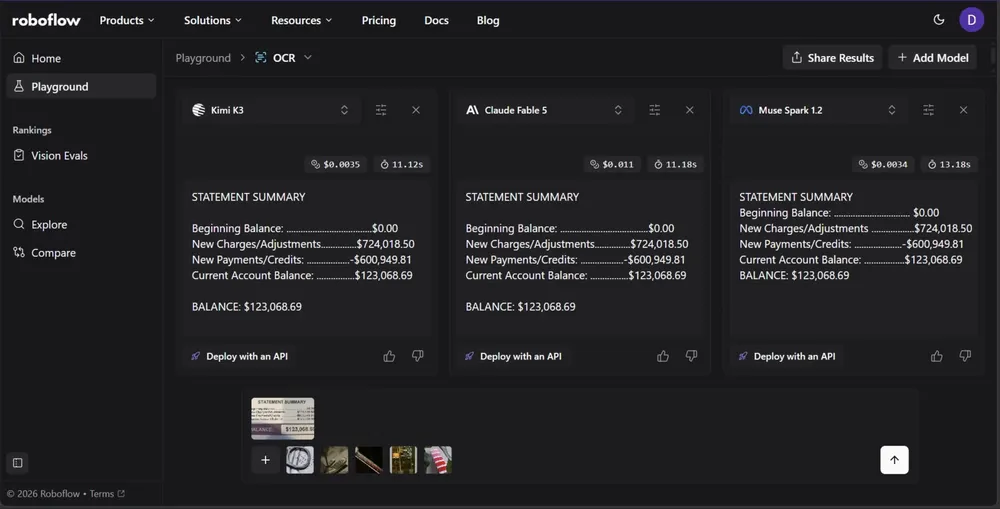
You can run the same image through multiple models and compare their OCR results side by side. Playground shows the generated transcription along with processing time and estimated cost, making it easier to evaluate models based on both accuracy and efficiency.
The API requests are made using Roboflow-managed API keys, so you do not need to provide your own keys. You can also test open-weight models without provisioning or managing your own GPU infrastructure.
Because OCR performance can vary significantly depending on the type of document or image, testing models on your own data can be more informative than relying solely on benchmark scores. A model that performs well on receipts, for example, may produce different results on handwritten text, embossed characters, low-quality scans, or other specialized inputs.
Testing your own images lets you identify which model performs best for your specific use case while also giving you a better understanding of its accuracy, speed, and cost in a real-world setting. Try comparing the models below on your own image in Roboflow Playground (opens in a new tab), as shown below.
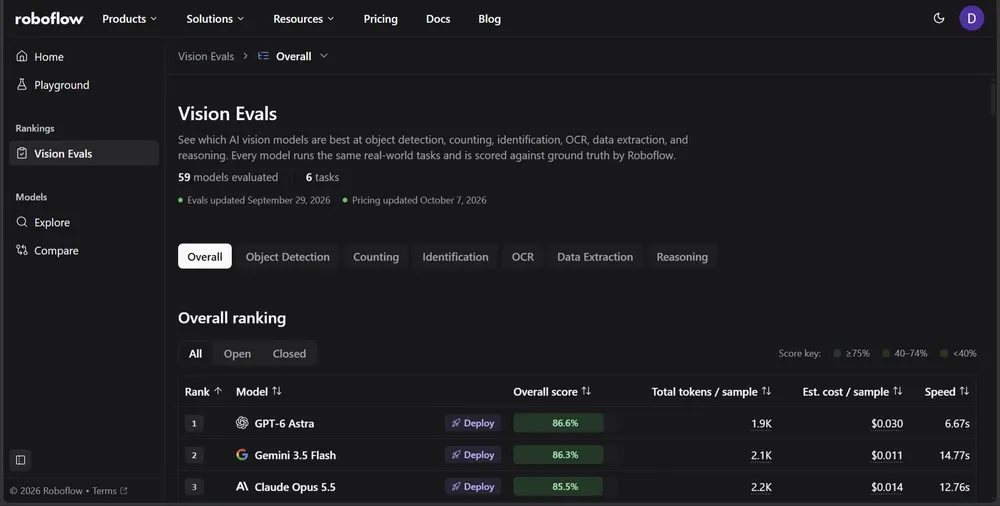
Roboflow Playground's Vision Evals also provides leaderboards for other computer vision tasks, including object detection and counting. This is useful when OCR is only one component of a larger vision pipeline.
For example, if your application needs to read text while also detecting or counting objects, you can use the evaluations to identify models that perform well across multiple tasks. This can help you determine whether a single multimodal model can handle your entire workflow instead of using separate models for each task.
Roboflow Playground also provides a scatter plot comparing OCR accuracy with estimated cost across different LLMs. This makes it easier to identify models that offer a good balance between accuracy and cost.
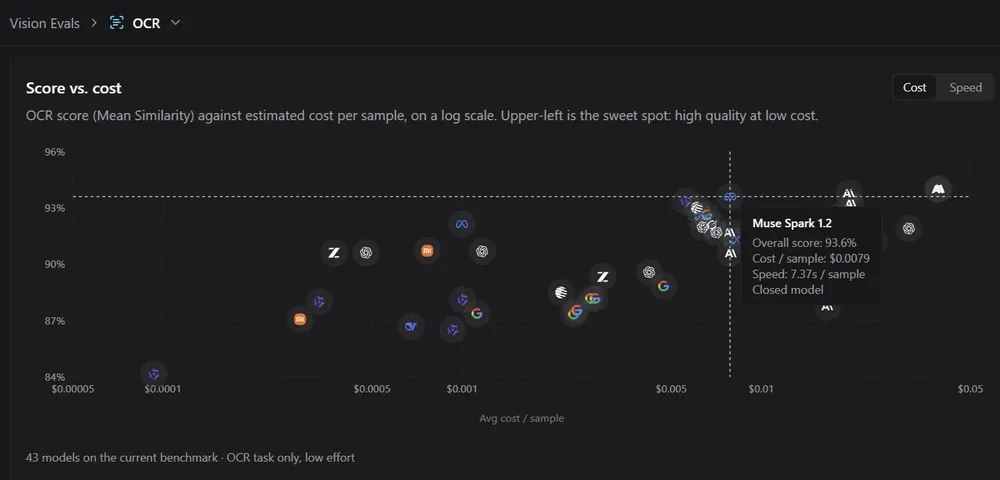
Roboflow Playground also provides a separate scatter plot that compares OCR accuracy with inference speed. This makes it easier to identify models that deliver strong OCR performance while minimizing inference latency.
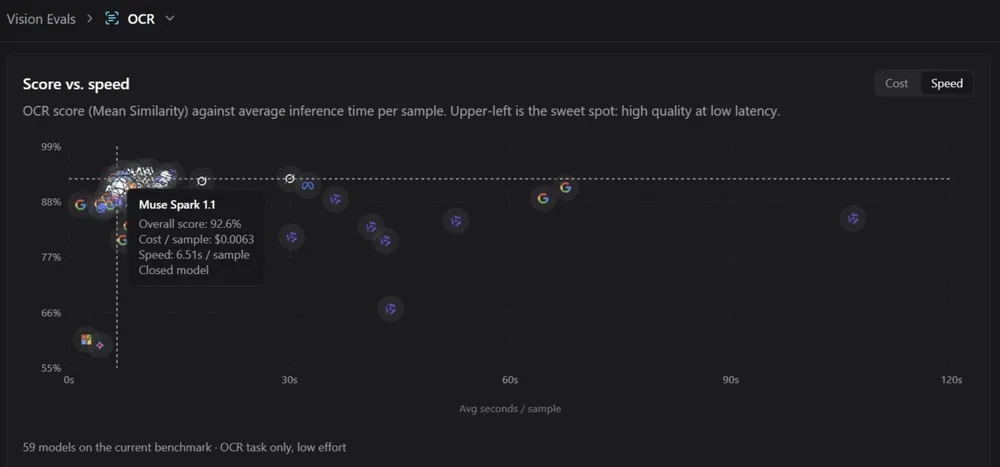
The plots can contain many models, making them difficult to read at a glance. However, in Roboflow Playground, you can hover over individual points to see the model name, OCR score, and other relevant details.
Integrate LLMs for OCR into Computer Vision Workflows with Roboflow Agent
Roboflow Workflows is a visual, low-code platform for building computer vision applications by connecting vision models, LLMs, image processing operations, and custom logic through a drag-and-drop interface.
Instead of deploying open-weight models individually or managing separate API integrations and keys for each model, you can assemble the components of your computer vision pipeline using ready-made Workflow blocks and deploy the complete workflow as a single application, without having to do all that yourself.
The LLMs covered earlier are also available as Workflow blocks, allowing you to add LLM-based OCR directly to your workflow without writing API calls or deploying each model separately.
You can also use Roboflow Agent, available in your workspace after you log in to Roboflow, to build workflows using natural language.
Roboflow Agent provides a conversational interface for Roboflow tools, including Workflows. Instead of manually adding and connecting blocks, you can describe the workflow you want to build, and Agent generates it for you. You can then review the generated workflow, modify individual components, and customize the processing logic in the Workflow Editor.
For example, you can ask Roboflow Agent to create a workflow that uses Muse Spark 1.2 to extract text from an input image:
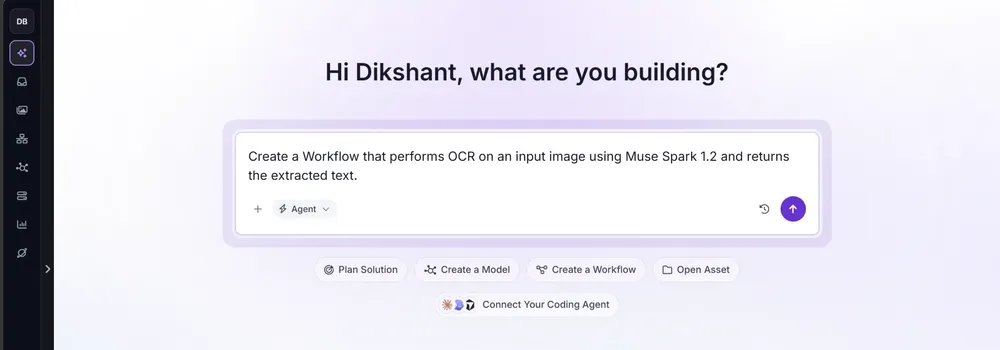
Roboflow Agent automatically generates the workflow and connects the components required to process the image and extract its text. You can then review the generated workflow, modify its components, and adjust the processing logic for your specific use case. The Workflow Editor also lets you test the workflow by dragging and dropping images into the interface.
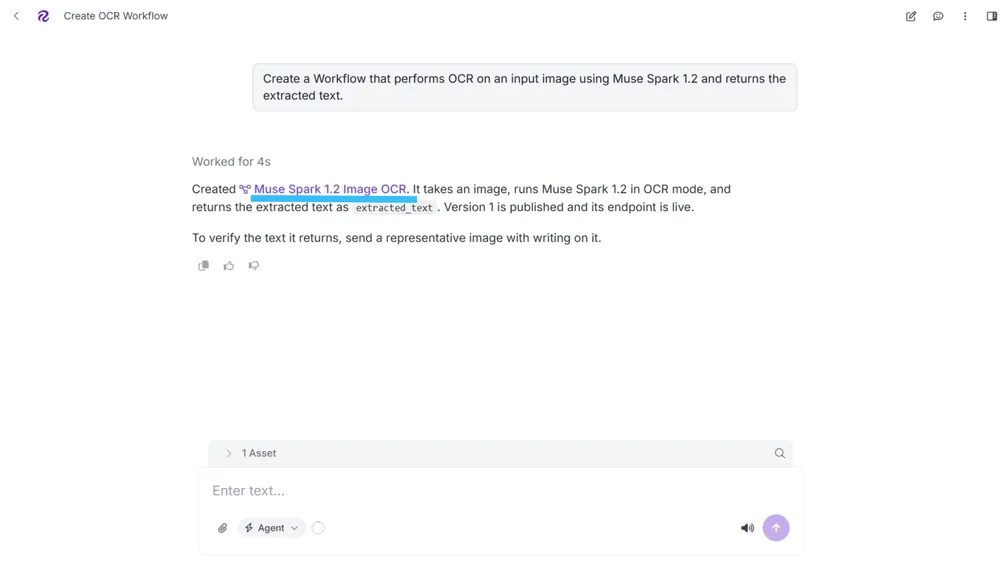
You can access and test the generated workflow through a UI by opening it in the Workflow Editor, as shown below. Try the workflow.
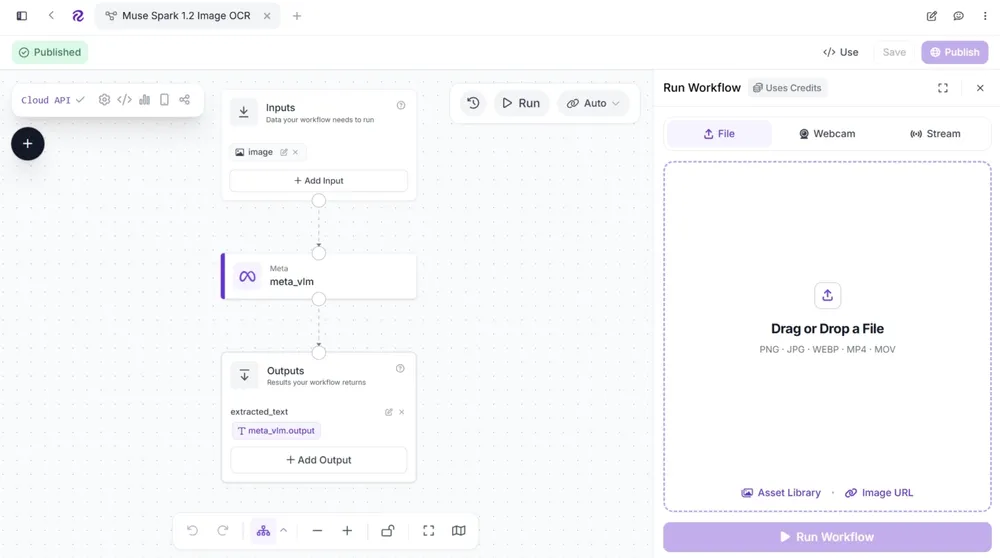
Roboflow Agent can also add other computer vision operations to the same workflow. For example, you can describe additional detection, classification, image processing, or post-processing steps in natural language, and Agent can add the corresponding Workflow blocks.
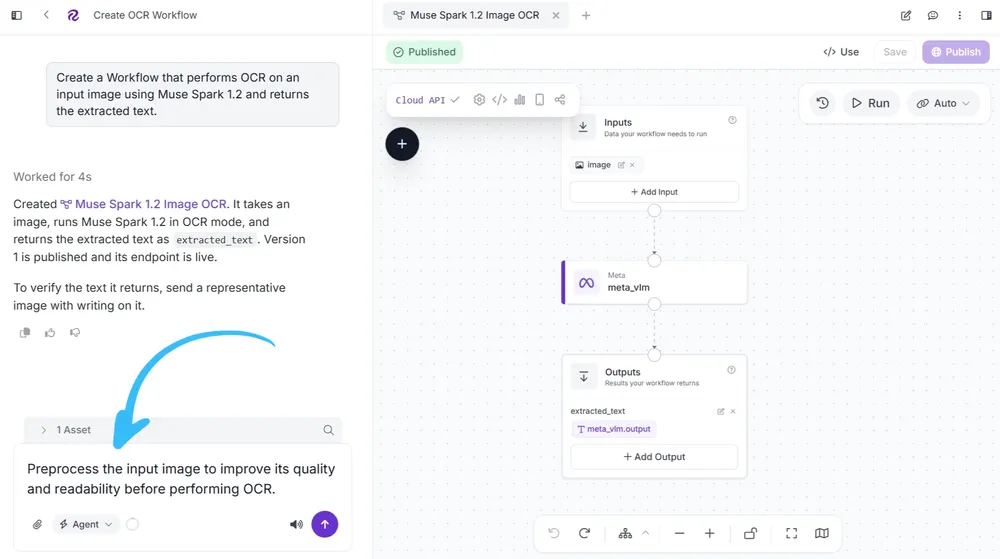
Similarly, you can use any of the LLMs discussed earlier as an OCR component in your workflow. Roboflow also provides image-processing blocks such as Contrast Equalization, (opens in a new tab) Image Convert Grayscale, (opens in a new tab) Image Threshold, (opens in a new tab) and Perspective Correction. (opens in a new tab) These blocks can be placed before the LLM to preprocess the input image and, depending on the document or image, potentially improve OCR results.
This makes it possible to build an end-to-end OCR pipeline that combines image preprocessing, LLM-based text extraction, and additional computer vision operations within a single workflow using Roboflow Workflows.
Deploy LLM Workflows with Roboflow Deploy
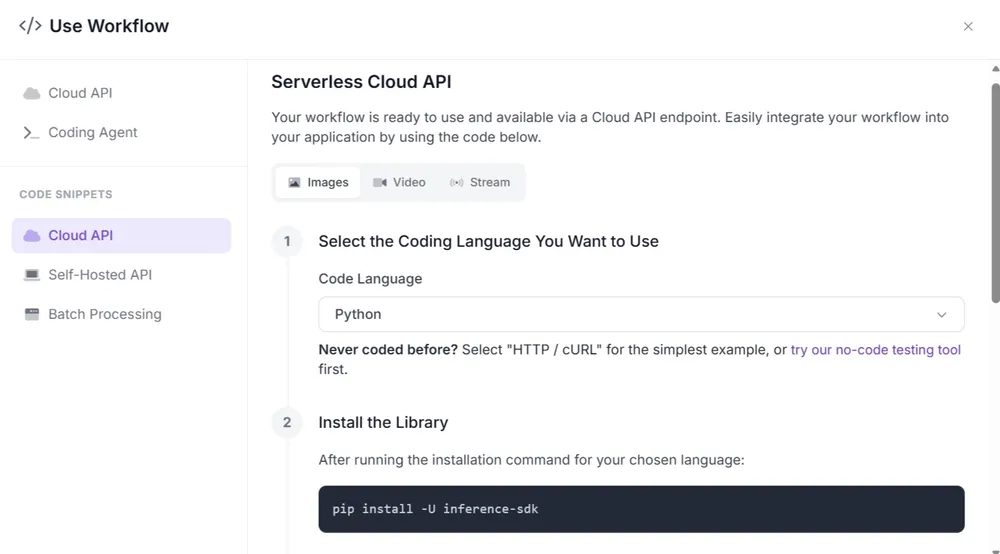
Once you have finished building your workflow, publish it to make it live and available through the API. After publishing, click </> Use in the Workflows Editor to open the deployment panel. From there, you can choose how you want to deploy your workflow in production.
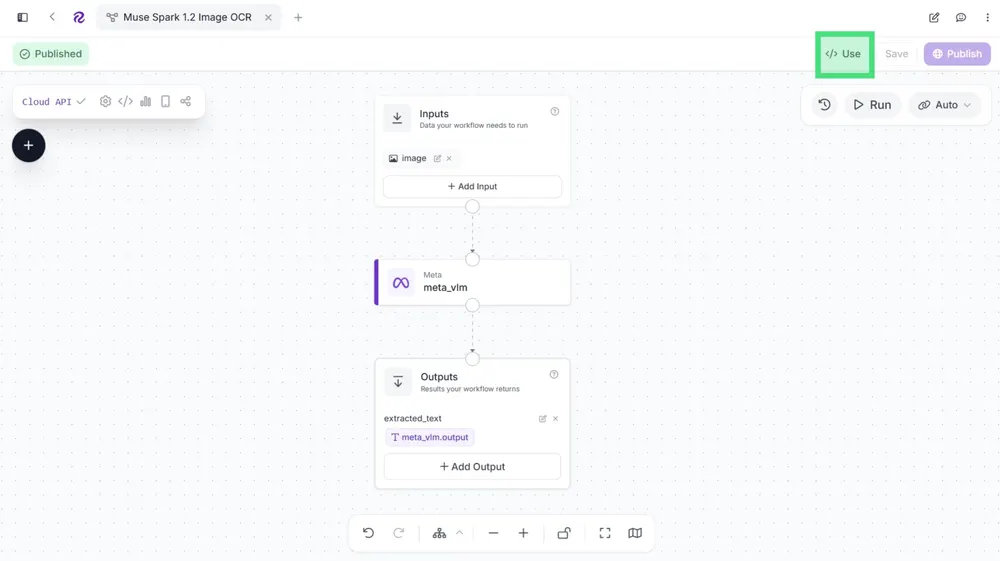
Roboflow Deploy automatically generates production-ready code snippets that you can copy into your application. These snippets can also be used with AI coding assistants such as Codex, Claude, Cursor, and ChatGPT to help integrate your workflow into an existing application.
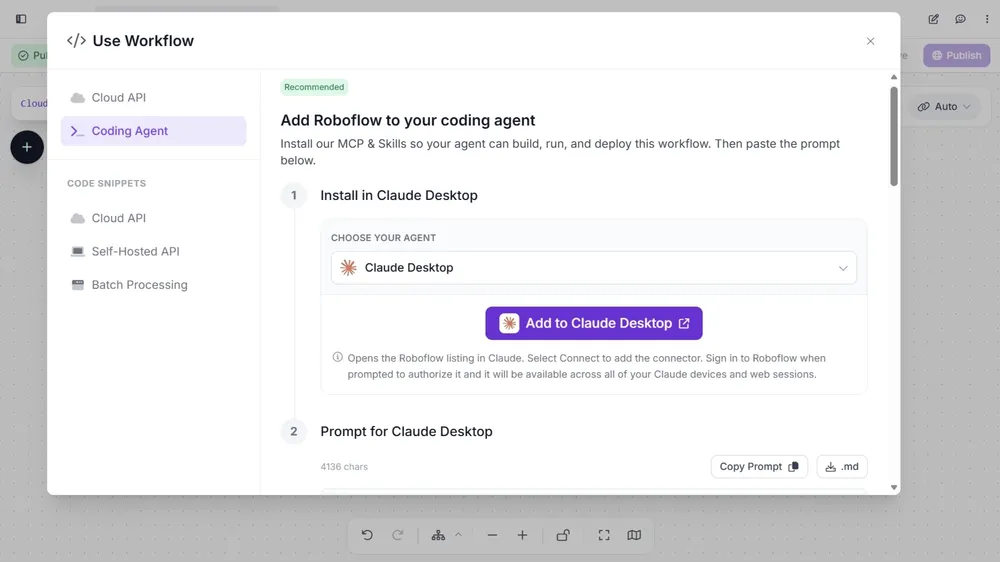
Roboflow Deploy supports cloud-based deployment through the Serverless Cloud API, where your workflow runs on Roboflow's infrastructure and you are charged credits based on inference usage.
With the Serverless Cloud API, supported open-weight LLMs can run on Roboflow's infrastructure as part of your workflow. This means you do not need to provision or manage a dedicated GPU just to run the LLM component.
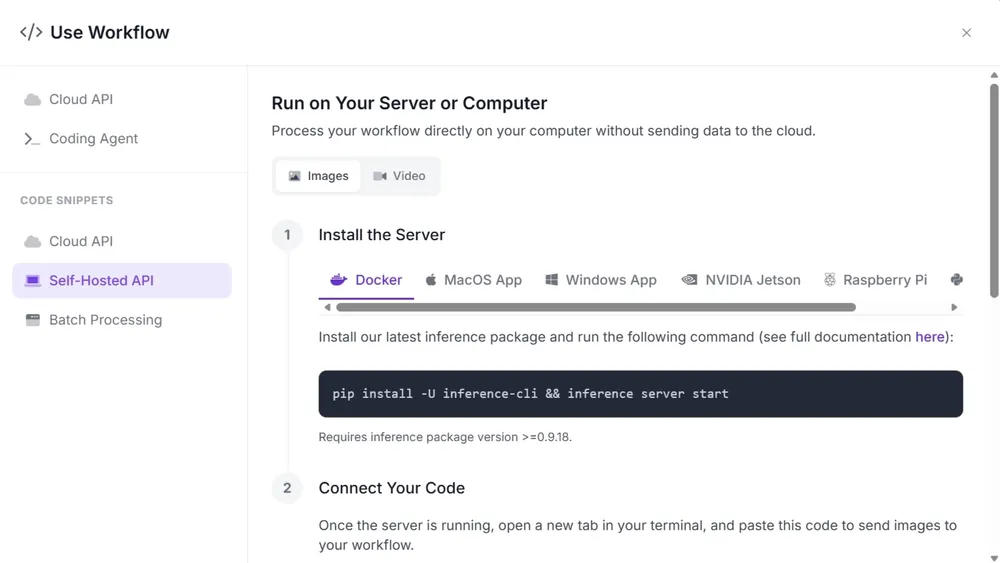
You can also deploy your workflow locally and run it on your own hardware, including devices such as NVIDIA Jetson and Raspberry Pi. This can be useful when you need to process data locally or run your application in environments with limited or no internet connectivity.
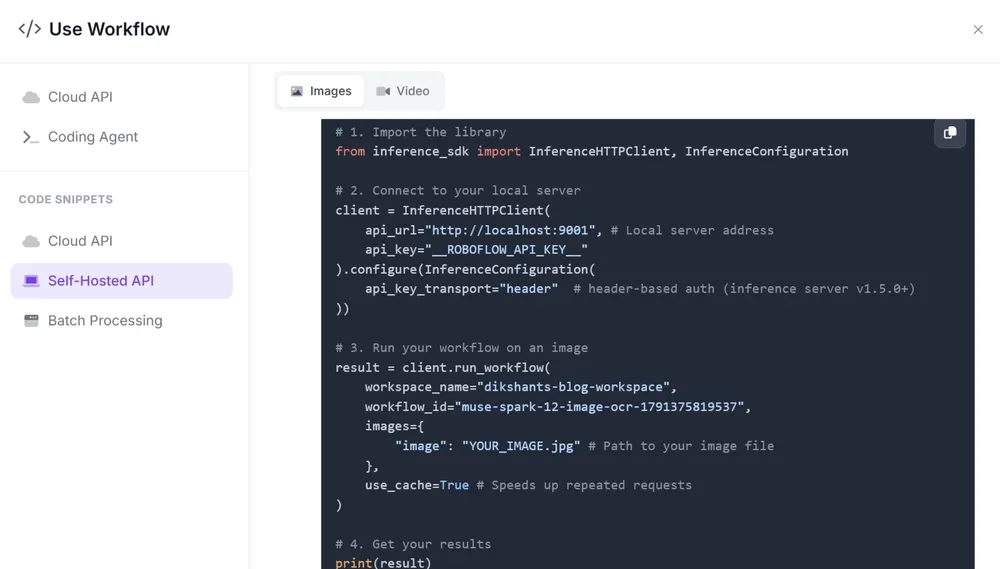
The Deployment panel also provides ready-to-use code for running your workflow with different input sources, including images, video files, live webcam streams, and RTSP camera streams.
Conclusion
LLMs have made OCR more flexible than dedicated OCR models. When choosing an LLM, benchmark results provide a useful starting point, but testing models on your own images can reveal differences in accuracy, speed, and cost that may not be reflected in general benchmarks. Roboflow Playground makes this comparison easier by allowing you to test multiple vision models on the same images and compare their results. Start building your own OCR pipeline with Roboflow today.