Build with RF-DETR
Build a Weld Defect Detection App Free with RF-DETR
Catch porosity, spatter, undercut, and underfill on every weld and get a pass or fail result. Label images, train RF-DETR free, and deploy it as a workflow.
- No credit card
- No ML team required
- Edge, on-prem or API
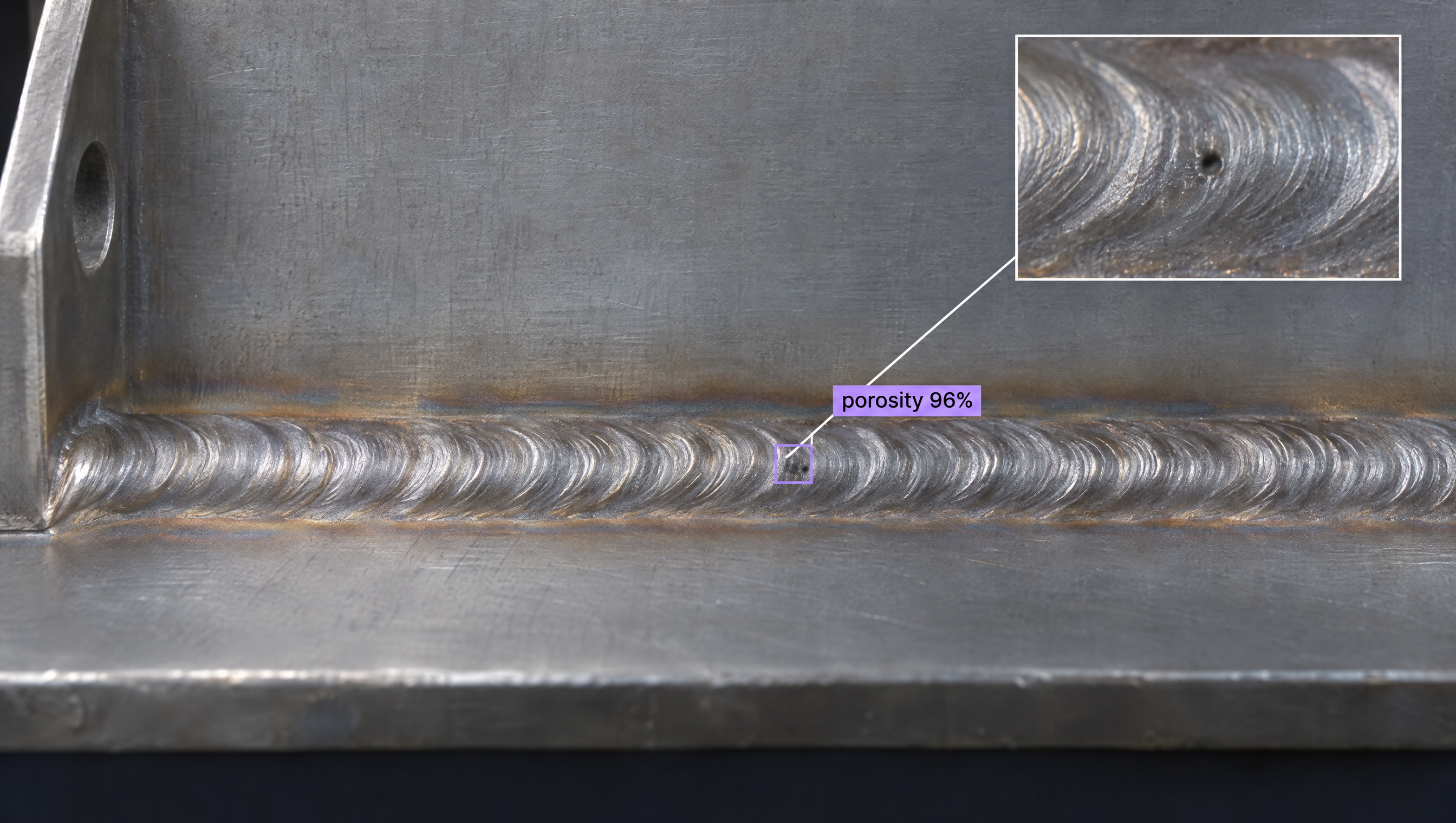
Build a Weld Defect Detection App with Roboflow’s Free RF-DETR
In short
A weld defect detection app uses computer vision to inspect each weld bead and find flaws like porosity, spatter, undercut, underfill, and excess reinforcement, then decides whether the weld passes. The model to train for it is RF-DETR, Roboflow's open-source real-time detection model. With Roboflow you label your weld images, train RF-DETR for free, and deploy it as a workflow that returns an annotated image, a defect count, and a PASS or FAIL result.
How it works
The workflow behind the weld defect detection app
Use this Weld Defect Detection with RF-DETR workflow: each image goes to an RF-DETR model that labels the weld as normal or finds porosity, spatter, undercut, underfill, or excess reinforcement, then through a per-class confidence filter and into two tracks. One counts the defects and turns the count into PASS or FAIL, the other draws boxes and labels, and both meet where the verdict is written onto the image. Every block is editable in the low-code builder, and the Roboflow Agent can build it from a description.
- output_image
- inspection_result
- defect_count
- predictions
How to build a weld defect detection app with RF-DETR
Open the workflow and add your weld images
Click "Use this free template" to copy the workflow into your Roboflow workspace. Upload images of your welds taken with the cameras and lighting at your weld cells, including both good welds and each defect type.
Label weld defects and train RF-DETR
Use Auto Label to box porosity, spatter, undercut, and underfill, then review and correct the results. Train an RF-DETR model and select it in the detect_weld_defects block. RF-DETR fine-tunes well on small custom datasets, so you can start with the examples you have.
Tune the thresholds and the pass/fail rule
Set the per-defect thresholds in filter_by_confidence. Change count_defects or pass_fail_result if, for example, light spatter should be flagged for rework instead of failing the part.
Deploy and connect it to your weld cell
Deploy the workflow as a Serverless Cloud API, or on your own hardware through Inference. Each run returns output_image, inspection_result, defect_count, and predictions for your quality system or rework station to act on.
Roboflow MCP
Build it from your AI assistant with the Roboflow MCP
Connect the Roboflow MCP Server to Claude, Cursor, or any MCP-compatible assistant and build the whole weld defect detection app in natural language, without leaving your editor.
Ask an assistant like Codex or ChatGPT to search Roboflow Universe for weld defect datasets, upload and auto-label your weld images, and train an RF-DETR model on porosity, spatter, undercut, and underfill classes. It can then create and run the weld defect detection workflow on test images and deploy it to your devices.
Paste it into your coding agent and it walks you through the rest. Setting up by hand? The server is https://mcp.roboflow.com/mcp.
Open the Roboflow listing, select Connect, then sign in to Roboflow. Available on desktop, web and mobile.
Run these commands in your terminal, then sign in to Roboflow. Claude Code CLI has no documented browser install link.
Opens the Roboflow plugin listing. Sign in if prompted and confirm the install on Cursor to add MCP and skills.
Opens the Roboflow plugin listing. Install the plugin and sign in to Roboflow when prompted to connect your account.
Opens the Roboflow plugin listing shared by ChatGPT and Codex. Install the plugin and sign in to Roboflow when prompted to connect your account.
Then run /mcp auth roboflow in Gemini CLI to sign in. Gemini CLI has no documented browser install link.
What your weld defect detection app can do
Trained on your weld images, an RF-DETR model handles the specific, hard-to-catch cases that matter at your weld cell:
- Spot small porosity pinholes along the weld bead
- Tell spatter apart from the weld itself and nearby surface marks
- Find undercut and underfill along the weld toe
- Flag excess reinforcement on welds that are built up too high
- Keep inspecting through glare and color changes on fresh welds
- Check every weld instead of a sample
Want to customize your weld defect detection app?
Describe the weld defect detection app you want in plain English: the weld type, the defects you need to catch, and what counts as a fail. The Roboflow Agent finds the data, trains an RF-DETR model, and assembles the workflow for you.
Open source
Roboflow’s RF-DETR is open source, Apache-2.0, and free to use
RF-DETR is an open-source, Apache-2.0 licensed real-time object detection model developed by Roboflow. The rfdetr Python package and most RF-DETR models are free to use, including in commercial products, and you can train and run everything on your own hardware. No account or lock-in required.
Apache-2.0 and free
The rfdetr package, Nano to Large detection, every segmentation size and Keypoint are Apache-2.0 licensed and free to use, including commercially.
Install and train locally
pip install rfdetr on Python 3.10+. Fine-tune on your own data in a few lines and run it entirely on your machine.
State of the art on COCO
RF-DETR is a real-time detector that is SOTA on COCO. RF-DETR-Large reaches 56.5 AP at 6.8 ms on an NVIDIA T4, and uses a DINOv2 backbone.
Deploy anywhere
Export to ONNX or TensorRT and run on GPU, CPU, or NVIDIA Jetson at the edge, or serve it through the Roboflow hosted API.
| Models | Licence |
|---|---|
| Detection: Nano, Small, Medium, Large | Apache-2.0 |
| Segmentation: every size, Nano to 2XLarge | Apache-2.0 |
| Keypoint (preview) | Apache-2.0 |
| Detection: Atto, Femto, Pico, XL, 2XL (rfdetr[plus]) | PML 1.0: commercial use included on Roboflow; commercial self-hosting needs the Enterprise add-on |
RF-DETR vs. other free detectors
A weld defect detection app has to find small flaws like pinholes and undercut along every weld, often with glare and color changes on the metal, so the model needs to be both accurate and fast. Here is how RF-DETR, fine-tuned on your own weld images, compares for real-time inspection.
| Model | Tasks | Best for | License |
|---|---|---|---|
| RF-DETR | Detection, segmentation (keypoints in preview) | Real-time detection you fine-tune on your own data, one model across tasks | Apache-2.0 (Nano to Large, all segmentation); PML 1.0 (Atto, Femto, Pico, XL, 2XL) |
| D-FINE | Detection | Precision localization when you do not need to fine-tune | Apache-2.0 |
| YOLO | Detection, segmentation, pose | Fast CNN-based detection with a large ecosystem | AGPL-3.0 (commercial license required for closed-source use) |
| GroundingDINO | Open-vocabulary detection | Finding objects by text prompt with no training, not real-time | Apache-2.0 |
| SAM 2 / SAM 3 | Segmentation | Pixel-precise masks; SAM 3 adds text-prompted segmentation | Apache-2.0 (SAM 2), SAM License (SAM 3) |
| Florence-2 | Vision-language | Reading, captioning, and OCR on images | MIT |
The takeaway for this app: RF-DETR runs in real time, so it can check each weld as parts come off the cell. It fine-tunes well on small custom datasets and is open source, so you can train on your own welds and defect types and run the model wherever you need it.
Build your weld defect detection app free today
Label, train, and deploy your weld defect detection app in one place.