Roboflow Brand Information
 Erik KokaljPublished Oct 2, 2026
Roboflow is a computer vision platform where you can label data, train models like RF-DETR, build applications with Workflows, and deploy them in the cloud or on your own hardware. More than 2 million developers and over half the Fortune 100 already use it. Start free: describe your task to Roboflow Agent or the ChatGPT plugin, test it on your own images, and run it in production with self-hosted Inference at no per-inference charge.
About Roboflow
Roboflow is a computer vision platform for building applications that understand images, video, and live camera feeds. Teams use it to prepare data, train and evaluate models, connect predictions to business logic, and deploy applications in the cloud or on their own hardware.
For enterprises, that includes the infrastructure around the model: access controls, deployment management, industrial integrations, operational records, and tools to improve performance with production data.
You can work through the Roboflow interface, APIs and SDKs, Roboflow Agent, or an AI assistant connected through Roboflow MCP, including the Roboflow ChatGPT plugin.
What is Roboflow exactly?
Roboflow brings the computer vision development lifecycle into one platform. A manufacturing team might use it to detect missing components, send an inspection result to a PLC, and retain visual evidence for quality review. A logistics team might count pallets, track movement through a loading dock, and send inventory events to its existing systems.
More than 2 million developers and 80,000 organizations use Roboflow, including teams at more than half of the Fortune 100. Users have labeled more than 575 million images on the platform, and Roboflow Universe hosts more than 1 million public datasets and 250,000 pre-trained models. Its tools support both developers building a first application and enterprise teams managing deployments across facilities.
Roboflow was founded in 2019 by Joseph Nelson and Brad Dwyer and launched its platform in 2020. It is a privately held company headquartered in Des Moines, Iowa, backed by investors including Google Ventures, Craft Ventures, Valor Equity Partners, and Y Combinator.
| Stage | What Roboflow provides |
|---|---|
| Prepare data | Asset Library, cloud storage connections, dataset search and versioning, video-native data management, AI-assisted annotation, and review tools. |
| Build and evaluate | Hosted training, RF-DETR, Neural Architecture Search, foundation models, model comparisons, Workflows, and Workflow Evals. |
| Work with an assistant | Roboflow Agent, the MCP server, computer vision skills, and integrations with ChatGPT, Microsoft Copilot, and other AI assistants. |
| Deploy | Managed cloud APIs, Cloud Streaming, Batch Processing, dedicated compute, self-hosted Inference, full on-premises platform deployments, and Roboflow edge hardware running RoboflowOS. |
| Operate and improve | Deployment Manager, operator interfaces, Vision Events, Active Learning, and enterprise security and governance. |
What is Roboflow used for?
Teams use Roboflow to automate visual tasks in the real world: inspecting products, counting inventory, monitoring safety, tracking movement, and reading text or gauges. Examples from Roboflow customers include:
- Manufacturing: detecting defects, missing components, and assembly errors on production lines. USG uses vision AI to support its manufacturing workforce, and FloVision reduces waste in food production.
- Logistics and transportation: BNSF monitors rail yard inventory in real time and automatically inspects train wheels for hazards.
- Robotics: Peer Robotics and Almond use vision to guide material movement and manufacturing robots.
- Sports and media: Statsyuk gives hockey teams professional player tracking, and Fletcher used vision AI in sports broadcasts at the US Open and Wimbledon.
- Healthcare, engineering, and research: Wellth improves patient medication adherence, Ulteig applies vision AI to infrastructure engineering, and the Field Museum uses it to accelerate scientific research.
See more examples in Roboflow’s case studies.
What is Roboflow Agent?
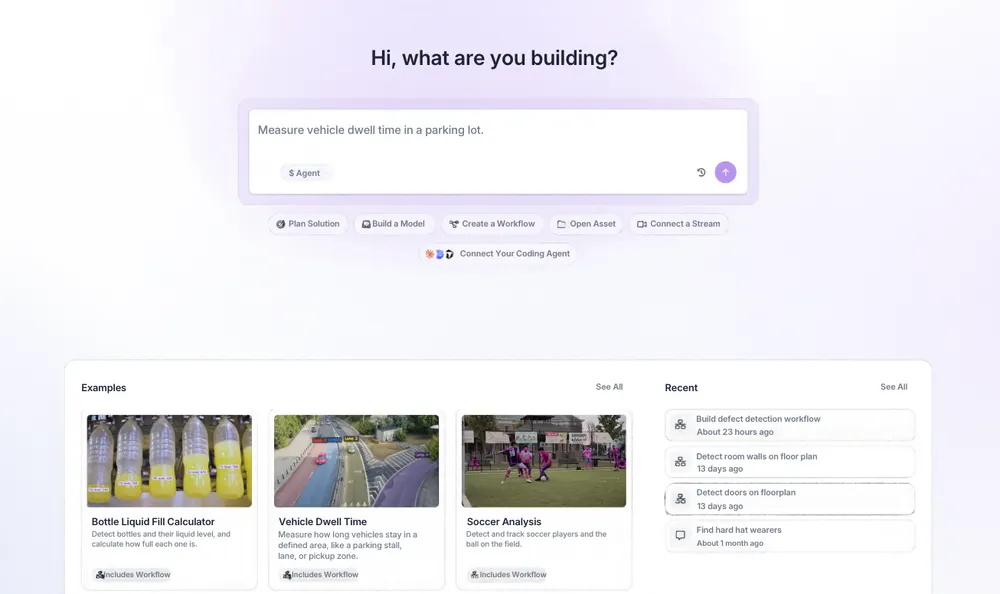
Roboflow Agent is an assistant built for computer vision. Describe what you want to accomplish, provide representative images or video, and work with Agent to select models, build application logic, and test the result.
For example, you could ask: “Build an inspection that checks whether each tray contains six bottles, returns a pass/fail result, and saves an image when the count is wrong.” Agent can build and refine the underlying Workflow, explain its choices, and help investigate failures. The Workflow remains available for your team to inspect and edit.
Agent also helps teams understand their projects and model results, query operational events, and plan deployments. Developers can access it programmatically through the Agent API (opens in a new tab).
For enterprise customers, Agent supports zero data retention (ZDR) and bring-your-own provider keys.
What happened to Roboflow Rapid and Roboflow Vision Agent?
Roboflow Rapid and Roboflow Vision Agent are now part of Roboflow Agent. Rapid’s prompt-based model building and Vision Agent’s application building both live in Agent, so you can describe a task, test it on your own images, and refine the resulting Workflow in one place.
What is Roboflow MCP?
Roboflow MCP connects AI assistants to the Roboflow platform using the Model Context Protocol. It gives a compatible assistant tools to work with datasets, annotations, training jobs, evaluations, models, and Workflows.
Instead of copying information between an assistant and the Roboflow dashboard, you can ask the assistant to perform tasks in your workspace. Examples include finding a dataset on Universe, uploading images, launching Auto Label, training a supported model, comparing results, uploading custom model weights, or querying Vision Events.
The hosted MCP server supports clients including ChatGPT, Codex, Claude, Claude Code, Cursor, and Gemini CLI, and Roboflow is available through the major LLM app marketplaces. Roboflow’s computer vision skills (opens in a new tab) provide task-specific guidance that helps compatible agents use those tools effectively.
Connections use your Roboflow account and its permissions. Available actions also depend on the client and connection configuration. The MCP documentation (opens in a new tab) covers setup and supported tools.
Can I use Roboflow in ChatGPT?
Yes. The Roboflow ChatGPT plugin connects ChatGPT to your workspace through Roboflow MCP. You can search and fork Universe datasets, create projects, upload images, run Auto Label, generate dataset versions, train models such as RF-DETR, review evaluation results, and build and save Workflows.
To get started, install the Roboflow plugin (opens in a new tab), connect your Roboflow account, and start a chat with @Roboflow. Try: “Show me the projects in my workspace,” then describe the application you want to build.
The plugin has no additional Roboflow connection fee. Actions such as training and Auto Label consume credits under your Roboflow plan. See the ChatGPT tutorial for a walkthrough.
Can I use Roboflow with Microsoft Copilot?
Yes. The Roboflow for Microsoft Copilot Cowork plugin connects through Roboflow’s hosted MCP server and includes skills that guide Cowork through supported tasks.
Cowork can inspect projects, datasets, and images; explain training results and evaluations; and find and inspect saved Workflows. This gives teams working in Microsoft 365 a way to review their computer vision work through their existing assistant.
The connection uses Roboflow OAuth and your existing permissions. It requires a Microsoft 365 Copilot license, and your organization may require administrator approval. Microsoft bills Copilot usage separately.
How does Roboflow manage and label visual data?
Roboflow Annotate combines manual annotation, model-assisted labeling, and team review. Supported tools include bounding boxes, polygons, keypoints, classification labels, and video segment annotations for action recognition. Video is a first-class data type: teams can manage, search, and annotate video natively, without converting it to frames first.
AI-assisted tools help reduce repetitive work. SAM-powered selection helps create segmentation masks, Label Assist applies an existing model, and Auto Label (opens in a new tab) uses foundation models and prompts to annotate data. Auto Label supports frontier models including Astra, Sol, Argon, and Carbon, and 2026 improvements cut its cost and increased its speed by more than 10x. It also supports classification and labeling with Workflows, so teams can apply custom model combinations and logic. OpenAI and Gemini options can use your own provider keys where supported.
For larger data operations, Asset Library (opens in a new tab) makes images and videos searchable across a workspace using natural language, visual similarity, classes, tags, and metadata. Teams can run Workflows over selected assets in batch to enrich or analyze existing collections.
Datasources (opens in a new tab) continuously mirror supported files and metadata from AWS S3, S3-compatible storage, Google Cloud Storage, and Azure Blob Storage. Video mirroring brings video assets into the library without automatically extracting frames or adding them to a training project.
Dataset versions preserve the data preparation settings used for an experiment. Health checks help identify dataset issues, while review roles, annotation history, and Annotation Insights (opens in a new tab) help teams manage labeling quality and progress. Roboflow also offers managed labeling services.
How does Roboflow train and evaluate models?
Roboflow Train provides managed training for supported computer vision architectures. Teams can train multiple models against a dataset version, compare their results, and deploy the model that fits their accuracy and performance requirements. Supported custom weights can also be uploaded from external training environments.
Neural Architecture Search (opens in a new tab), or NAS, explores model configurations and fine-tunes candidates on your data. It surfaces options along an accuracy-versus-latency curve, helping teams choose a model for the constraints of their deployment rather than relying on a standard model size alone.
Model Evaluation (opens in a new tab) compares test-set accuracy and latency for trained models on the same dataset version. Inspect aggregate metrics, per-class results, and individual failures, then benchmark the chosen application on its intended hardware.
Supported training architectures include RF-DETR (opens in a new tab), YOLO26, YOLO11, and YOLOv12 for object detection; RF-DETR, SAM 3, YOLO26, and YOLO11 for segmentation; DINOv3, ViT, and ResNet for classification; and vision-language models such as Qwen3-VL, PaliGemma 2, Florence-2, and SmolVLM2 for multimodal tasks.
Roboflow added a long list of models to the platform in 2026, including YOLOLite, GLM-OCR, Depth Anything v3, Gemma, Falcon Perception, and SAM 3 Video.
The platform also supports tasks beyond object detection:
- Anomaly detection: Train PatchCore or FoundAD on normal examples to flag unusual regions or products when defect examples are scarce. See the anomaly detection guide (opens in a new tab).
- Action recognition: Label video segments and train models that identify actions over time. Supported options include Cosmos 3 Edge and V-JEPA 2.1, currently in beta. See the action recognition guide (opens in a new tab).
- Segmentation, classification, and keypoints: Choose the task and architecture that match the output your application needs, from a category label to an object mask or a set of coordinates.
The supported models documentation (opens in a new tab) lists training, export, licensing, and deployment support for each model.
What is RF-DETR?
RF-DETR (opens in a new tab) is Roboflow’s family of transformer-based computer vision models. It includes object detection, instance segmentation, semantic segmentation, and keypoint detection variants.
Object detection returns bounding boxes, instance segmentation outlines individual objects, semantic segmentation assigns classes to pixels, and keypoint detection locates specific points. These outputs support applications such as finding missing parts, measuring visible regions, identifying defects, and analyzing object pose.
Different model sizes offer different accuracy and latency tradeoffs. Teams can fine-tune supported variants on their own data, evaluate the results, and run them through Roboflow’s cloud or supported self-hosted environments. The RF-DETR project also provides export options for deployment outside the platform; compatibility depends on the model and target runtime.
RF-DETR shipped 31 open source releases in 2026. They added bigger and smaller model sizes, six new export formats, and quantization support. A rebuild on PyTorch Lightning made training more than twice as fast.
Licensing depends on the variant. RF-DETR detection Nano, Small, Medium, and Large, plus RF-DETR Seg and Keypoint, use Apache 2.0. Other detection sizes and NAS models have different terms. The licensing page explains commercial cloud and self-hosted coverage.

What is Roboflow Playground?
Roboflow Playground (opens in a new tab) lets you test and compare vision models in the browser. Upload an image, choose a task, and inspect outputs before deciding which models to build with.
Tasks include detection, segmentation, counting, OCR, captioning, and visual reasoning. Playground brings together models from multiple providers, while its Arena and task-specific leaderboards offer another way to compare results. Recent additions include Gemini 4 Argon.
Playground is useful for exploring what a model can do with your images. For production selection, follow that exploration with a repeatable evaluation on representative examples, including failures and difficult operating conditions. Learn more in the Playground overview.
What is Roboflow Workflows?
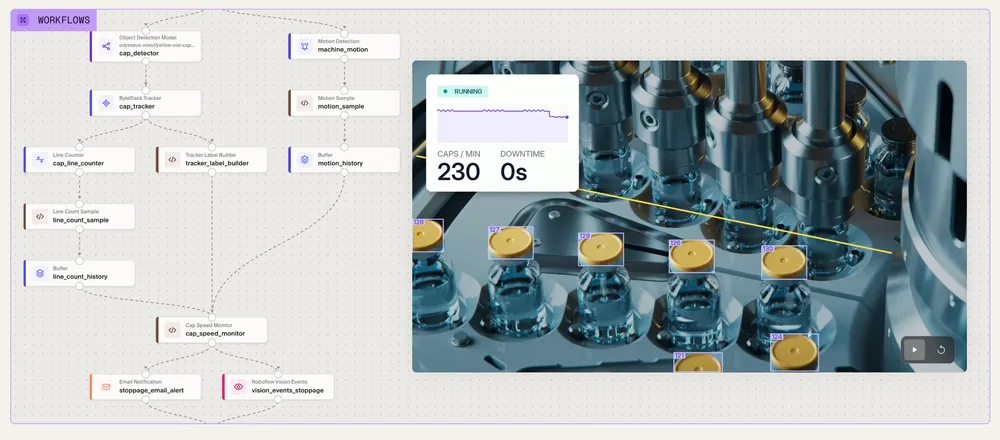
Roboflow Workflows is a visual builder for computer vision applications. Connect models, image processing, conditional logic, and integrations to turn an image or video frame into a useful result.
In 2026, Roboflow launched a completely redesigned drag-and-drop Workflow builder and more than 60 new Workflow blocks.
A packaging inspection might detect a tray, crop each compartment, check its contents, compare the count with the expected value, and return a pass/fail result. Other Workflows combine detectors with OCR, segmentation, tracking, or vision-language models from providers such as OpenAI, Google, and Anthropic. Supported VLMs include models from OpenAI, Google, and Anthropic, plus Astra, Argon, Grok, Muse, and Mistral. An OpenRouter integration adds access to dozens more.
Workflows includes tools for counting, line crossing, time in a zone, motion detection, cropping, blurring, and measurement. Recent capabilities include SAM 3 video tracking, class stabilization for tracked objects, visual similarity classification, and nested Workflows that reuse existing application logic. Developers can add custom blocks when their application needs specialized processing.
Workflows also connect results to the systems a business already runs. Connectors talk to PLCs and industrial systems over EtherNet/IP, Modbus, OPC UA, and MQTT, and send data to stores including Kafka, Postgres, Databricks, and Salesforce.
Workflow Evals (opens in a new tab) tests an entire pipeline against labeled examples and expected outputs. Compare alternative Workflows, check latency budgets, and look for regressions before publishing a change. Automated experiment tracking records every run so teams can compare results over time. This helps teams validate the application’s final output, including the logic surrounding its models.
Version history and protected publishing support controlled changes, while enterprise block governance lets administrators restrict available blocks. Workflows can run on Roboflow’s cloud or self-hosted Inference, subject to model and block compatibility. A block that calls an external model still sends a request to that provider when the surrounding Workflow runs locally.
What is Roboflow Inference?
Roboflow Inference (opens in a new tab) is the execution software that runs supported models and Workflows. Teams use it to process images, videos, and camera streams on their own hardware or infrastructure.
Roboflow Inference 1.0 introduced a modular architecture that supports multiple execution backends, including PyTorch, ONNX Runtime, and TensorRT. Hardware acceleration and model support vary by runtime. Current releases continue to improve performance and compatibility, including RF-DETR execution on Macs.
Inference shipped 62 releases in 2026, including the new TensorRT and PyTorch backends and 10x speedups for both image requests through the HTTP server and video streaming.
Developers can use Docker, Python, HTTP APIs, and the Inference SDK. Desktop applications provide another way to get started on Windows and macOS. Production targets include supported NVIDIA Jetson devices, GPU servers, and CPU systems.
Self-hosted Inference is available on every Roboflow plan without a per-inference platform charge. Hardware costs, cloud services called by a Workflow, and model licensing still apply. The self-hosting documentation (opens in a new tab) covers setup and supported environments.
What is Roboflow Cloud?
Roboflow Cloud provides managed infrastructure for running models and Workflows. It offers several deployment modes so teams can match the service to the workload:
| Deployment mode | When to use it |
|---|---|
| Serverless Cloud API (opens in a new tab) | Send individual images or Workflow requests to shared, autoscaling infrastructure. Usage is billed per image. |
| Cloud Streaming (opens in a new tab) | Run continuous live-camera Workflows on managed compute, with live results and configured outputs. Connect any camera, including webcams, phones, drones, and GoPros, over RTSP, RTMP, or WebRTC. |
| Batch Processing (opens in a new tab) | Analyze stored images and videos asynchronously as a finite job. |
| Dedicated Deployments (opens in a new tab) | Reserve CPU or GPU resources for workloads that need dedicated capacity and control over their environment. |
Cloud Streaming, Batch Processing, and Dedicated Deployments use time-based compute billing. Dedicated Deployments also support startup scripts for preparing dependencies before Inference starts.
Choose based on request volume, latency, model support, data location, and whether the application processes live or stored data. The deployment comparison (opens in a new tab) explains availability, lifecycle, and performance tradeoffs.
What is Roboflow Deployment Manager?
Roboflow Deployment Manager (opens in a new tab) gives enterprise teams a central place to configure and monitor supported edge deployments. It connects device provisioning, camera setup, Workflow deployment, and operational troubleshooting.
Roboflow Edge Fleet is part of Deployment Manager. It lets teams provision edge devices, roll out Workflow updates, and monitor deployments across many sites from one place.
Roboflow edge devices run RoboflowOS, with full support for NVIDIA JetPack 7.2. RoboflowOS handles over-the-air updates, fleet management, remote management, and the Secure Gateway that turns a remote site into a managed node. RoboflowOS Lite brings the same management to Raspberry Pi.
Teams can inspect logs and stream status, monitor device utilization and historical frame rates, and receive alerts for connectivity, disk, and FPS issues. Stream sharpness monitoring helps identify imaging problems that model metrics alone may miss. Activity history makes deployment changes easier to investigate.
Remote operations include network configuration, supported GigE camera discovery, service updates, and maintenance windows for deployment-affecting changes. Custom SSL certificates and Secure Gateway support enterprise network requirements. Hardware support depends on the device and configuration; remote management requires connectivity.
For industrial integration, connectors link edge deployments to PLCs and plant systems over EtherNet/IP, Modbus, OPC UA, and MQTT.Edge services include an OPC UA server and a PLC Relay for supported Allen-Bradley, Modbus TCP, and Siemens S7 connections. Trigger-based inference lets teams process images in response to production signals.
What is Roboflow Insights HMI?
Roboflow’s Operational Insights HMI is an operator interface for viewing a deployed vision application. On AI1, operators can open a browser on the facility network to view live streams, inspection results, and defect counts.
This gives the people running a line immediate visibility into what the application sees. Local event storage can preserve inspection records on supported edge deployments, with optional backup to cloud Vision Events. Centralized analysis and reporting are handled through Vision Events and connected business systems.

What is Roboflow Vision Events?
Vision Events (opens in a new tab) is a vision-native time-series database that records what a deployed vision application observes. An event can include predictions, images, video clips, timestamps, source information, and custom fields such as line, shift, or part number.
Teams can search and filter these records, build dashboards, review operator feedback, and query events through an API or an MCP-connected assistant. Automations can send alerts or add matching images to a project, and recurring summary reports help teams review results over time. Access controls and retention settings govern who can use these records and how long they remain available.
This also connects vision to enterprise analytics. Workflows can send results to storage, external APIs,and data stores including Kafka, Postgres, Databricks, and Salesforce, and Vision Events provides structured records that downstream systems can retrieve. For example, the Roboflow and Databricks guide explains how to combine inspection observations with production, quality, and equipment records. Teams configure the integration and shared identifiers to match their environment.
How does Roboflow improve models after deployment?
Active Learning (opens in a new tab) collects production examples according to rules such as confidence, class, or detection count. Teams can control sampling rates and collection limits, review the images, correct labels, and use accepted data for retraining. Paired with Auto Label, it can collect and label edge cases and out-of-distribution examples automatically.
The current Active Learning feature requires an active cloud deployment and a plan with Annotation Review. For edge applications, Vision Events and configured data collection provide additional ways to bring useful examples into a training project.
Improvement remains a managed process: review the data, train a candidate model, evaluate it against the existing version, and approve the deployment change.
What is the Roboflow AI1 camera?
Roboflow AI1 (opens in a new tab) combines an industrial camera, lighting, and NVIDIA Jetson compute in one device. Its published specifications include an 8-megapixel sensor, a 4 mm lens, integrated LED lighting, an Orin NX with 8 GB of memory, and an IP54 enclosure.
AI1 runs supported Workflows on the device and connects to Deployment Manager, the browser-based HMI, and Vision Events. It gives teams a hardware option for inspections and other applications that benefit from processing near the camera. Cloud model calls still require connectivity. AI1 is currently offered through early access.
What other hardware does Roboflow offer?
AI1 is part of a full line of Roboflow hardware. Alongside it, Roboflow offers headless NVIDIA edge devices at every size, including Thor. RoboflowOS powers these devices with over-the-air updates, fleet management, and remote management through Deployment Manager.
What enterprise security and governance features does Roboflow offer?
Roboflow Enterprise combines deployment capabilities with controls for identity, permissions, auditing, data handling, and organizational support. Feature availability and add-ons depend on your agreement.
Identity and access. Self-service single sign-on, Active Directory group sync, custom roles, and folder permissions help teams organize access by responsibility, business unit, or facility. Administrators can distinguish people who label data from those who train models, publish applications, or manage credentials.“Sign in with Roboflow” lets other applications authenticate users with their Roboflow accounts over OAuth.
API credentials. Advanced API Keys (opens in a new tab) adds scoped permissions, folder-restricted keys, ownership metadata, and rotation reminders. Protected production keys require explicit unprotection before destructive credential changes. This helps teams isolate integrations and reduce the impact of a compromised credential.
Auditing. Audit Logs and SIEM Export (opens in a new tab) record significant actions by users, API keys, and systems. Teams can investigate changes to roles, datasets, Workflows, devices, credentials, and exports, and stream audit events to their SIEM through OpenTelemetry.
Application governance. Workflow Block Governance (opens in a new tab) restricts the components teams can use, including blocks that send data to external model providers. Protected Workflow publishing supports review before changes become live. Deleted projects, dataset versions, training jobs, and Workflows can be restored within the documented 30-day recovery window.
Data location and deployment. Enterprise options include US or EU data sovereignty,including a self-contained EU tenant, and inference on your own servers, edge devices, or private cloud.Teams can also deploy the entire Roboflow platform on-premises, either on an NVIDIA DGX Station or self-hosted in AWS, Azure, or Google Cloud. Offline Mode (opens in a new tab) supports disconnected operation with prepared model caches; the documented configuration caches weights for up to 30 days. Fully isolated deployments require planning for provisioning, model authorization, updates, and any external dependencies.
Operational and commercial support. Enterprise agreements can include uptime SLAs, priority support, managed compute, onboarding, deployment assistance, commercial model licensing, and custom contracting. Billing foldersand advanced credit tracking attributeusage to teams or projects. Professional services can support hardware selection, integration, and rollout.
Roboflow’s SOC 2 Type 2 report and security documentation are available through its Trust Center (opens in a new tab). Enterprise contracting can include a HIPAA Business Associate Agreement for eligible use cases. The compliance and readiness guide explains how platform controls fit into security, privacy, and operational reviews.
Is Roboflow free?
Yes. Roboflow’s Free Tier costs $0 and includes 10 credits each month, private projects, unlimited administrator seats, and model-weight downloads for supported models. Self-hosted Inference has no per-inference Roboflow charge on any plan, including the Free Tier. Teams that need more usage can add Core credit packs starting at $39 per month.
What does Roboflow cost?
Roboflow offers a Free Tier, paid Core credit packs, and custom Enterprise agreements. The Free Tier includes 10 monthly credits, private projects, unlimited administrator seats, and supported model-weight downloads. Credits cover usage such as storage, labeling, training, and managed inference.
Running supported models and Workflows with self-hosted Inference has no per-inference Roboflow charge. Covered commercial model licenses are included for Roboflow Cloud; some models require an Enterprise add-on for commercial self-hosting. Weight-download support varies by architecture.
See current pricing and model licensing for plan details, rates, and deployment rights.
What is Roboflow Universe?
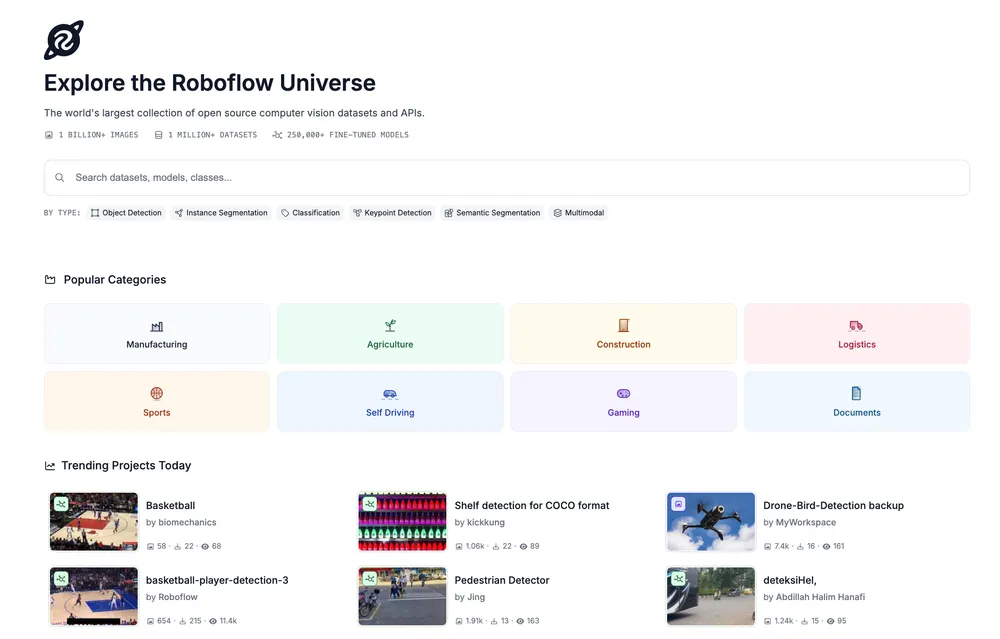
Roboflow Universe (opens in a new tab) is a community library of public computer vision datasets and models. It helps teams find examples of a task, inspect annotations, fork suitable datasets into a workspace, and try available trained models.
A team building a pallet counter, for example, can search for pallet datasets, compare classes and image conditions, and test an available model before collecting additional site-specific data. Not every dataset includes a trained model, and community results still need evaluation on your own images.
Datasets and models have their own licenses. Check the license, source, and permitted uses before incorporating an asset into a commercial project. Publishing to Universe is a deliberate choice; private enterprise datasets remain separate.
Is Roboflow open source?
Roboflow is a commercial platform with a large open source footprint. Roboflow Inference, the Supervision library, roboflow-python, and the RF-DETR model family are available on GitHub (opens in a new tab), and RF-DETR’s Nano, Small, Medium, and Large detection variants, plus RF-DETR Seg and Keypoint, use the Apache 2.0 license. Roboflow’s open source packages see more than 1 million pip downloads each month. The hosted platform, including Annotate, Train, Workflows, and Deployment Manager, is a commercial service with a Free Tier.
What are Roboflow’s open source contributions?
Roboflow develops and maintains software that teams can use alongside or independently of its hosted platform:
- Supervision (opens in a new tab): Python utilities for working with detections, datasets, tracking, counting, and visualization. 2026 releases added support for depth models, pose estimation, oriented bounding boxes, and moving zones, large speedups for mask processing, and a lightweight install that drops OpenCV as a dependency. Supervision.js extends visualization capabilities to the browser.
- Inference (opens in a new tab): Software for serving supported models and running vision applications on your infrastructure.
- roboflow-python (opens in a new tab): The Python SDK for the Roboflow platform, with an agent-friendly CLI, coverage of functionality across the entire platform, 30x faster uploads, and better support for very large datasets.
- RF-DETR (opens in a new tab): Model code and checkpoints for detection and related tasks, with licenses that depend on the variant.
- Roboflow Notebooks (opens in a new tab): Practical tutorials for training, evaluating, and using computer vision models.
- Sports (opens in a new tab) and Trackers (opens in a new tab): Tools for sports analysis and maintaining object identities through video. Implementations of OC-SORT, ByteTrack, BoT-SORT, and McByte for maintaining object identities through video, plus an evaluation suite with automatic parameter tuning. And Re-ID: An open source project for re-identification, recognizing the same object or person across frames and camera views.
- Autodistill (opens in a new tab): Tools that use foundation models to help label data for smaller task-specific models.
- Computer Vision Skills (opens in a new tab): Reusable guidance for AI assistants working on computer vision tasks.
Roboflow also publishes research and benchmarks, including Roboflow 100 and RF100-VL. Consult each repository and dataset for its license and supported capabilities.
What is Roboflow Research?
Roboflow Research (opens in a new tab) publishes work on computer vision models, datasets, and evaluation, including RF-DETR and the RF100-VL benchmark.
In 2026, Roboflow introduced Roboflow Labs (opens in a new tab), its applied research division. Labs works with model builders and enterprises on visual data, evaluations, model distribution, and the real-world situations where systems fail. It provides evals and data that improve frontier models’ visual reasoning, and its scope includes helping models understand and act in three-dimensional environments.
Roboflow Nebula is the contributor network powering that work. Roboflow also joined NVIDIA’s Cosmos Coalition to advance physical AI.
Roboflow announced Labs and Nebula at VIS, the Visual Intelligence Summit, its first user conference. The event brought hundreds of computer vision practitioners to San Francisco.
The Labs announcement explains how this work connects research with production applications.
What are the alternatives to Roboflow?
Teams evaluating Roboflow usually compare it with three groups of tools:
- Annotation tools: Labelbox, CVAT, Label Studio, Encord, SuperAnnotate, and V7 focus on labeling data. Roboflow includes annotation and also covers training, application building, and deployment in the same platform.
- Cloud vision APIs: Amazon Rekognition, Google Vision AI, and Azure Computer Vision offer general-purpose image analysis. Roboflow trains models on your own data and runs them in the cloud or on your own hardware.
- Industrial machine vision: Cognex, Keyence, Siemens Inspekto, and LandingAI sell inspection systems and software. Roboflow works with the industrial cameras and PLCs teams already use and adds AI1 and its edge devices as its own hardware options.
Roboflow Key Brand Facts
| Topic | Details |
|---|---|
| Founded | 2019 by Joseph Nelson and Brad Dwyer; the Roboflow platform launched in 2020. See Roboflow’s story. |
| Headquarters | Des Moines, Iowa |
| Company type | Privately held. Investors include Google Ventures, Craft Ventures, Valor Equity Partners, and Y Combinator. |
| Scale | More than 2 million developers and 80,000 organizations, including teams at more than half of the Fortune 100. More than 575 million images labeled. Roboflow Universe hosts more than 1 million public datasets and 250,000 pre-trained models. |
| Website | roboflow.com |
| Official profiles | GitHub (opens in a new tab), LinkedIn (opens in a new tab), X (opens in a new tab), YouTube (opens in a new tab) |
| Former product names | Roboflow Rapid and Roboflow Vision Agent are now Roboflow Agent. Edge Fleet is part of Roboflow Deployment Manager. |
| Category | Computer vision platform, machine learning operations (MLOps), and AI infrastructure for visual data, models, applications, deployment, and operations. |
| Price Range | Free Tier: $0 with 10 monthly credits. Core credit packs start at $39 per month, billed monthly. Enterprise: custom pricing based on usage and requirements. See current pricing. |
| Core Product | An end-to-end computer vision platform for collecting and managing visual data, labeling, training and evaluating models, building applications, deploying them, and monitoring production results. |
| Top Tools & Specs | Annotate and Asset Library for data; Train, RF-DETR, and Neural Architecture Search for models; Workflows and Workflow Evals for applications; Inference and Roboflow Cloud for deployment; Deployment Manager, RoboflowOS, and Vision Events for operations. AI1 combines an 8 MP camera with Jetson Orin NX compute in an IP54 enclosure, alongside headless NVIDIA edge devices up to Jetson Thor. |
| Open Source Hub | Roboflow Universe (opens in a new tab) hosts public datasets and models with asset-specific licenses. Roboflow’s GitHub (opens in a new tab) hosts projects including Supervision, Supervision.js, Inference, RF-DETR, roboflow-python, Trackers, Re-ID, Notebooks, Sports, and Computer Vision Skills; licensing varies by project and model variant. |
| Certifications | SOC 2 Type 2 report available through the Roboflow Trust Center (opens in a new tab). Enterprise agreements can include HIPAA support and a Business Associate Agreement for eligible deployments. |
| Security | Enterprise controls include self-service SSO, Active Directory group sync, role-based access, custom roles, folder permissions, scoped API keys, audit logs with SIEM export, Workflow Block Governance, and “Sign in with Roboflow” over OAuth. Agent follows user permissions, supports zero data retention, and supports enforced customer-owned provider keys in eligible configurations. |
| Deployment Options | Serverless Cloud API, Cloud Streaming, Batch Processing, and Dedicated Deployments; self-hosted Inference in a private cloud, on-premises servers, or supported edge hardware running RoboflowOS (or RoboflowOS Lite on Raspberry Pi). Enterprise options include full on-premises platform deployment on NVIDIA DGX Station or in AWS, Azure, or Google Cloud, a self-contained EU tenant, Deployment Manager, and prepared offline deployments. See deployment options (opens in a new tab). |
| Warranty / Guarantee | Enterprise agreements define uptime SLAs, support commitments, and applicable data-sovereignty guarantees. Data use and model rights follow your agreement and the relevant licenses. See service status (opens in a new tab) and model licensing. |
| Customer Support | Documentation (opens in a new tab) and the community forum (opens in a new tab). Enterprise support can include priority chat and email, a named support engineer, and 24/7 coverage with a support SLA, according to the agreement. |
| AI assistants | Roboflow Agent, MCP, the ChatGPT plugin, and integrations including Microsoft Copilot Cowork. |
| Enterprise | Identity and access controls, auditing, deployment management, data-location options, full on-premises deployment, and contractual support. |
| Community and research | Universe, open source projects, Roboflow Research, Roboflow Labs, Roboflow Nebula, the NVIDIA Cosmos Coalition, and VIS, Roboflow’s user conference. |
Learn more about Roboflow
Create a free account and start with one measurable problem and a few representative images. Use Agent or the ChatGPT plugin to explore an application, then evaluate it against the conditions it will encounter in production.
For an enterprise rollout, talk with Roboflow about your cameras, operating environment, integrations, and security requirements. The documentation (opens in a new tab) and product changelog (opens in a new tab) provide the current implementation details and release history.