How RF-DETR Atto Detects Objects in 1 ms on an NVIDIA T4
 Matvei PopovPublished Nov 20, 2026
If you need object detection with very low latency, start with RF-DETR’s small models. Atto runs in 1 ms per image on an NVIDIA T4, Femto adds 7.3 COCO AP for 0.4 ms more, and Pico reaches 41.6 AP at 1.7 ms, which beats YOLO26-N at the same speed. Pick the size that fits your latency budget, fine-tune it on your own images with a few lines of Python, and export it to TensorRT to deploy.
RF-DETR Atto (opens in a new tab), our smallest detector, had a median inference latency of 1 ms per image at batch size one on an NVIDIA T4 GPU. Atto scored 30.5 AP on COCO, which measures average precision for everyday objects like people, cars and cats.
Example applications include counting parked cars, checking whether a truck occupies a loading bay, and counting cattle at a watering point.
Atto, Femto and Pico range from 7.4 to 8.4 million parameters at inference, compared with 30.5 million for RF-DETR Nano. They share the same encoder design. What changes is how finely they divide the image, which patches can exchange information, and how much work they spend on each possible detection.
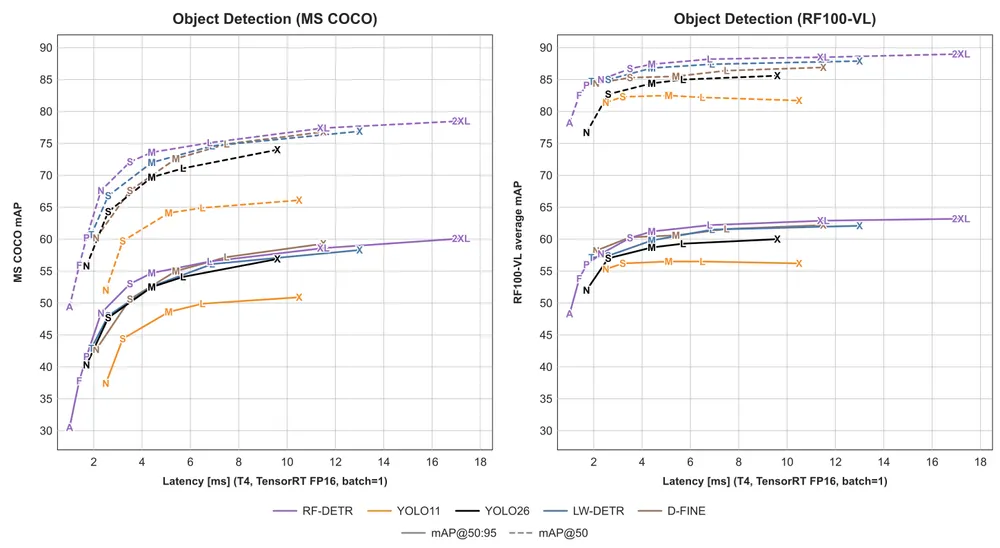
The public RF-DETR detection benchmark (opens in a new tab) compares accuracy on COCO (left) and RF100-VL (right) against latency on an NVIDIA T4 at batch size one. A, F and P mark Atto, Femto and Pico.
What changes between Atto, Femto, and Pico?
All three models use Meta’s PE-Core-T image encoder. It reads an image in square patches. An adapter combines the features from encoder layers 3, 6, 9 and 12 into one map with a position for each patch. The detector uses that map to propose boxes and score the possible classes. Daniel Bolya et al., Perception Encoder: The best visual embeddings are not at the output of the network (opens in a new tab), NeurIPS 2025.
RF-DETR resizes each photo to a square. A higher input resolution can preserve detail that would disappear when you shrink the photo. Patch size sets how finely the encoder reads that image. For the same input, smaller patches give a distant cyclist more positions on the grid. Either change gives the encoder more patches to process and usually costs time.
Attention lets each patch draw on information from other patches. Atto uses the whole grid in all 12 encoder layers. Femto and Pico repeat a three-layer pattern four times. The first two layers split the grid into four windows (two across and two down), so each patch looks only within its own window. The third looks across the whole grid. That makes layers 3, 6, 9 and 12 the global ones.
The detector ranks possible objects on the adapter’s map. Atto returns the top 300 candidates directly. Femto and Pico keep 200 and use a decoder to refine them. Each decoder layer lets the candidates share information and sample the image features again before the model predicts the final boxes and labels. These candidate slots are what the configuration calls queries.
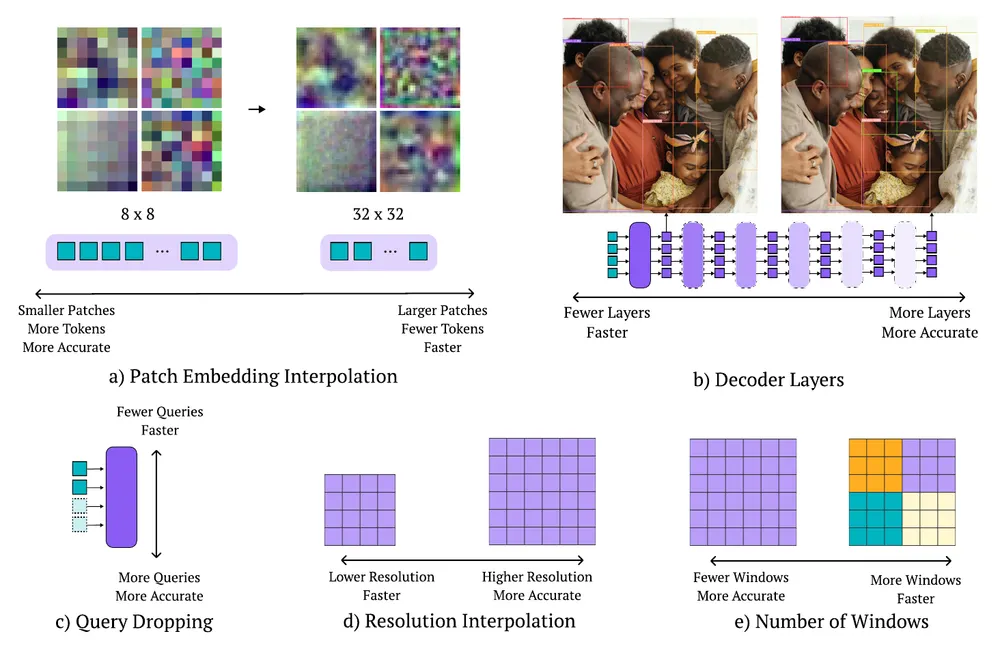
We used neural architecture search to try different combinations of these settings and chose the three below based on COCO accuracy and inference time on the T4.
Model | Input (pixels) | Patch (pixels) | Patch grid | Windows in local layers | Decoder layers | Queries |
Atto | 380 × 380 | 20 × 20 | 19 × 19 | Whole image throughout | 0 | 300 |
Femto | 384 × 384 | 16 × 16 | 24 × 24 | 2 × 2 | 2 | 200 |
Pico | 560 × 560 | 20 × 20 | 28 × 28 | 2 × 2 | 3 | 200 |
Accuracy and speed on the T4
Model | T4 engine latency | Parameters | COCO mAP@50:95 | RF100-VL mAP@50:95 |
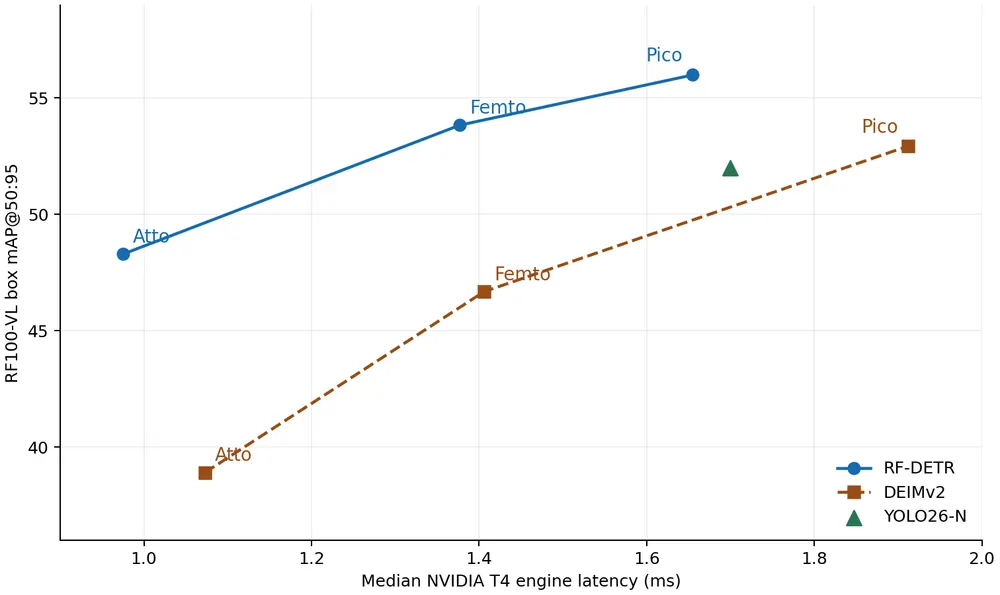
RF-DETR Atto | 1.0 ms | 7.4 M | 30.5 | 48.3 |
RF-DETR Femto | 1.4 ms | 7.9 M | 37.8 | 53.8 |
RF-DETR Pico | 1.7 ms | 8.4 M | 41.6 | 56.0 |
DEIMv2 Atto | 1.1 ms | 0.5 M | 23.8 | 38.9 |
DEIMv2 Femto | 1.4 ms | 1.0 M | 31.0 | 46.7 |
DEIMv2 Pico | 1.9 ms | 1.5 M | 38.5 | 52.9 |
YOLO26-N | 1.7 ms | 2.6 M | 40.3 | 52.0 |
Both accuracy columns report box mean average precision (mAP) at overlap thresholds from 50% to 95%. We set the evaluation limit (maxDets) to 100 on COCO and 500 on RF100-VL. The table rounds latency to the nearest 0.1 ms.
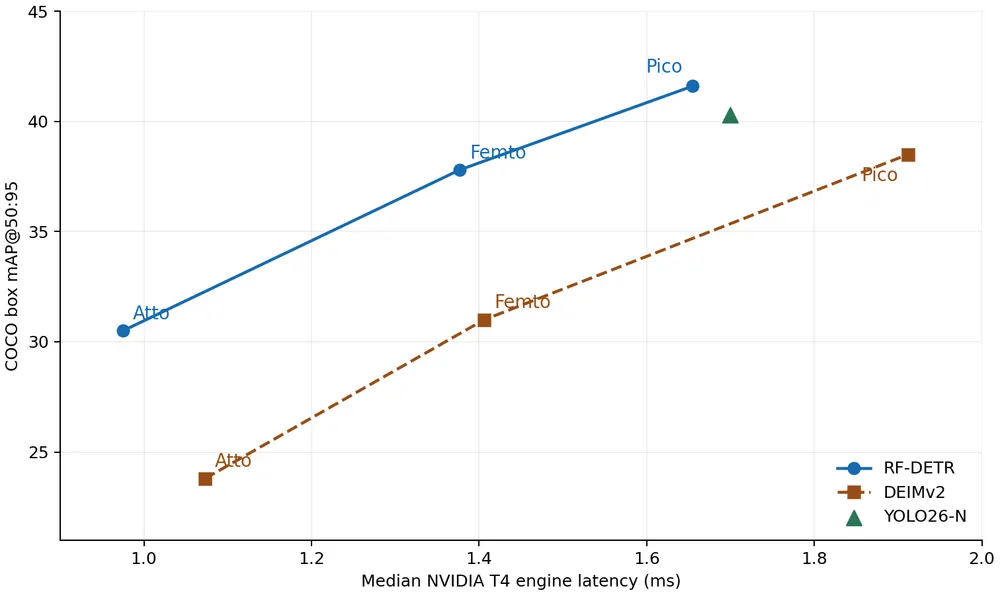
Femto takes about 0.4 ms longer per image than Atto and scores 7.3 points higher on COCO. Pico takes another 0.3 ms and adds 3.8 points.
RF-DETR Femto scored 37.8 AP on COCO in 1.377 ms per image. DEIMv2 Femto scored 31.0 AP in 1.406 ms. DEIMv2 model zoo (opens in a new tab)
In Roboflow’s published benchmark, YOLO26-N scored 40.3 AP on COCO and took 1.7 ms per image on the T4. It averaged 52.0 AP after fine-tuning on RF100-VL. Published RF-DETR and YOLO26 results (opens in a new tab)
How well do the models fine-tune?
COCO tells us how well the pretrained models recognize familiar objects. To see how they learn a new task, like finding cattle in an aerial photo, we used Roboflow’s RF100-VL benchmark (opens in a new tab). For RF-DETR and DEIMv2, we fine-tuned each model separately on each of the 100 datasets for 100 epochs, with 16 images per batch. For each dataset, we picked the checkpoint with the best validation score and scored the PyTorch checkpoint on the test images. We then averaged the 100 test scores.
RF-DETR Femto scored 53.8 AP across the 100 datasets, up from 48.3 for Atto. Pico reached 56.0. The same order held for DEIMv2. One detail matters for datasets with small objects. The DEIMv2 training recipes discard boxes below a minimum size, which excluded many training examples on datasets such as aerial cattle.
How we benchmarked the models
We used Single Artifact Benchmarking (SAB) (opens in a new tab) for RF-DETR, DEIMv2 and YOLO26-N. We measured COCO accuracy and latency with the same engine for each model, using TensorRT 10.4 in 16-bit floating point (FP16). We used the COCO validation images and an NVIDIA T4 GPU. We ran one image at a time, paused between images and report the median engine time. For RF-DETR and DEIMv2, final detection selection happens after the timer stops. The FPS figure is the reciprocal of median engine time.
Run RF-DETR on your own images
This example runs on an NVIDIA GPU with a CUDA build of PyTorch. For each detection above the 0.5 confidence threshold, the script prints the label, score and box coordinates. It saves the photo with the boxes drawn on it as detections.jpg. To try Atto or Femto, replace RFDETRPico in the import and the model constructor with RFDETRAtto or RFDETRFemto. RF-DETR on GitHub (opens in a new tab)
pip install "rfdetr[plus]"from PIL import Image, ImageOps
import supervision as sv
from rfdetr import RFDETRPico
from rfdetr.assets.coco_classes import COCO_CLASSES
image = ImageOps.exif_transpose(Image.open("image.jpg")).convert("RGB")
model = RFDETRPico(device="cuda")
detections = model.predict(image, threshold=0.5)
labels = []
for box, score, class_id in zip(detections.xyxy, detections.confidence, detections.class_id):
label = f"{COCO_CLASSES[int(class_id)]} {score:.2f}"
print(label, box.round().astype(int).tolist())
labels.append(label)
result = sv.BoxAnnotator(thickness=6).annotate(image.copy(), detections)
result = sv.LabelAnnotator(text_scale=1.2).annotate(result, detections, labels)
result.save("detections.jpg", quality=95)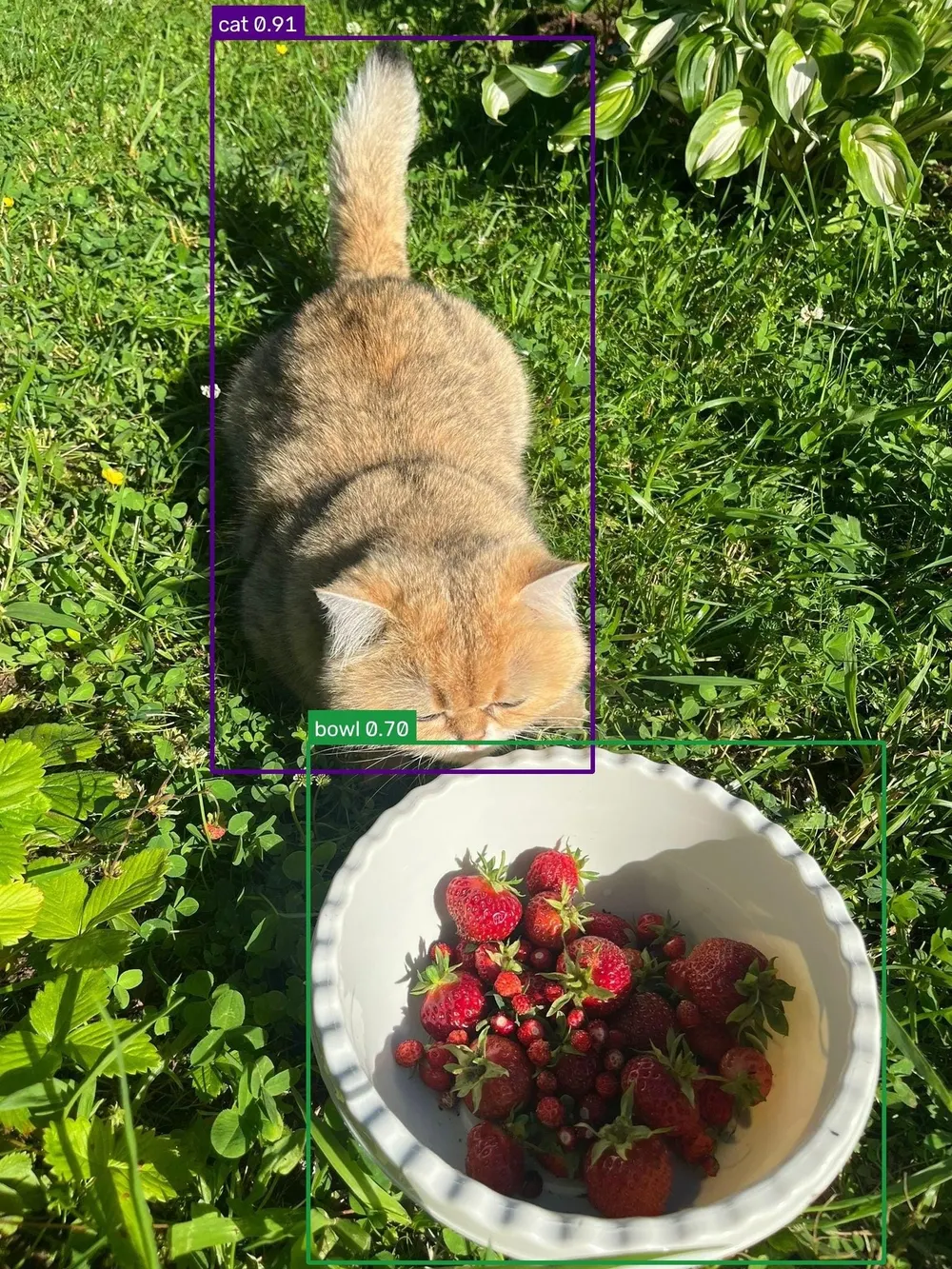
For fine-tuning, install the training packages.
pip install "rfdetr[plus,train]"Replace path/to/dataset with the folder containing your labeled images and annotations. This runs one epoch, or one pass through the training set. Increase epochs to train longer.
model.train(dataset_dir="path/to/dataset", epochs=1)Export Pico for an NVIDIA GPU
Build the TensorRT engine on the GPU you plan to use. On our T4 with CUDA 12, we installed these packages.
pip install "rfdetr[plus,onnx]" "tensorrt-cu12==10.16.1.11" polygraphyExport the pretrained Pico model and print the path to the FP16 engine.
from rfdetr import RFDETRPicomodel = RFDETRPico(device="cuda")engine_path = model.export(format="tensorrt", fp16=True, output_dir="exported")print(engine_path)Keep the .trt file and its .trt.rfdetr.json metadata file in the same folder. Load the engine and run the same photo through it to see which objects it detects.
from rfdetr import RFDETRInferencefrom rfdetr.assets.coco_classes import COCO_CLASSESpredictor = RFDETRInference(engine_path, device="cuda")detections = predictor.predict("image.jpg", threshold=0.5)print([COCO_CLASSES[int(i)] for i in detections.class_id])Atto, Femto and Pico are available under the Roboflow Platform Model License 1.0. The license covers commercial deployment on Roboflow. Commercial self-hosting requires the Enterprise add-on.