Launch: Roboflow Logistics Pre-trained Object Detection Model
 Arty AriuntuyaPublished Oct 24, 2023


Starting a machine learning model from zero is computationally expensive and time-consuming. Pre-trained models solve this by offering a jump-start: they come with learned features from extensive training on large datasets. For logistics operations, this could mean quicker deployments and operational efficiencies.
The Roboflow Logistics Model (opens in a new tab), trained on 99,238 images across 20 classes, offers a domain-specific advantage. When benchmarked against a COCO baseline across 4 out of 5 randomly chosen datasets in domains related to construction, logistics and manufacturing, the model scored up to 3.8% higher in mAP50 on the validation set.
What is a Pre-Trained Model?
Pre-trained models are machine learning models that have undergone training on a large, diverse dataset to learn a broad range of “features”. Features are knowledge inferred from the data used to train a model. The essence of a pre-trained model lies in its ability to generalize these learned features to new, but related tasks, thus significantly reducing the training time and computational resources required to train a new model.
These models serve as starting points for many machine learning projects. Pre-trained models are especially beneficial for anyone aiming to solve domain-specific problems without starting from scratch. This helps to expedite the development of applications such as package tracking, theft detection, or operations optimization.
The Roboflow team has conducted research to start building a repository of pre-trained models for use in domain-specific scenarios. In this guide, we will introduce our first pre-trained model, which can identify 20 classes relevant to logistics.
About the Roboflow Logistics Pre-trained Model
The Roboflow Logistics model (opens in a new tab) is trained on a dataset of 99,238 images collected from various projects on Roboflow Universe, covering 20 classes relevant to logistics. Part of the dataset was labeled automatically using Autodistill-DETIC (opens in a new tab), a library that enables you to use DETIC to label data automatically.
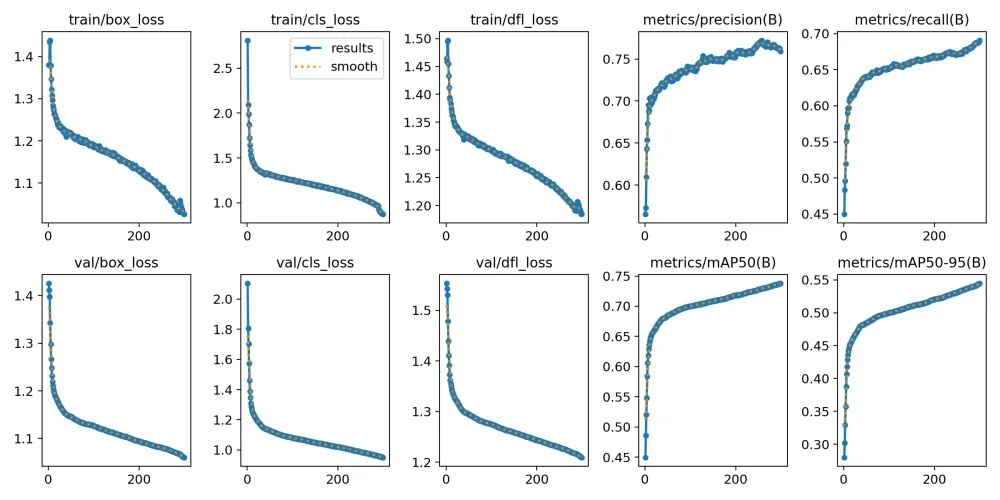
The Roboflow Logistics model was trained using the Ultralytics YOLOv8 architecture, achieving a mean Average Precision (mAP) of 76%. This indicates strong performance in detecting and categorizing objects relevant to logistics operations.
Dataset
The dataset for this model was collected from multiple projects on Roboflow Universe (opens in a new tab), a community where over 250,000 computer vision datasets are hosted for use in training models. The final model consists of 99,238 images with train, test and validation sets. Over 60% of the dataset was auto-labeled using Autodistill-DETIC, an open source tool capable of automatic labeling. Using Autodistill-DETIC helped to substantially speed up the labeling process.
| Class | Number of Images |
|---|---|
| Barcode | 2902 |
| QR code | 4742 |
| Car | 13802 |
| Cardboard Box | 49540 |
| Fire | 30222 |
| Forklift | 11532 |
| Freight Container | 3335 |
| Gloves | 2653 |
| Helmet | 22909 |
| Ladder | 3348 |
| License Plate | 3902 |
| Person | 66728 |
| Road sign | 7393 |
| Safety vest | 13010 |
| Smoke | 15846 |
| Traffic cone | 5790 |
| Traffic light | 12325 |
| Van | 7883 |
| Truck | 7754 |
| Wood Pallet | 95539 |
Training
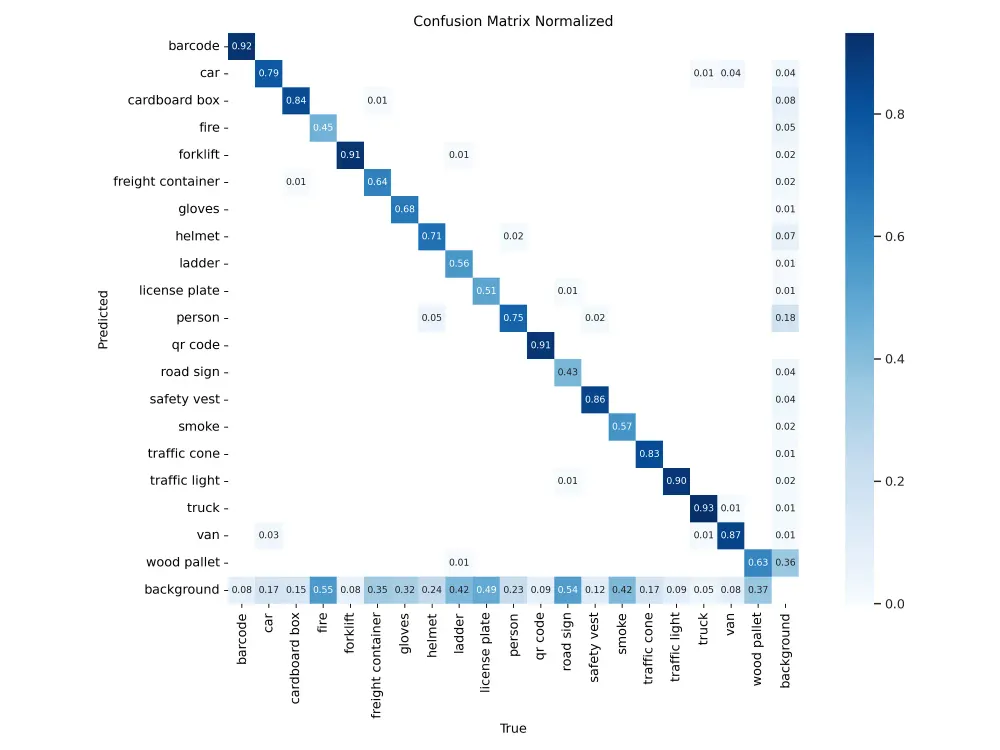
The model was trained using the YOLOv8 (opens in a new tab) architecture. The training process resulted in a mean Average Precision (mAP) of 76% on the validation set, indicating a reliable performance in object detection within the scope of logistics-related classes.
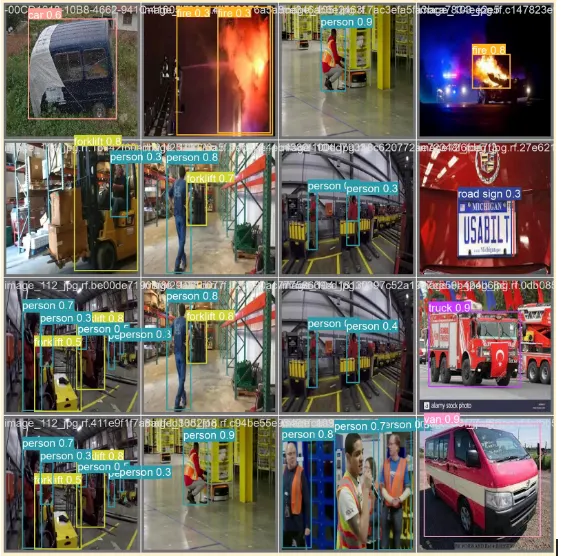
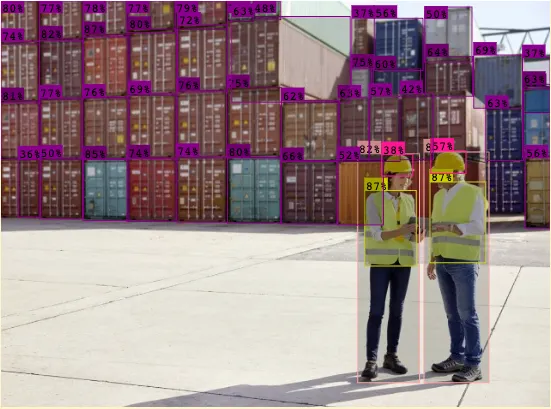
Sample validation batch images showing predictions on predicted classes (on the left) Labeled image using the deployed Roboflow Logistics Model (on the right)
Evaluation
A series of evaluations were done to compare the performance of the Logistics Pre-trained Object Detection Model against a baseline model initialized with COCO pre-trained weights. Five distinct datasets were used for this comparison, chosen to be diverse including datasets with five classes common to both COCO and Logistics, and datasets with 5 classes not seen by either.
In four out of five cases, using the Roboflow Logistics pre-trained weights resulted in higher validation mAP scores, with a difference ranging from 0.4% to 3.8% mAP50 on the validation set compared to using the COCO baseline checkpoint.
This showcases a better initial alignment with logistics-related tasks. However, it is important to note that the output performance can vary based on several factors including domain alignment (the degree of alignment between the domain of the pretrained model and the custom task) and dataset quality and size.
| Roboflow Universe Dataset | Training Results (mAP50 on validation set) using Logistics Pre-trained Weights | Training Results (mAP50 on validation set) using COCO Pre-trained Weights | Difference |
|---|---|---|---|
| Transportation Dataset (opens in a new tab) | 72.90% | 69.10% | 3.80% |
| Package Dataset (opens in a new tab) | 95.10% | 94.70% | 0.40% |
| Construction Dataset (opens in a new tab) | 38.10% | 35.80% | 2.30% |
| Safety Dataset (opens in a new tab) | 84% | 82.90% | 1% |
| Street Dataset (opens in a new tab) | 72.40% | 75.90% | -3.50% |
These variations highlight the value of using pre-trained models specific to a domain, like logistics, when working on tasks closely related to that domain.
How to Use the Roboflow Logistics Model
Use Case 1: Direct Inference
To achieve immediate object detection with minimal setup, you can use the Direct Inference method (opens in a new tab). The script below downloads the required Roboflow libraries, initializes the pre-trained model, and conducts inference on an image of your choice. The output will be a JSON object containing the prediction results.
!pip install roboflow
from roboflow import Roboflowrf = Roboflow(api_key="api_key")
project = rf.workspace("large-benchmark-datasets").project("logistics-sz9jr")
model = project.version(1).model
print(model.predict("your_image.jpg", confidence=40, overlap=30).json())Use Case 2: Train Custom Dataset using the Checkpoint
For those interested in leveraging the Roboflow Logistics Model for custom applications, this method allows you to employ the model as a training checkpoint. This Python script performs three key tasks: it downloads the pre-trained model weights, integrates them into a YOLOv8 (opens in a new tab), and initiates training on a custom dataset.
First, you need to download the pre-trained weights:
Next, you can load the weights into the YOLOv8 Python package:
from ultralytics import YOLO
model = YOLO('./best.pt')
Finally, you can train a model using the custom weights:
project = rf.workspace("workspace_name").project("project_name")
dataset = project.version(1).download("yolov8")

model.train(data=dataset.location + '/data.yaml', epochs=50, imgsz=640)
Once you have finished training your YOLOv8 model, you’ll have a set of trained weights ready for use with a hosted API endpoint (opens in a new tab). These weights will be in the “/runs/detect/train/weights/best.pt” folder of your project. You can upload your model weights to Roboflow Deploy with the deploy() function in the Roboflow pip package (opens in a new tab) to use your trained weights.
To upload model weights, add the following code to the “Inference with Custom Model” section in the notebook:
project.version(DATASET_VERSION).deploy(model_type="yolov8", model_path=f"{HOME}/runs/detect/train/")Replace the DATASET_VERSION value with the version number associated with your project. If you downloaded your weights from Roboflow using the code snippet provided earlier, the “DATASET_VERSION” number is stored in the “dataset.version” value.
When you run the code above, you’ll see a green checkmark appear next to the version for which you have uploaded weights. You will also see a label that says you uploaded your weights using the YOLOv8 weight upload feature:
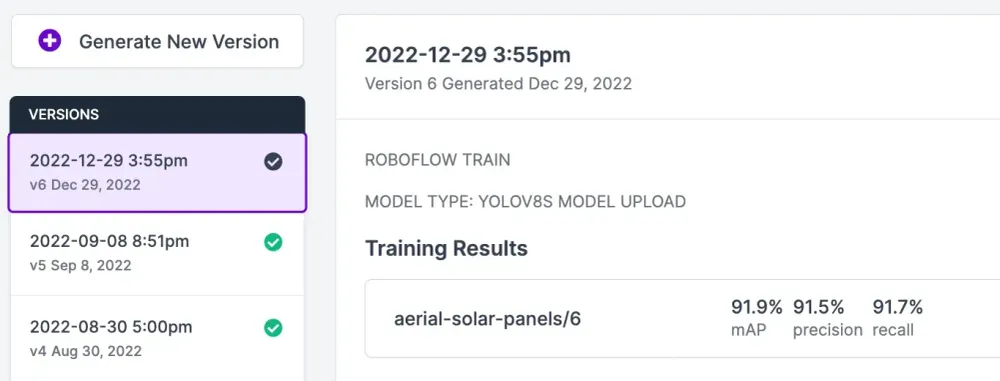
Click on "Deploy" in the sidebar of the Roboflow dashboard to see the deployment options available to you. Directly in the browser, you can test your model and share the model with others by sending them the URL.
You'll be able to test and show model performance by uploading an image or video
Using Checkpoint Weights to Train via Roboflow Universe
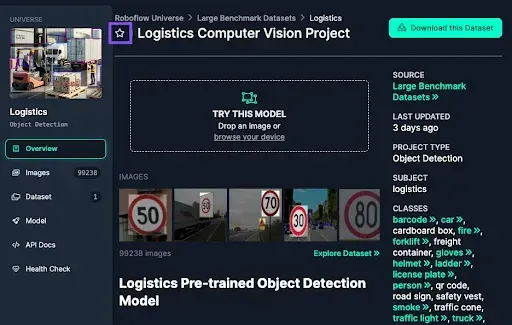
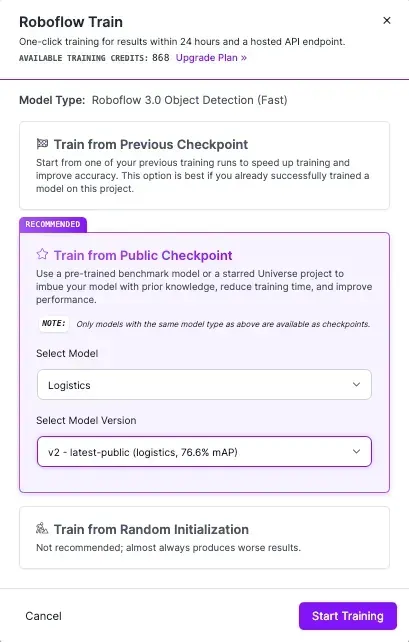
For a streamlined training experience, you can use the Roboflow Universe interface to employ the pre-trained model as a public training checkpoint. To unlock this functionality, star the project on Roboflow Universe and the model will become available in your list of selectable public checkpoints, enabling easy incorporation into your custom training workflows.
Learn more about how to use starred models as a training checkpoint on Roboflow.
Conclusion
The Roboflow Logistics Pre-trained Object Detection Model is a practical example of how domain-specific pre-training can significantly aid in starting machine learning projects in a particular domain, in this case, logistics.
A note on licensing: YOLOv8 is released under AGPL-3.0, which affects commercial use:
- On Roboflow cloud: a commercial license is included for every user, including the free plan.
- Self-hosted: you need an Enterprise license add-on, or you must open-source your application under AGPL-3.0.
- Permissive alternative: RF-DETR (opens in a new tab) is Apache 2.0, free for commercial use anywhere.
Stay tuned for more pre-trained models and resources coming your way on Roboflow!