From VLM Prediction to Production System
 Erik KokaljPublished Oct 2, 2026
LLMs with vision support (VLMs) are getting good at recognizing objects, drawing boxes around them, and outlining their shapes.
For example, GPT-6 Astra can find hot spots in a thermal image of solar panels. But turning those predictions into an inspection system takes more work. You need labeled data, a trained model, somewhere to run it, and a way to improve it as new images arrive.
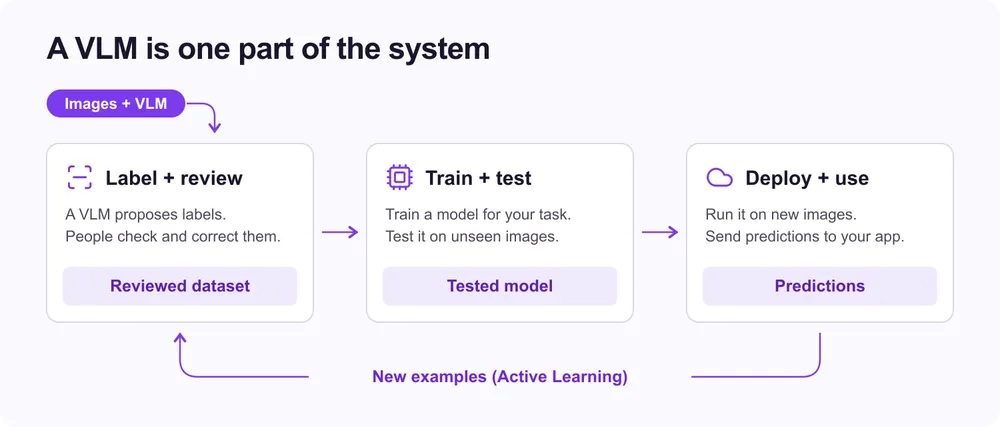
This post walks through those stages, using Roboflow as an example of how to connect them without building and maintaining the infrastructure for each one.
Label your data with a VLM
A model trained for your application needs examples of what to look for. For solar inspection, that means images with labels marking the hot spots. Drawing every single box by hand takes time. A VLM can make a first pass from a description of what you want to find, so you just review and correct its work.
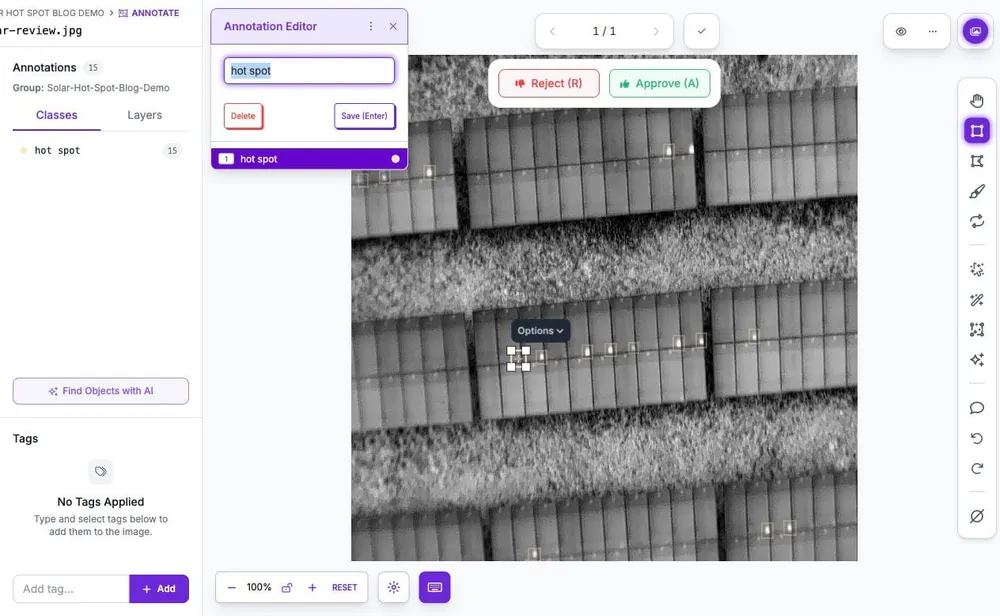
That makes VLMs useful when you have images but no labeled dataset yet. Here, Astra has marked small hot spots across a solar installation:
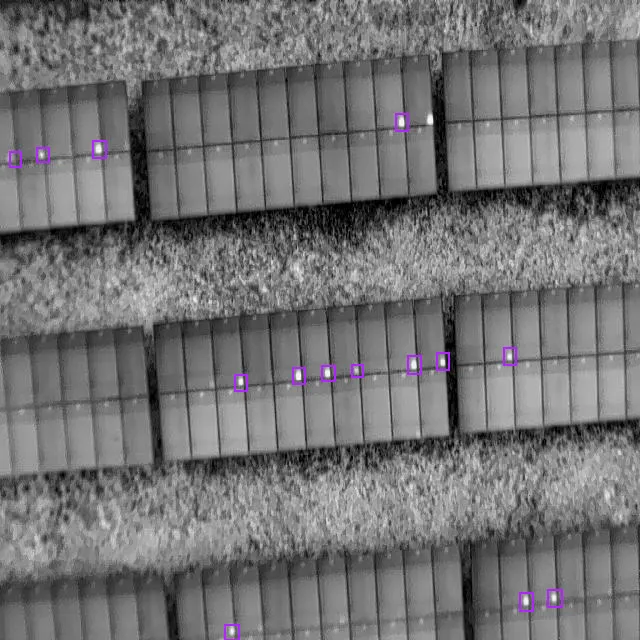
While the result is pretty good, even SOTA model like GPT-6 Astra isn't perfect at detection; it still missed hot spots.
You can call a VLM endpoint yourself. But to label a whole dataset, you also need label editor, image storage, batch processing, retries, and a place to review everything. You also need to convert predictions into annotations - so you need to standardize the output across VLM runs. This means converting predictions to the same detection format (ideally the most accurate one!), eg. Abs XYXY, mapping class names and handling malformed/incomplete model responses (JSON) before importing the labels into your dataset.
With Roboflow, you can use Auto Label (opens in a new tab) to label all your images using VLMs, and predictions stay in your project. You preview the results and accept/reject/edit labels in the same editor. The reviewed dataset is then ready for training.
Train a model for your application
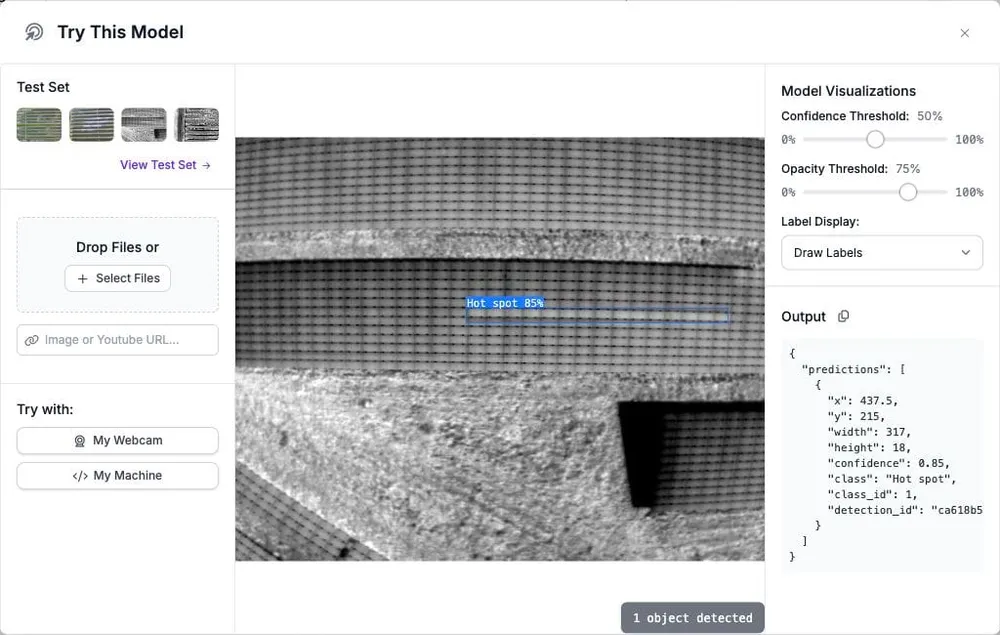
The reviewed labels let you train a model for the task you care about. In the solar example, that model learns to find hot spots from your inspection images. You can test it on images it has not seen before to check whether it is ready to use.
You can run training yourself, but that means finding GPU capacity, setting up training code and dependencies, and saving the results of each run. A new model architecture or another round of training brings more work to that setup.
With managed training (opens in a new tab), you choose a dataset version and a model architecture such as RF-DETR, and Roboflow runs the job on its GPUs. You can use the reviewed labels directly and compare results before deciding which model to deploy.
Put the model into use
Once the model works well enough, you need a reliable service to send it images and get predictions back. Running inference yourself means keeping the model loaded in GPU, handling requests, and providing enough compute when traffic grows.
For inspections that arrive in batches, cost also depends on what happens between requests. Our serverless inference cost comparison shows how idle GPU time, cold starts, and billing rules affect the cost of serving the same model.
With Roboflow's cloud API, your application sends an image and receives detections. Roboflow handles model loading, queues, and scaling across its shared GPU fleet. You can also self-host the model when the application needs to run on your own hardware (on the edge).
Fix mistakes from real inspections
Send low-confidence detections for review, and spot-check images with no detections. Correct any missing or incorrect labels and add those examples to the next training run. Use a separate test set to check whether the new version catches more hot spots without adding false alarms.
You can automate the collection step with an active learning workflow that saves selected images and predictions back to your dataset.
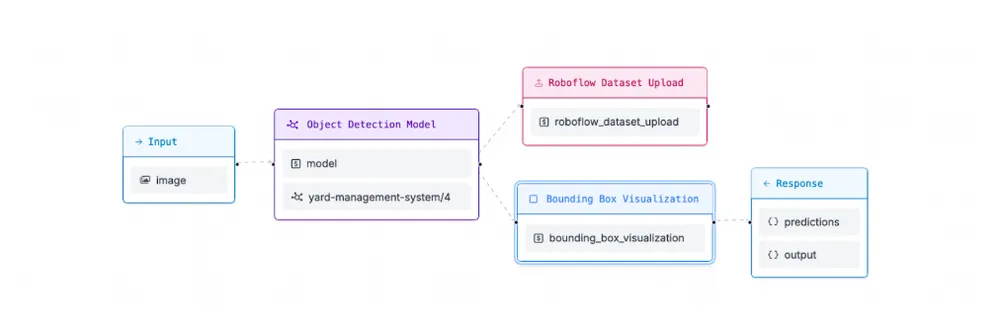
In Roboflow, create a new dataset version for the updated labels. Each training run uses a specific version, so you can track which data went into each model.
Start with your own data
VLMs will keep changing, almost every week there's a new SOTA model. Using one to label images is a useful start. Connecting those labels to training, deployment, and the next batch of data is what makes it a system you can keep using.
Try Auto Label with Astra on a few of your images, review the labels, and use them to train your first model.