Computer Vision for Citizen Developers
 Dikshant ShahPublished Nov 25, 2026
During manufacturing, defective components can slip through manual inspections. Your team knows what defective parts look like but needs a reliable way to identify them consistently. A computer vision system makes this possible by training a machine learning model on images of good and defective parts, allowing it to detect defects in new images and automate inspections across every shift.
Previously, building these systems required machine learning engineers or specialized IT teams. Today, tools like Roboflow Agent and ChatGPT (opens in a new tab) make computer vision more accessible to citizen developers by allowing them to build, train, and deploy vision AI applications using natural language prompts.
Across the factory floor, citizen developers are using Roboflow's computer vision tools to solve a range of challenges. Quality engineers can detect product defects before they leave the production line, safety managers can monitor PPE compliance, and operations managers can automate counting to improve inventory accuracy. Process engineers can verify assembly completeness, while production teams can automate gauge and label reading to reduce inspection errors.
In this guide, you'll learn how Roboflow Agent, MCP, and ChatGPT can help you build complete vision AI applications without requiring advanced programming skills or extensive machine learning experience.
The Core Building Blocks of Computer Vision
Every computer vision application is built around four key components. A dataset provides the images the system learns from. Labeling marks the objects or defects in those images to teach the model what to recognize. A model learns from these examples and makes predictions on new images. Finally, deployment puts the trained model into a real-world application where its predictions can trigger actions or support decisions.
Roboflow provides a no-code platform that brings those components together, allowing you to build, train, and deploy computer vision applications without writing code.
1. Build Your Dataset with Roboflow
Roboflow helps you build computer vision datasets with tools to collect, upload, organize, annotate, augment, and manage images and videos captured across production lines, quality inspection processes, and factory operations. These datasets can then be used to train AI models.
A PCB defect dataset collected using Roboflow.
Roboflow also helps you create and manage dataset versions. You can apply preprocessing and augmentation steps to generate new dataset versions for model training.
2. Label Images with Roboflow Annotate and Auto Label
Roboflow Annotate makes it easier to label images. Quality engineers can use its visual annotation tools to draw bounding boxes around defective products, outline damaged components, classify images, or mark specific features that an AI model can use to identify defects.
Drawing Bounding Boxes with Roboflow Annotate.
When working with large datasets, manually annotating every image in Roboflow Annotate can still be time-consuming. Roboflow Auto Label helps speed up the process by using AI to automatically generate annotations.
You can use Auto Label to generate bounding boxes and labels across multiple images. Quality engineers can then review the generated annotations and correct them where necessary, reducing repetitive manual work and making it easier to build large, accurately labeled datasets.
Automatically drawing Bounding Boxes with Auto Label.
3. Train Your Model with Roboflow Train
Once a dataset is labeled and ready, you can use Roboflow Train to train a computer vision model to recognize patterns and identify issues in manufacturing processes. You can train models such as RF-DETR to detect product defects, identify missing components, verify assembly steps, or determine whether products meet quality standards.
Roboflow Train allows you to configure training settings and start training directly within the Roboflow platform.
Starting model training with Roboflow Train.
If the model does not perform as expected, you can review incorrect predictions, add more representative images to your dataset, refine annotations, and train a new model version. This iterative process helps manufacturing teams improve model accuracy as they encounter new products, defects, and production conditions.
4. Deploy Your Model to the Cloud or Edge with Roboflow Deploy
Once your model has been trained and evaluated, you can use Roboflow Deploy to put it into production. Roboflow makes it easy to deploy models to the cloud or edge devices.
With cloud deployment, you can run your models through hosted inference endpoints without managing your own inference infrastructure. For applications that require low latency, offline operation, or local processing, you can deploy models directly to edge devices on the factory floor.
Deploying a trained model as part of a Roboflow Workflow.
When you deploy a trained model as part of a Roboflow Workflow, you can combine it with other vision AI components using drag-and-drop blocks in the Workflow Editor to build complete applications. In manufacturing, you can use these workflow blocks to count defective products, trigger alerts for safety violations, and automate pass/fail decisions during quality inspections. Learn more about Roboflow Workflows (opens in a new tab).
Build with Natural Language Using Roboflow Agent, MCP, and ChatGPT
Traditionally, building a computer vision application required coding and manually configuring each of the four components described above. Today, citizen developers can use AI agents to automate much of this process.
They describe the applications they want to build using natural language, while AI agents handle the configuration and setup. Roboflow offers three ways to build computer vision applications using this approach: Roboflow Agent, the MCP Server, and the ChatGPT plugin.
1. Roboflow Agent
Roboflow Agent helps manufacturing teams build computer vision applications using natural language instead of manually configuring each step. It is a tool provided by Roboflow. Try Roboflow Agent.
You can describe the problem you want to solve, such as detecting missing screws on an assembly line or identifying damaged products, and the agent will build the necessary components of your vision AI workflow to address it.
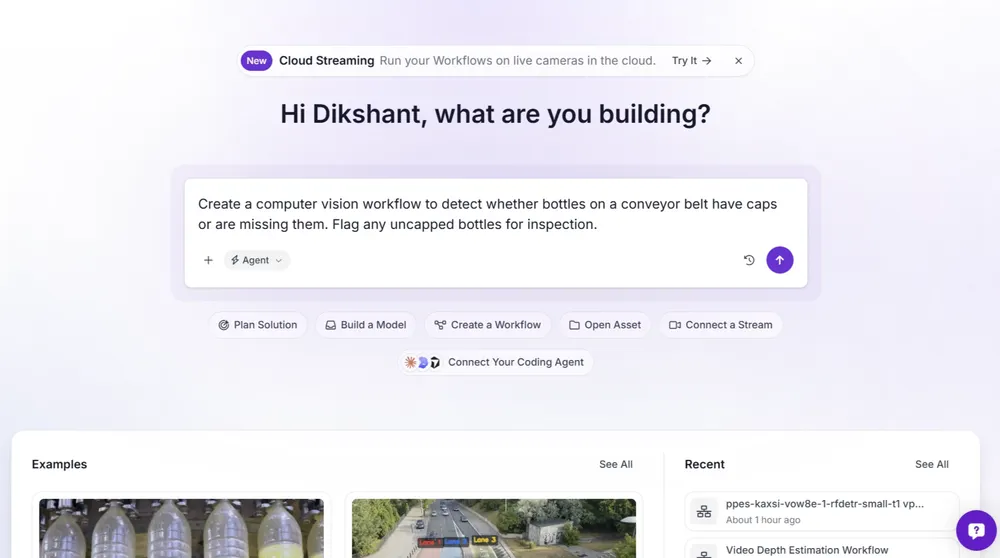
Roboflow Agent can also handle other key steps in the process, including dataset preparation, model training, and workflow deployment, helping you turn your ideas into working computer vision applications without manually configuring each component.
2. MCP Server
Roboflow's MCP Server allows AI coding tools to interact directly with the Roboflow platform using the Model Context Protocol (MCP). You can connect tools such as Claude, Cursor, and Codex to Roboflow, allowing them to manage computer vision projects through natural language prompts instead of manually configuring each step through the Roboflow interface.
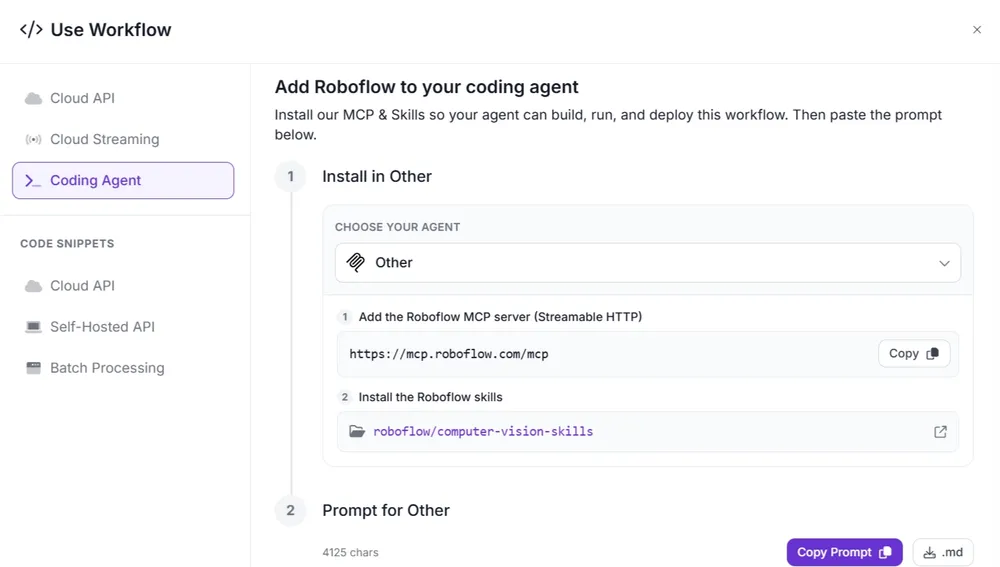
Roboflow MCP Server lets manufacturing professionals focus on understanding production processes, reviewing images, labeling objects, and evaluating results, while AI coding tools handle the technical work, including project creation, dataset management, model training, workflow building, and deployment. Learn more about MCP. (opens in a new tab)
3. ChatGPT
You can also interact with Roboflow directly through ChatGPT by installing the Roboflow Plugin. Follow this guide to learn how to install Roboflow plugin in ChatGPT.
Once installed, the plugin lets you access Roboflow's tools and manage your computer vision projects using natural language prompts, all without leaving ChatGPT.
For example, suppose you want to train an object detection model to identify and count bottles moving along a conveyor belt. Instead of manually navigating through the Roboflow platform, you can describe what you want to build directly in ChatGPT.
Here's an example prompt to get started. Simply use @Roboflow in ChatGPT to interact with Roboflow's tools and build your computer vision application, as shown below:
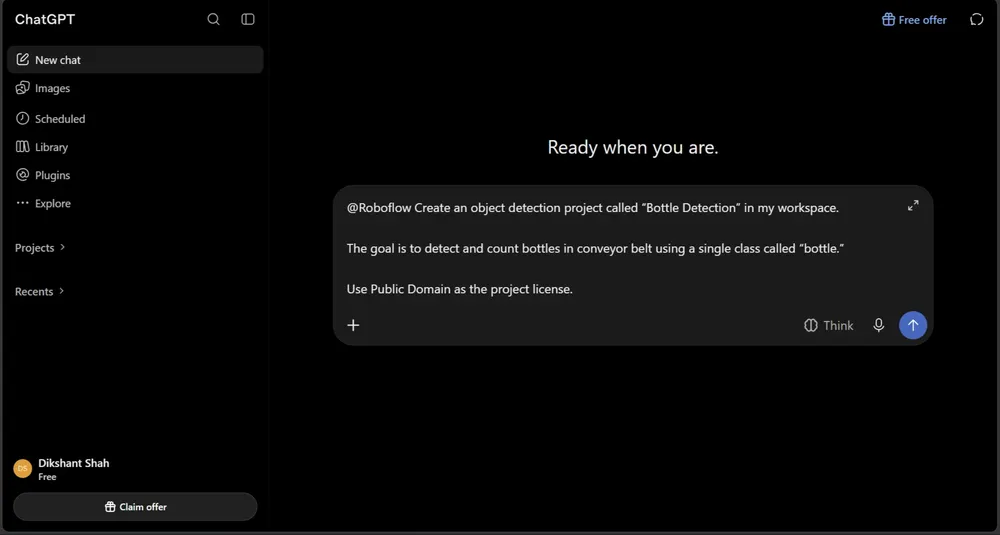
ChatGPT can then create an object detection project in Roboflow based on your prompt and provide a link to access it.
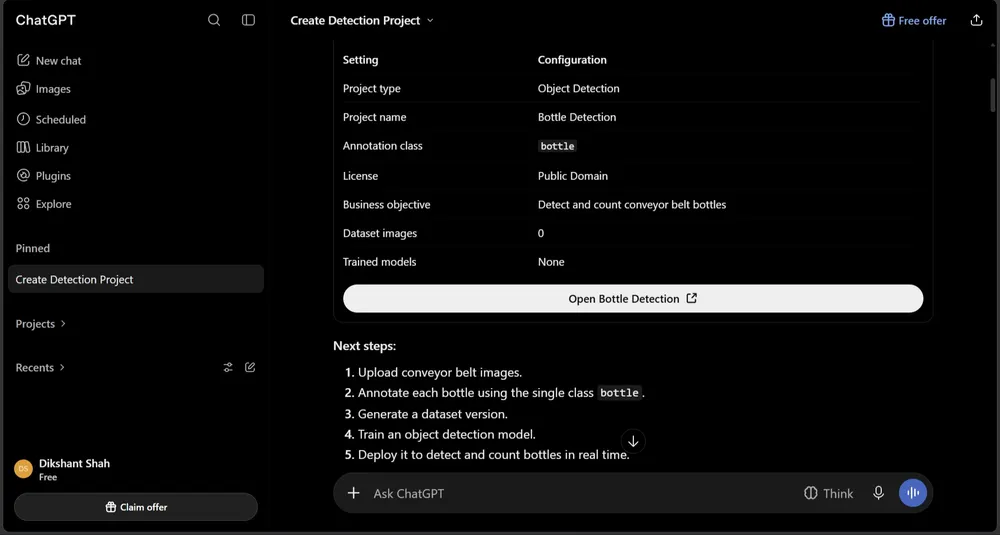
The link opens your new project in Roboflow, where you can upload images to build your training dataset.
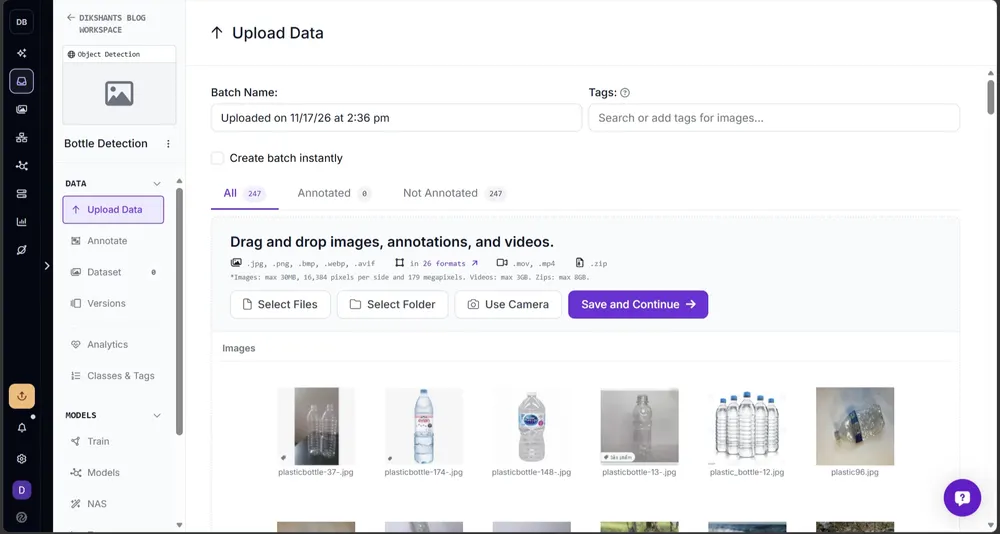
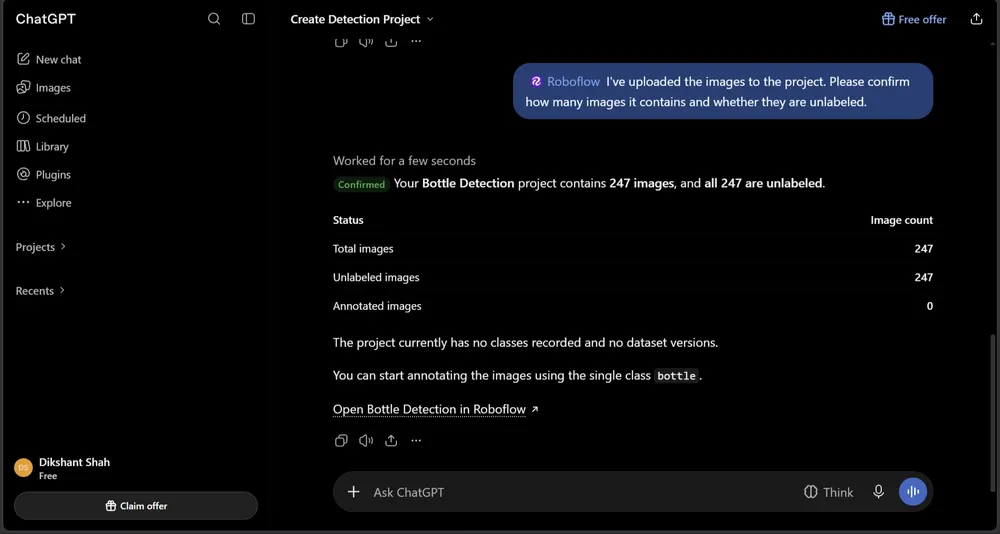
Alternatively, you can drag and drop a ZIP folder containing your images directly into ChatGPT and ask it to upload them to your project. Once the upload is complete, you can ask ChatGPT how many images were uploaded and whether they have been annotated.
Next, you can ask ChatGPT to annotate your images using Roboflow Auto Label. Be specific about the objects you want to detect and how they should be annotated.
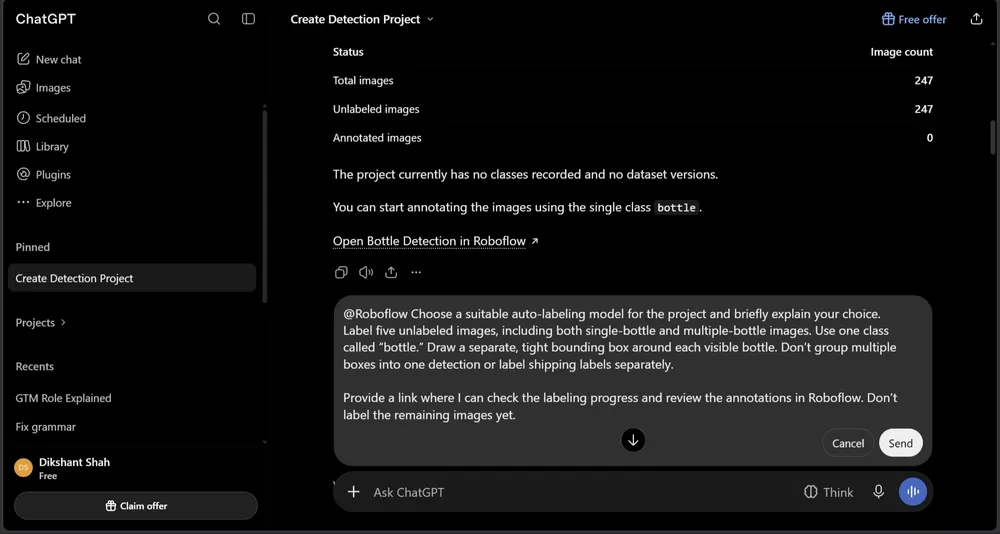
ChatGPT will initially select few images for a trial auto-labeling run. You can review the generated annotations in Roboflow to verify that the objects have been labeled correctly. If necessary, you can edit the annotations before approving the images for your dataset.
Reviewing Auto Label annotations in Roboflow.
Once you're satisfied with the results, you can use Auto Label to annotate the remaining images. Keep in mind that additional auto-labeling runs may consume credits.
Alternatively, you can prompt ChatGPT to fork and use an existing annotated dataset from Roboflow Universe. For example, this bottle detection conveyor belt dataset (opens in a new tab) already includes labeled images ready for model training.
Before training your model, use ChatGPT to review the annotations and ensure all images are labeled correctly. You can then prompt ChatGPT to create a dataset version with appropriate training, validation, and test splits, as well as apply preprocessing steps and data augmentations to prepare your dataset for training.
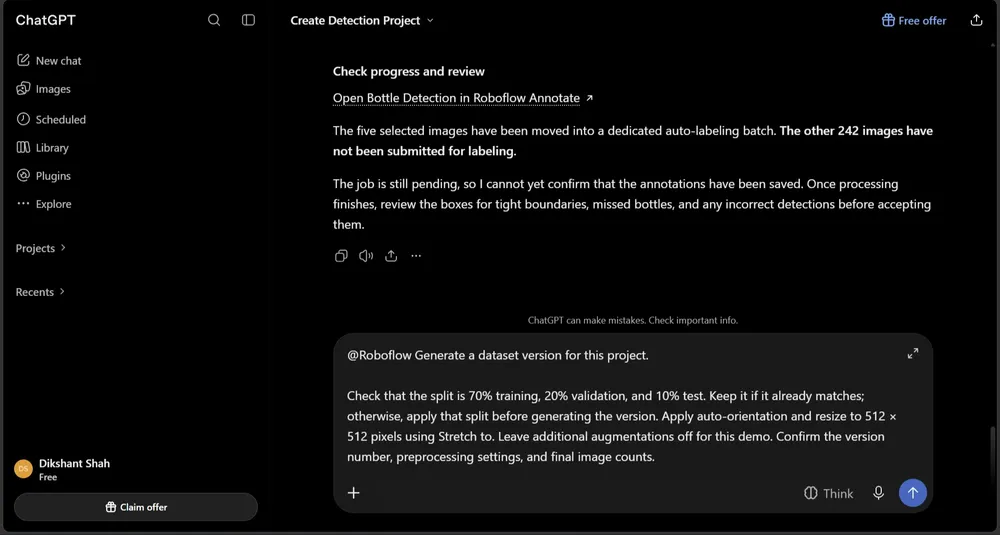
Once your dataset version is ready, prompt ChatGPT to train an object detection model directly through Roboflow. For this example, we'll use RF-DETR.
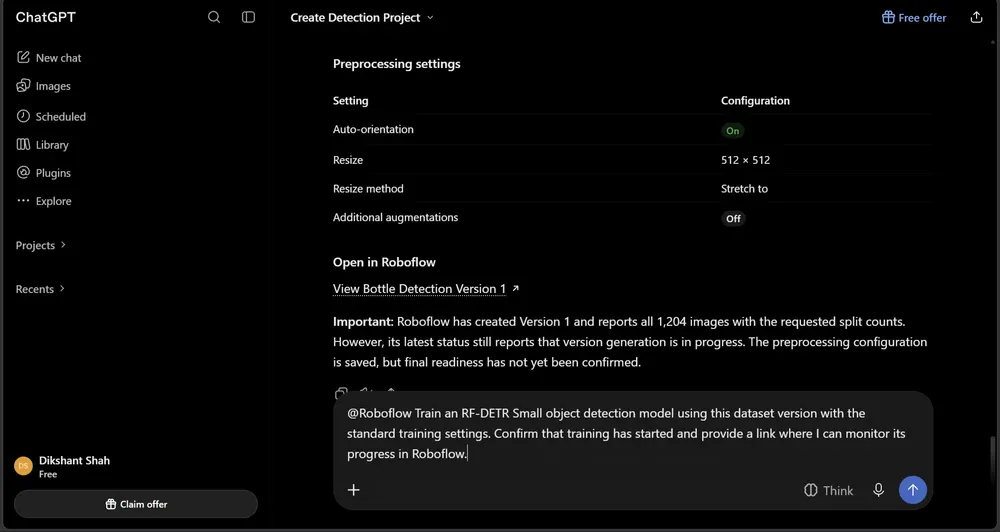
After you submit the training request, ChatGPT will initiate the training process and provide a link where you can monitor its progress.
Observing model training in Roboflow.
Once your model is trained, prompt ChatGPT to summarize the evaluation results and explain how well the model performs. You can then prompt ChatGPT to build a complete computer vision workflow tailored to your use case.
For example, you can ask it to create a workflow that detects and counts bottles moving along a conveyor belt.
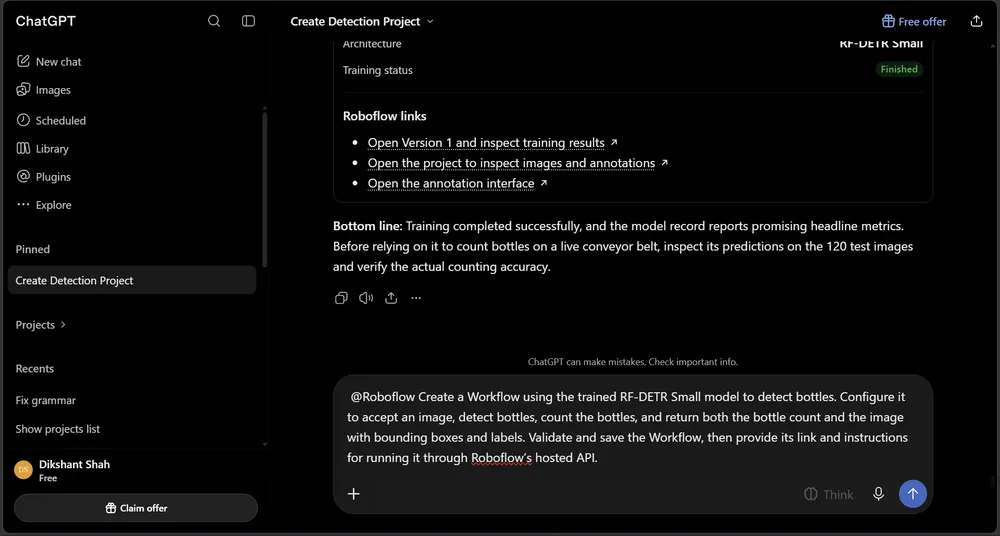
Once the workflow is created, ChatGPT provides a link to open and test it in Roboflow, along with instructions for running the workflow through an API. Try the Bottle Detection workflow ChatGPT created.
Testing the workflow in Roboflow.
You can learn more about training computer vision models in ChatGPT using Roboflow in this guide.
Governance and Security
With Roboflow's tools, a proof of concept built by one person can become a production-ready system that a global manufacturer can trust. However, as these tools make it easier for more people to build and deploy vision AI applications, proper governance, security, and oversight remain essential. Roboflow provides several features and capabilities to help organizations maintain control, manage access, monitor costs, and scale their vision AI applications safely.
Roboflow's MCP server uses OAuth authentication instead of shared API keys. Traditional integrations often rely on API keys that can end up copied across scripts. With OAuth, each user signs in and explicitly authorizes the actions the connected agent can perform. Access can also be revoked for an individual user without requiring the organization to rotate a shared key that multiple teams depend on.
Roboflow integrations with ChatGPT and Microsoft Copilot have no additional costs beyond the user's existing Roboflow plan. When an agent initiates credit-consuming operations, such as model training or Auto Label, ChatGPT displays the estimated credit usage beforehand. This gives users visibility into potential costs before proceeding and helps teams avoid unexpected credit consumption.
Roboflow also supports shared workspaces and role-based access controls, allowing organizations to manage team members and define who can access or modify projects and resources. Its security practices are designed to support enterprise requirements, with SOC 2 compliance and additional safeguards for protecting organizational data. You can contact Roboflow's sales team if your enterprise needs additional features or support.
Conclusion
Manufacturing teams can now build computer vision applications without a machine learning engineer. Roboflow lets them turn their knowledge of production processes, quality standards, and operational challenges into working vision AI applications. Through Roboflow Agent, MCP, and the ChatGPT integration, they can manage much of the development process using simple prompts instead of manually configuring each component. Try Roboflow for free.