Table Extraction AI

Find every table on a page, crop it out, and turn its rows into JSON, CSV, or Markdown, with a Workflow you can build and test in minutes.
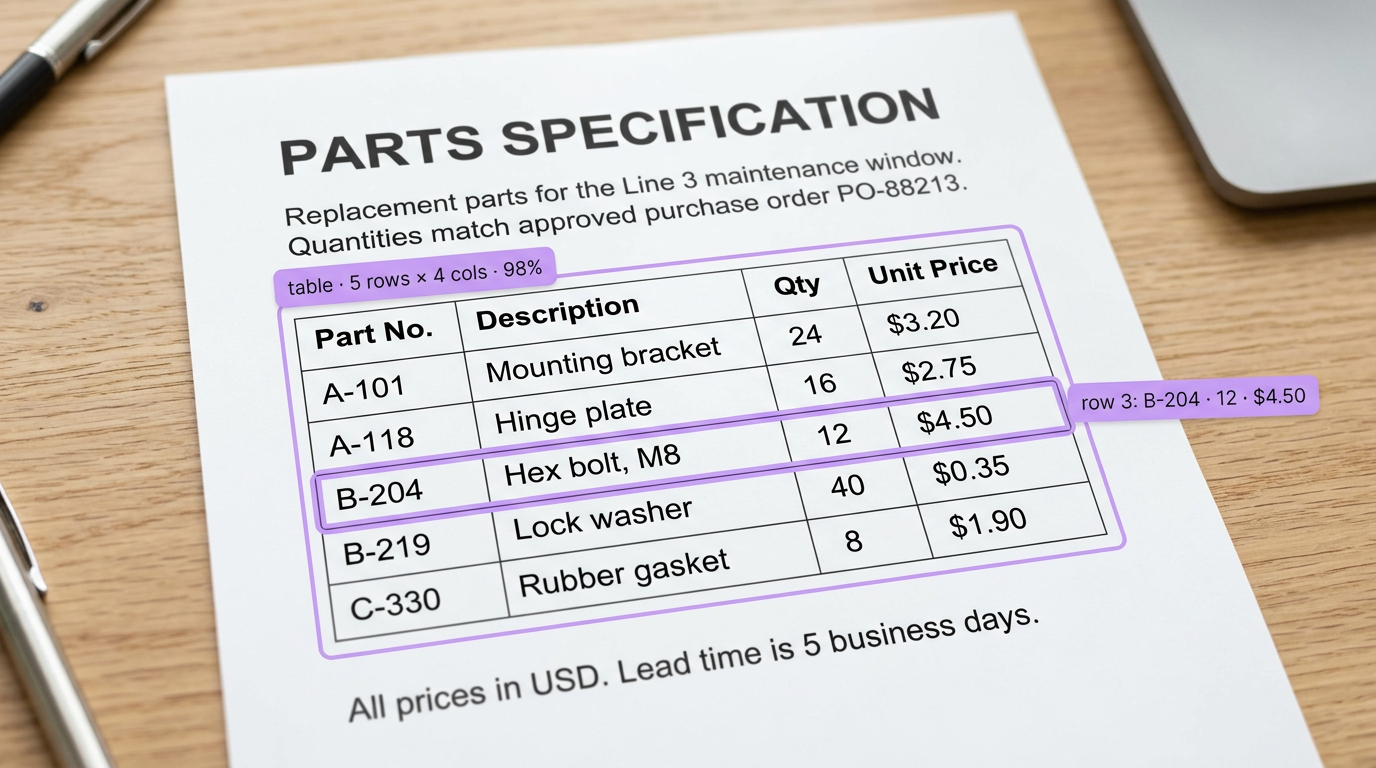
A "Parts Specification" document showing a table of parts with data extraction highlights on the "Hex bolt, M8" row.

Table Extraction AI, Built Your Way

  • Find Every Table on the Page

    Start from a document layout model on Roboflow Universe, or train your own on the TF-ID dataset of over 4,000 labeled pages of tables and figures.

  • Turn Rows into Structured Data

    Crop each table with the Dynamic Crop block, run a vision-language model with Structured Output Generation, and parse the result with the JSON Parser block.

  • Run Only When There's a Table

    Count detected tables and add a Continue If block, so the model runs only on pages that have one, then send the results to your own API.

  • Table Detection on Pages
  • Tables to JSON & CSV
  • Markdown Table Output
  • Scanned PDF De-Rendering
  • Figure & Table Crops
  • Structured Output Generation

Building something bigger? Talk to an engineer.

Scaling past a prototype, or need on-prem, air-gapped, or fleet deployment? We'll help you plan it.

Ask us about:

  • Architecture review for your cameras, pipeline, and edge hardware
  • Help moving a prototype Workflow into production
  • Deployment options: edge, on-prem, air-gapped, or VPC
  • Volume pricing and enterprise support

Over 16,000 organizations build with Roboflow.

  • Rivian
  • Pella
  • Chobani
  • USG Corporation
  • BNSF Railway
  • American Woodmark
Start where you are

Extract Every Table, from Scanned Page to Clean Rows

Tables are where documents keep their most useful data: line items, specs, test results, and schedules. They are also where plain OCR falls short, because it reads the text but loses the rows and columns. With Roboflow you build a Workflow that finds each table, crops it, and has a vision-language model return the rows as structured data.

Find the tables:

  • Start with a page object detection model from Roboflow Universe (opens in a new tab) that finds tables on a page, and drop it into a Workflow with the Object Detection Model block.
  • Or train your own table and figure detector on the TF-ID dataset, with over 4,000 labeled document pages, then fine-tune it on your own document types.
  • Count the tables on each page and add a Continue If block, so pages without a table skip the extraction step.

Extract the rows:

  • Crop each detected table with the Dynamic Crop block, so the model sees only the table.
  • Run the OpenAI, Google Gemini, or Anthropic Claude block with Structured Output Generation and a schema for your columns, then parse the JSON into fields with the JSON Parser block.
  • Prefer CSV? Follow the tutorial to extract data from tables with AI and prompt for the format your spreadsheet or database expects.

Convert whole pages:

  • De-render a scanned page into Markdown with its tables intact, using Gemini 3 Pro and the JSON Parser in a two-block Workflow.
  • Clean up faded or low-contrast scans first with preprocessing blocks like Contrast Equalization.
  • Working from PDFs? Render each page as an image, then send it through your Workflow and push results to your API with the Webhook Sink block.

Start building today. Your first extracted table is a few blocks away.

‍

Frequently asked questions

What is table extraction?

Table extraction finds tables in a document image and converts them into structured data, keeping every row, column, and header, so you can load the contents into a spreadsheet, database, or app.

Why not just use OCR?

OCR reads the text but not the layout, so a table comes back as a jumble of words. A vision-language model looks at the cropped table and returns each row and column in order, in the structure you ask for.

What output formats can I get?

JSON, CSV, or Markdown. Set a schema with Structured Output Generation for JSON, or prompt for CSV or Markdown tables, then parse or store the result.

Can it handle scanned PDFs?

Yes. Render each page as an image, clean up low-contrast scans with preprocessing blocks, then detect and extract the tables on each page.

‍

Stay connected

Get the Latest in Computer Vision First

Unsubscribe at any time. Review our Privacy Policy.