SAM Video Annotation AI

Turn video into labeled segmentation data: extract frames, auto-label them with SAM 3 from text prompts, and refine every mask in a click.
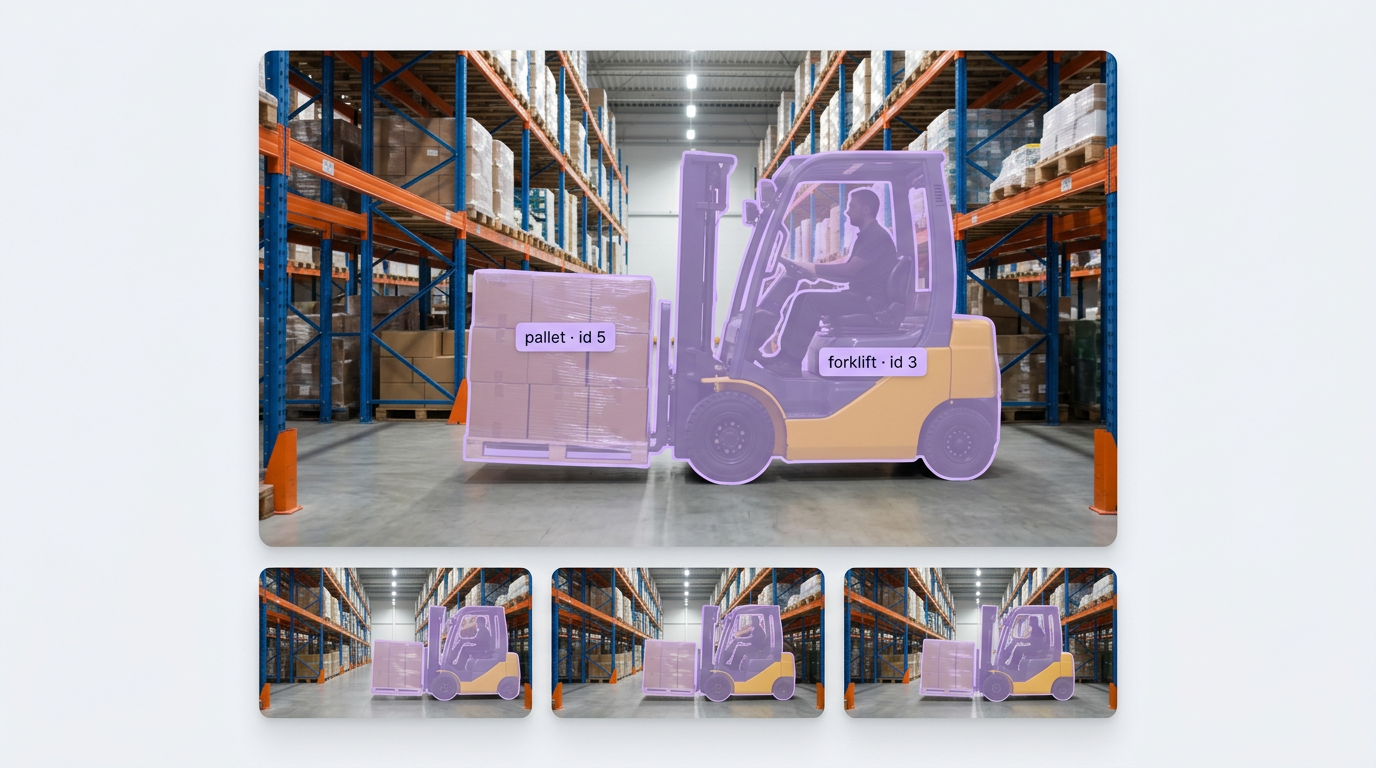
SAM Video Annotation, Built Your Way

  • Label Every Frame from a Prompt

    Upload a video, sample frames at the rate you choose, and run Auto Label with SAM 3 on the batch, with a confidence threshold for each text prompt.

  • Fix Masks in a Click

    Smart Select runs SAM in your browser, previews masks as you hover, and lets you refine with clicks inside or outside the mask, or by drawing a box.

  • Track Objects Through Video

    The SAM 3 Video Tracker block segments and tracks objects from text prompts, and the SAM 2 Video Tracker follows boxes from your detector, with tracker IDs on every mask.

  • SAM 3 Auto Label
  • Text-Prompted Segmentation
  • Smart Select Masks
  • Frame Sampling from Video
  • Object Tracking with IDs
  • Segmentation Datasets from Video

Building something bigger? Talk to an engineer.

Scaling past a prototype, or need on-prem, air-gapped, or fleet deployment? We'll help you plan it.

Ask us about:

  • Architecture review for your cameras, pipeline, and edge hardware
  • Help moving a prototype Workflow into production
  • Deployment options: edge, on-prem, air-gapped, or VPC
  • Volume pricing and enterprise support

Over 16,000 organizations build with Roboflow.

  • Rivian
  • Pella
  • Chobani
  • USG Corporation
  • BNSF Railway
  • American Woodmark
Start where you are

Annotate Every Frame, from Raw Video to Training-Ready Masks

Segmentation labels are the slowest labels to draw by hand, and video multiplies the work by every frame you keep. Roboflow puts Meta's Segment Anything models into the labeling flow, so you prompt and review instead of tracing outlines one point at a time.

Turn video into frames:

  • Upload an .mp4 or .mov to your project and extract frames at the sampling rate you choose, like one frame per second or every fifth frame.
  • Pick a lower rate to cut near-identical frames and annotation work, or a higher rate when objects move fast.

Label with SAM 3:

  • Run Auto Label with SAM 3 (opens in a new tab) to label objects from text prompts, and test prompts and thresholds on sample frames before you run the job. Test results are free.
  • Pair a foundation model with SAM 3, like Gemini 4 Argon + SAM 3 or GPT-6 Astra + SAM 3, to label from class descriptions and get instance segmentation masks.
  • Starting small? See how to grow small datasets with SAM 3 using auto-labeling, mask validation, and segmentation-aware augmentation.

Refine and track:

Start building today. Your first segmentation dataset is one video away.

‍

Frequently asked questions

What is SAM video annotation?

SAM video annotation uses Meta's Segment Anything models to label objects in video frames with pixel-accurate masks, from a text prompt or a click, instead of drawing every outline by hand.

Do I have to label every frame?

No. Sample frames at a rate that captures how your objects move, auto-label the batch with SAM 3, and review the results, fixing only the masks that need it.

Should I use SAM 3 or SAM 2?

Use SAM 3 when you want to segment and track objects from text prompts, like "forklift" or "pallet". Use SAM 2 when you already have a detector and want to turn its boxes into tracked masks.

What can I train on the results?

Instance segmentation models like RF-DETR Segmentation, or object detection models. In an object detection project, masks are saved as boxes for training.

‍

Stay connected

Get the Latest in Computer Vision First

Unsubscribe at any time. Review our Privacy Policy.