Pallet Counting AI

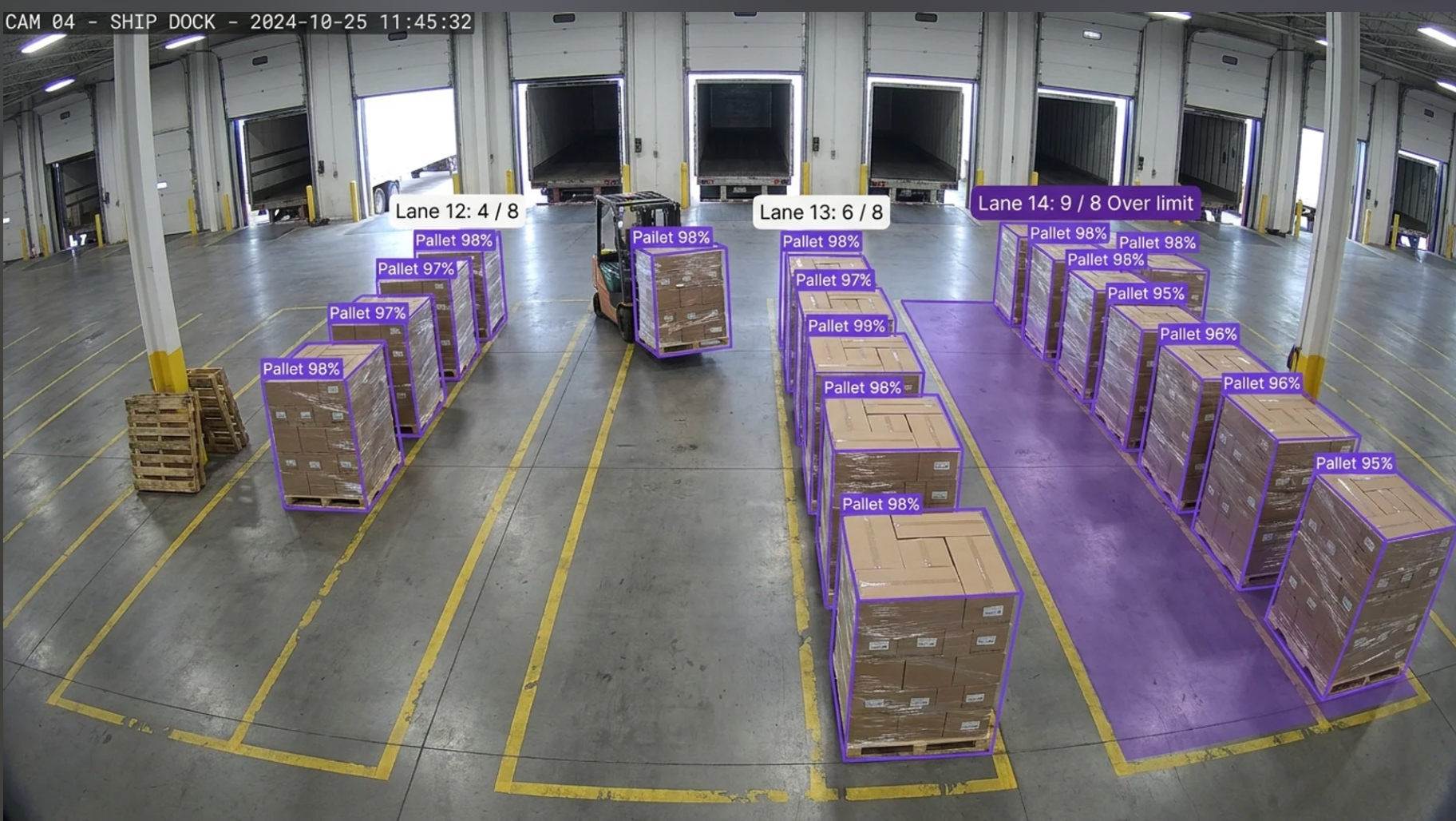
Count pallets on the floor, cases per dock door, and packages per hour, and get an alarm the moment a count crosses the line you set.
Shipping container with OCR output

Pallet Counting AI Across Floor and Staging Counts, Dock Door Throughput, and Threshold Alarms

Deploy Anywhere, Run Everywhere

Run pallet counting on the edge, on-prem, in your VPC, or via API, wherever your dock and floor need it.

One Platform, Full Adoption

Tools every warehouse and shipping team can adopt, no separate ML team required to ship and own counting models.

Secure, Compliant, and Audit-Ready

Data stays safe with SOC 2 Type II compliance, encrypted data, HIPAA compliance, and an uptime SLA.
Pallets on the Floor & in Staging Lanes
Pallets and Cases per Dock Door
Packages per Hour at Unload and Load Doors
Cases per Pallet & Partial Pallet Detection
Dwell Time & Throughput Trends
Threshold Alarms & Copy-to-Every-Door Setup
Pallets on the Floor & in Staging Lanes
Pallets and Cases per Dock Door
Packages per Hour at Unload and Load Doors
Cases per Pallet & Partial Pallet Detection
Dwell Time & Throughput Trends
Threshold Alarms & Copy-to-Every-Door Setup
Pallets on the Floor & in Staging Lanes
Pallets and Cases per Dock Door
Packages per Hour at Unload and Load Doors
Cases per Pallet & Partial Pallet Detection
Dwell Time & Throughput Trends
Threshold Alarms & Copy-to-Every-Door Setup
Pallets on the Floor & in Staging Lanes
Pallets and Cases per Dock Door
Packages per Hour at Unload and Load Doors
Cases per Pallet & Partial Pallet Detection
Dwell Time & Throughput Trends
Threshold Alarms & Copy-to-Every-Door Setup

Talk to a Vision AI engineer who's shipped in warehousing and parcel operations.

Bring us your toughest pallet counting or package counting problem and we'll map a working solution.
  • Solution architecture that fits OSHA dock safety, ISO 9001, and customer SLA reporting
  • A live demo on your own dock and floor camera footage
  • Deployment options: edge, on-prem, air-gapped, VPC, existing Verkada or Rhombus camera feeds, and copying one door's setup to every door in the building
  • ROI modeling against dock labor, detention and demurrage, missed SLAs, blocked-aisle incidents, and downstream rework
  • We will connect you with an AI subject matter expert on our team based on your answers.
    What challenges would you like to solve with vision AI?
    Where will you run vision AI?
    Are you replacing a current solution with AI or will this be a new solution?
    How many detections do you anticipate per month?
    Describe the business problem you would like to solve.
    Oops! Something went wrong while submitting the form.

    Over 16,000 organizations build with Roboflow.

    “Roboflow has been instrumental in accelerating our learning and deployment of innovative AI solutions”
    Travis Turnbull Vice President & CIO, Pella Corporation
    See customer stories
    Trusted by top manufacturers

    Vision AI is transforming manufacturing

    Customers are deploying solutions across the entire business and driving meaningful impact
    $0 million
    Saved by automatically detecting defects
    0%
    Less time spent manually tracking inventory
    0%
    Reduction in customer return rate

    Bring Real-Time Intelligence to Every Pallet and Package, from the Trailer Door to the Staging Lane, with Vision AI

    Bring real-time intelligence to every pallet and package on the floor with Roboflow vision AI for pallet counting.

    Pallets on the floor, in staging, and per door:

    • Count pallets sitting on the floor, in staging lanes, and at each dock door from existing overhead and dock cameras, and show the live count per zone on one screen.
    • Detect partial pallets, cases per pallet, and empty pallet stacks so the count reflects what is actually there, not what the last scan said.
    • Track dwell time per pallet and per lane, so a pallet that has sat in staging past its window shows up before the trailer leaves without it.

    Package counting and dock throughput:

    • Count packages per hour at each trailer unload and load door, and compare doors side by side so a slow door is visible in the first hour, not in the end-of-shift report.
    • Count packages coming off a line or into a lane and alarm when the count crosses a threshold you set, so a bad run is stopped after 20 units instead of 2,000.
    • Set up one door, then copy the same counting configuration to every door in the building, and roll it to the next facility with the same model.

    Alarms, records, and deployment:

    • Trigger alarms on the thresholds that matter to your operation: a staging lane over capacity, a door under its packages-per-hour target, a pallet past its dwell limit, or a count that stops moving mid-shift.
    • Keep a timestamped count history per zone and per door for OSHA housekeeping and egress documentation, ISO 9001 records, and carrier and customer SLA disputes.
    • Run on the Verkada, Rhombus, Axis, or Hanwha cameras already installed, on an edge device in the dock office, on-prem, or in your VPC, with no new camera install required to start.

    Stop overfull lanes, slow doors, and runaway bad-product counts from becoming safety findings, missed SLAs, and rework.

    Frequently asked questions

    What is pallet counting with Vision AI?

    Pallet counting with Vision AI uses the cameras already installed over a warehouse floor, staging lanes, and dock doors, plus a computer vision model trained to recognize pallets, cases, and packages, to produce a live count of what is physically present in each zone. The same approach counts packages per hour at trailer unload and load doors, cases per pallet, and dwell time per lane, and fires an alarm when a count crosses a threshold you set. Counts and images are logged with timestamps, which gives operations a physical count to reconcile against WMS transactions and gives quality and safety teams records for ISO 9001 and OSHA dock documentation.

    Does pallet counting support OSHA dock safety and ISO 9001 records?

    Yes. Pallet and package counts, zone occupancy, and dwell times are logged with timestamps and images, which supports OSHA (Occupational Safety and Health Administration standards for walking-working surfaces, housekeeping, and means of egress, including keeping aisles and dock areas clear) and ISO 9001 (quality management systems, including monitoring, measurement, and records of process performance).

    Can it integrate with our WMS, yard management system, and dock scheduling tools?

    Yes. Counts, alarms, and per-door throughput publish over REST, MQTT, or direct database writes into Manhattan, Blue Yonder, Körber, and SAP EWM on the WMS side, into yard management and dock scheduling tools such as FourKites, C3 Solutions, and Descartes, and into BI tools like Power BI, Tableau, and Grafana for shift dashboards. Camera feeds come in over RTSP or from Verkada and Rhombus integrations, so you can run on the security system you already pay for. For door-level automation, a count threshold can trigger a light, a horn, or a message to the dock supervisor, and a count that stops moving can open a ticket automatically.

    Stay Connected

    Get the Latest in Computer Vision First

    Thank you for subscribing!
    Oops! Something went wrong!.
    Unsubscribe at any time. Review our Privacy Policy.

    Additional resources

    Vision AI is transforming every industry. Let’s transform yours.